RHEL 7.4 fails to mount ACFS File System due to KMOD package

After a fresh OS installation or an upgrade to RHEL 7.4, any attempt to install ACFS drivers will fail with the following message: “ACFS-9459 ADVM/ACFS is not supported on this OS version”

The error persists even if the Oracle Grid Infrastructure software includes the  Patch 26247490: 12.2 ACFS MODULE ERRORS & CRASH DURING MODULE LOAD & UNLOAD WITH OL7U4 RHCK.


This problem has been identified by Oracle with  BUG 26320387 – 7.4 kmod weak-modules not checking kABI compatibility correctly

And by Red Hat  Bugzilla bug:  1477073 – 7.4 kmod weak-modules –dry-run changed output format missing ‘is compatible’ messages.

root@oel7node06:/u01/app/12.2.0.1/grid/crs/install# /u01/app/12.2.0.1/grid/bin/acfsroot install
ACFS-9459: ADVM/ACFS is not supported on this OS version: '3.10.0-514.6.1.el7.x86_64'

root@oel7node06:~# /sbin/lsmod | grep oracle
oracleadvm 776830 7
oracleoks 654476 1 oracleadvm
oracleafd 205543 1


The current Workaround consists in downgrade the version of the kmod  RPM to  kmod-20-9.el7.x86_64.

root@oel7node06:~# yum downgrade kmod-20-9.el7


After the package downgrade the ACFS drivers are correcly loaded:

root@oel7node06:~# /sbin/lsmod | grep oracle
oracleacfs 4597925 2
oracleadvm 776830 8
oracleoks 654476 2 oracleacfs,oracleadvm
oracleafd 205543 1


Adding Pluggable Databases to an existing Multitenant Data Guard environment

We all know the benefits of the Oracle Multitenant cosolidation “Many-as-One”, one container (CDB) operation for wich many Pluggable Databases (PDBs) can take benefit; for example one CDB backup protects all PDBs stored inside the container itself.

While among the DBAs the setup of Oracle Data Guard is become more than a standandard routine,  described in thousands of Internet pages and blogs (one example available here), this post explains how to add new Pluggable Databases (PDBs) to an existing Multitenant environment protected by Data Guard.


How to create PDBs in Oracle Multitenant environment protected by Data Guard

There are multiple scenarios of PDB creation and they differently integrate within the Data Guard architecture. The easiest way to proceed consists in creating a new Pluggable Database using the SEED PDB:

  • PDB creation from SEED
    The creation of a brand new empty pluggable database is automatically replicated to each physical standby database. No additional action is required.


Unfortunately, this option is not always applicable because the new PDB should be a clone of an existing one. Therefore, it is important for the DBA to understand how integrating new non-empty Pluggable Database on a Multitenant and Data Guard environment without impacting the pre-existing setup.


  • PDB clone 

Cloning a PDB in a Data Guard environment requires few additional steps, which changes across the different Oracle versions and when Active Data Guard option is in use. While remote cloning the PDB the option STANDBYS=NONE should be used to defer the PDB replica to the Standby container. Then it is possible to replicate and protect the newly cloned PDB with Data Guard.

A full example of how to perform those tasks is reported below.


Cloning a PDB via DB Link using the STANDBYS=NONE option

create pluggable database PCJORD from PCLORD@ccls01_PCLORD tempfile reuse STANDBYS=NONE;


Open the newly cloned PDB

alter pluggable database PCJORD open instances=all;


On the Standby Container Restore PDB from Primary

run{
set newname for pluggable database PCJORD to new;
restore pluggable database PCJORD from service CMJP01;
switch datafile all;
}


Connect to the Standby container and STOP the Apply Process

dgmgrl
connect sys/xxxxxxxx@CMJP01
edit database 'CMJS01' set state='APPLY-OFF';


If Active Data Guard is in use, re-start the Standby container in MOUNT

srvctl stop database -db CMJS01 

sqlplus / as sysdba
startup mount


Enable the PDB recovery on the Standby Container

alter session set container=PCJORD;
alter pluggable database enable recovery;


Connect to the Standby container and RE-START the Apply Process

dgmdrl
connect sys/xxxxxxxx@CMJP01
edit database 'CMJS01' set state='APPLY-ON';


If Active Data Guard is in use Open the Container in Read Only

alter database open;


Adding flexibility to Oracle GI Implementing Multiple SCANs

Nowadays the business requirements force the IT to implement the more and more sophisticated and consolidated environments without compromising availability, performance and flexibility of each application running on it.

In this post, I explain how to improve the Grid Infrastructure Network flexibility, implementing multiple SCANs and how to associate one or multiple networks to the Oracle databases.

To better understand the reasons for such type of implementation, below are listed few common use cases:

  • Applications are deployed on different/dedicated subnets.
  • Network isolation due to security requirement.
  • Different database protocols are in use (TCP, TCPS, etc.).


Single Client Access Name (SCAN)

By default on each Oracle Grid Infrastructure cluster, indipendently from the number of nodes, one SCAN with 3 SCAN VIPs is created.

Below is depicted the default Oracle Clusterware network/SCAN configuration.
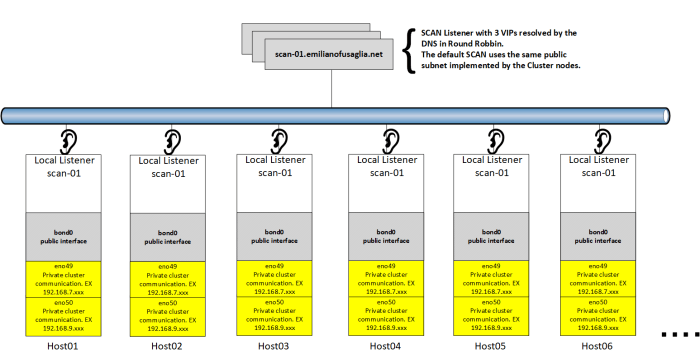
 

Single_Scan_Listener


Multiple Single Client Access Name (SCAN) implementation

Before implemeting additional SCANs, the OS provisioning of new network interfaces or new VLAN Tagging has to be completed.

The current example uses the second option (VLAN Tagging), and the bond0 interface is an Active/Active setup of two 10gbe cards, to which a VLAN tag has been added.

Below is represented the customized Oracle Clusterware network/SCAN configuration, having added a second SCAN.


Multi_Scan_Listeners


Step-by-step implementation

After completing the OS network setup, as grid owner add the new interface to the Grid Infrastructure:

grid@host01a:~# oifcfg setif -global bond0.764/10.15.69.0:public

grid@host01a:~# oifcfg getif
eno49 192.168.7.32 global cluster_interconnect,asm
eno50 192.168.9.48 global cluster_interconnect,asm
bond0 10.11.8.0 global public
bond0.764 10.15.69.0 global public
grid@host01a:~#


Then as root create the network number 2 and disply the configuration:

root@host01a:~# /u01/app/12.2.0.1/grid/bin/srvctl add network -netnum 2 -subnet 10.15.69.0/255.255.255.0/bond0.764 -nettype STATIC

root@host01a:~# /u01/app/12.2.0.1/grid/bin/srvctl config network -netnum 2
Network 2 exists
Subnet IPv4: 10.15.69.0/255.255.255.0/, static
Subnet IPv6:
Ping Targets:
Network is enabled
Network is individually enabled on nodes:
Network is individually disabled on nodes:


As root user add the node VIPs:

root@host01a:~# /u01/app/12.2.0.1/grid/bin/srvctl add vip -node host01a -netnum 2 -address host01b-vip.emilianofusaglia.net/255.255.255.0
root@host01a:~# /u01/app/12.2.0.1/grid/bin/srvctl add vip -node host02a -netnum 2 -address host02b-vip.emilianofusaglia.net/255.255.255.0
root@host01a:~# /u01/app/12.2.0.1/grid/bin/srvctl add vip -node host03a -netnum 2 -address host03b-vip.emilianofusaglia.net/255.255.255.0
root@host01a:~# /u01/app/12.2.0.1/grid/bin/srvctl add vip -node host04a -netnum 2 -address host04b-vip.emilianofusaglia.net/255.255.255.0
root@host01a:~# /u01/app/12.2.0.1/grid/bin/srvctl add vip -node host05a -netnum 2 -address host05b-vip.emilianofusaglia.net/255.255.255.0
root@host01a:~# /u01/app/12.2.0.1/grid/bin/srvctl add vip -node host06a -netnum 2 -address host06b-vip.emilianofusaglia.net/255.255.255.0


As grid user  create a new listener based on the network number 2:

grid@host01a:~# srvctl add listener -listener LISTENER2 -netnum 2 -endpoints "TCP:1532"


As root user add the new SCAN to the network number 2:

 root@host01a:~# /u01/app/12.2.0.1/grid/bin/srvctl add scan -scanname scan-02.emilianofusaglia.net -netnum 2


As root user start the new node VIPs:

root@host01a:~# /u01/app/12.2.0.1/grid/bin/srvctl start vip -vip host01b-vip.emilianofusaglia.net
root@host01a:~# /u01/app/12.2.0.1/grid/bin/srvctl start vip -vip host02b-vip.emilianofusaglia.net
root@host01a:~# /u01/app/12.2.0.1/grid/bin/srvctl start vip -vip host03b-vip.emilianofusaglia.net
root@host01a:~# /u01/app/12.2.0.1/grid/bin/srvctl start vip -vip host04b-vip.emilianofusaglia.net
root@host01a:~# /u01/app/12.2.0.1/grid/bin/srvctl start vip -vip host05b-vip.emilianofusaglia.net
root@host01a:~# /u01/app/12.2.0.1/grid/bin/srvctl start vip -vip host06b-vip.emilianofusaglia.net


As grid user start the new node Listeners:

grid@host01a:~# srvctl start listener -listener LISTENER2
grid@host01a:~# srvctl status listener -listener LISTENER2
Listener LISTENER2 is enabled
Listener LISTENER2 is running on node(s): host01a,host02a,host03a,host04a,host05a,host06a


As root user start the new SCAN and as grid user check the configuration:

root@host01a:~# /u01/app/12.2.0.1/grid/bin/srvctl start scan -netnum 2

grid@host01a:~# srvctl config scan -netnum 2
SCAN name: scan-02.emilianofusaglia.net, Network: 2
Subnet IPv4: 10.15.69.0/255.255.255.0/, static
Subnet IPv6:
SCAN 1 IPv4 VIP: 10.15.69.44
SCAN VIP is enabled.
SCAN VIP is individually enabled on nodes:
SCAN VIP is individually disabled on nodes:
SCAN 2 IPv4 VIP: 10.15.69.45
SCAN VIP is enabled.
SCAN VIP is individually enabled on nodes:
SCAN VIP is individually disabled on nodes:
SCAN 3 IPv4 VIP: 10.15.69.43
SCAN VIP is enabled.
SCAN VIP is individually enabled on nodes:
SCAN VIP is individually disabled on nodes:

grid@host01a:~# srvctl status scan -netnum 2
SCAN VIP scan1_net2 is enabled
SCAN VIP scan1_net2 is running on node host02a
SCAN VIP scan2_net2 is enabled
SCAN VIP scan2_net2 is running on node host01a
SCAN VIP scan3_net2 is enabled
SCAN VIP scan3_net2 is running on node host03a


As grid user add the SCAN Listener and check the configuration:

grid@host01a:~# srvctl add scan_listener -netnum 2 -listener LISTENER2 -endpoints TCP:1532

grid@host01a:~# srvctl config scan_listener -netnum 2
SCAN Listener LISTENER2_SCAN1_NET2 exists. Port: TCP:1532
Registration invited nodes:
Registration invited subnets:
SCAN Listener is enabled.
SCAN Listener is individually enabled on nodes:
SCAN Listener is individually disabled on nodes:
SCAN Listener LISTENER2_SCAN2_NET2 exists. Port: TCP:1532
Registration invited nodes:
Registration invited subnets:
SCAN Listener is enabled.
SCAN Listener is individually enabled on nodes:
SCAN Listener is individually disabled on nodes:
SCAN Listener LISTENER2_SCAN3_NET2 exists. Port: TCP:1532
Registration invited nodes:
Registration invited subnets:
SCAN Listener is enabled.
SCAN Listener is individually enabled on nodes:
SCAN Listener is individually disabled on nodes:


As grid user start the SCAN Listener2 and check the status:

grid@host01a:~# srvctl start scan_listener -netnum 2

grid@host01a:~# srvctl status scan_listener -netnum 2
SCAN Listener LISTENER2_SCAN1_NET2 is enabled
SCAN listener LISTENER2_SCAN1_NET2 is running on node host02a
SCAN Listener LISTENER2_SCAN2_NET2 is enabled
SCAN listener LISTENER2_SCAN2_NET2 is running on node host01a
SCAN Listener LISTENER2_SCAN3_NET2 is enabled
SCAN listener LISTENER2_SCAN3_NET2 is running on node host03a


Defining the multi SCANs configuration per database

Once the above configuration is completed, it remains to define which SCAN/s should be used by each database.

When multiple SCANs exists, by default the CRS populate the LISTENER_NETWORKS parameter to register the database against all SCANs and LISTENERs.

To overwrite this default behavior, allowing for example the authentication of a specific database only against the SCAN scan-02.emilianofusaglia.net, the database parameter LISTENER_NETWORKS should be manually configured.
The parameter LISTENER_NETWORKS can be dynamically set but the new value is enforced during the next instance restart.


Oracle Multitenant supports database DevOps standards

As a consultant I constantly speak with my customers, and among a big number of them I noticed that the speed and flexibility of all database provisioning activities generate huge concern.

Hence I decide to describe on this post few Oracle Multitenant options to resolve those problems.

If production is the most critical environment to maintain, it is definetly not the one generating the greatest efforts in term of provisioning. The applications are more and more complex, and require continuous delivery;  to satify those needs the infrastructure has few provisioning challengers to overcome.

Now with the Oracle version 12.2 and the Mutitenet option, the DBaaS model becomes simpler than ever.


Clone PDB

The Clone PDB operation has been enhanced from Cold to Hot Clone. This improvement requires the usage of  PDB Local Undo. The Hot Clone is now the default method and can be devided in three major steps:

  1. PDB source datafile copy, because the PDB remains open in read/write at this stage the cloned datafiles are physically inconsistent (fuzzy data files).
  2. The Redo Log entries generated on the source PDB during the copy are applied to the targed PDB. This step makes the source and target PDBs two exact physical copies.
  3. Because the Redo Log entries coming from the source PDB contain committed and uncommitted transactions, to make the target PDB transactionally consistent, the undo entries of all uncommitted transations must be applied.


The command below shows how to clone a PDB open in read/write:

Create Pluggable Database ERP_Hot_Clone from ERP;


Refreshable PDB

Refreshable PDB leverages the Hot Clone PDB capability, creating an initial copy of the source PDB refreshed over the time at scheduled interval or on-demand.

To better understand the possible use cases, the graphical example below covers the development’s request to have every morning a copy of production data.


Refreshabe_PDB_all.png


How to create a Refreshable PDB

Syntax to create an automatic refreshable PDB:

Create Pluggable Database CRM_Test from CRM_Prod@db_link refresh mode every 720; -- (12H)


Syntax to create a manual PDB refresh:

Create Pluggable Database CRM_Test from CRM_Prod@db_link refresh mode manual;


After the clone the refreshable PDB should then be opened in read-only:

Alter Pluggable Database CRM_Test read only;


How to invoke a manual PDB refresh:

Alter Pluggable Database CRM_Test refresh;


Creation of the snapshot databases:

Create Pluggable Database CRM_TEST_Snap01 FROM CRM_Test
FILE_NAME_CONVERT = ('/u03/oradata/CDB122/CRM_Test/','/u03/oradata/CDB122/CRM_Test_Snap01/')
SNAPSHOT COPY;


New Resource Manager options on Oracle 12c R2 Muntitenant

Since its introductions Oracle Resource Manager has been a key tool to guarantee performance stability and predictability, regulating the access to the database resources.

In the era of extreme consolidation, the role of Oracle Resource Manager is more important then ever, and Oracle Multitenant has extended its functionalities.

In Oracle 12.1 the resource manager was capable to handle:

  • Parallel server processes
  • CPU

The version 12.2 the following options have been introduced:

  • I/O rate limits for PDBs (Not supported on Exadata enviroment where I/O Resource Manager exists)
  • Memory  Management
  • Performance Profiles
  • Resource Monitoring


How to limit a PDB I/O consumption

--Limiting the number of I/O per second.
Alter System set MAX_IOPS = 9500 scope = BOTH;

--Limiting the amount of MB per second.
Alter System set MAX_MBPS = 70 scope = BOTH;


Memory  Management

Optionally starting from Oracle 12.2 it is possible to limit the PDB memory utilization using the following parameters:

  • SGA_Target                       – Max SGA size for PDB
  • SGA_Min_Size                   – Amount of guaranteed SGA size for PDB.
  • DB_Cache_Size                  – Amount of guaranteed Buffer Cache size for PDB.
  • DB_Shared_Pool_Size      – Amount of guaranteed Shared Pool size for PDB.
  • PGA_Aggregate_Limit      – Max PGA size for PDB.
  • PGA_Aggregate_Target    – Target PGA size for PDB.


Performance Profiles

The Profiles allows to create standard and common  Resouce Profiles, based for example on the different SLA levels (platinum, gold, silver), to grant directly to the PDBs.

DBMS_RESOURCE_MANAGER.CREATE_CDB_PROFILE_DIRECTIVE(
 plan => 'PDB_Silver', 
 profile => 'silver', 
 shares => 2, 
 utilization_limit => 30, 
 parallel_server_limit => 20,
 memory_limit=> 30
);


Resource Monitoring

The new system view  V$RSRCPDBMETRIC can be used to monitor  chargeback the I/O and memory consumpion.

SELECT r.CON_ID, p.PDB_NAME, r.IOPS,r.SGA_BYTES, r.SHARED_POOL_BYTES
FROM V$RSRCPDBMETRIC r, CDB_PDBS p WHERE r.CON_ID = p.CON_ID;


ASM Filter Driver (ASMFD)


ASM Filter Driver is a Linux kernel module introduced in 12c R1. It resides in the I/O path of the Oracle ASM disks providing the following features:

  • Rejecting all non-Oracle I/O write requests to ASM Disks.
  • Device name persistency.
  • Node level fencing without reboot.


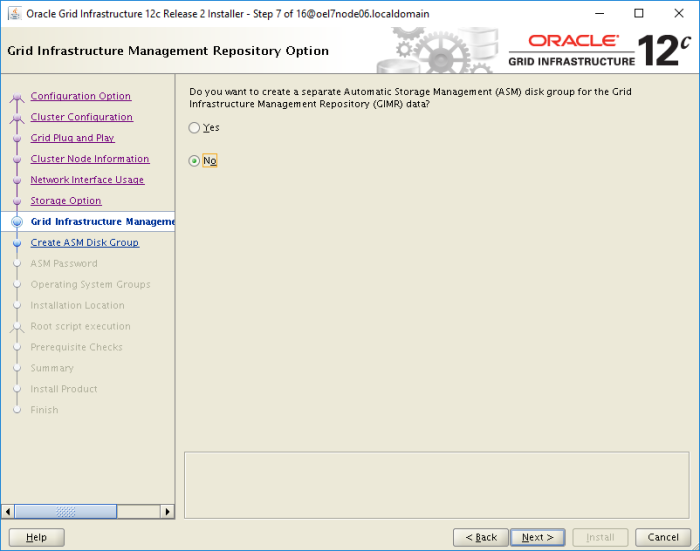
In 12c R2 ASMFD can be enabled from the GUI interface of the Grid Infrastructure installation, as shown on this post GI 12c R2 Installation at the step #8 “Create ASM Disk Group”.

Once ASM Filter Driver is in use, similarly to ASMLib the disks are managed using the ASMFD Label Name.


Here few examples about the implementation of ASM Filter Driver.

--How to create an ASMFD label in SQL*Plus
SQL> Alter system label set 'DATA1' to '/dev/mapper/mpathak';

System altered.


--How to create an ASM Disk Group with ASMFD
CREATE DISKGROUP DATA_DG EXTERNAL REDUNDANCY DISK 'AFD:DATA1' SIZE 30720M
ATTRIBUTE 'SECTOR_SIZE'='512','LOGICAL_SECTOR_SIZE'='512','compatible.asm'='12.2.0.1',
'compatible.rdbms'='12.2.0.1','compatible.advm'='12.2.0.1','au_size'='4M';

Diskgroup created.


ASM Filter Driver can also be managed from the ASM command line utility ASMCMD

--Check ASMFD status
ASMCMD> afd_state
ASMCMD-9526: The AFD state is 'LOADED' and filtering is 'ENABLED' on host 'oel7node06.localdomain'


--List ASM Disks where ASMFD is enabled
ASMCMD> afd_lsdsk
--------------------------------------------------------------------------------
Label                    Filtering                Path
================================================================================
DATA1                      ENABLED                /dev/mapper/mpathak
DATA2                      ENABLED                /dev/mapper/mpathan
DATA3                      ENABLED                /dev/mapper/mpathw
DATA4                      ENABLED                /dev/mapper/mpathac
GIMR1                      ENABLED                /dev/mapper/mpatham
GIMR2                      ENABLED                /dev/mapper/mpathaj
GIMR3                      ENABLED                /dev/mapper/mpathal
GIMR4                      ENABLED                /dev/mapper/mpathaf
GIMR5                      ENABLED                /dev/mapper/mpathai
RECO3                      ENABLED                /dev/mapper/mpathy
RECO1                      ENABLED                /dev/mapper/mpathab
RECO2                      ENABLED                /dev/mapper/mpathx
ASMCMD>


--How to remove an ASMFD label in ASMCMD
ASMCMD> afd_unlabel DATA4


Installing Oracle Grid Infrastructure 12c R2

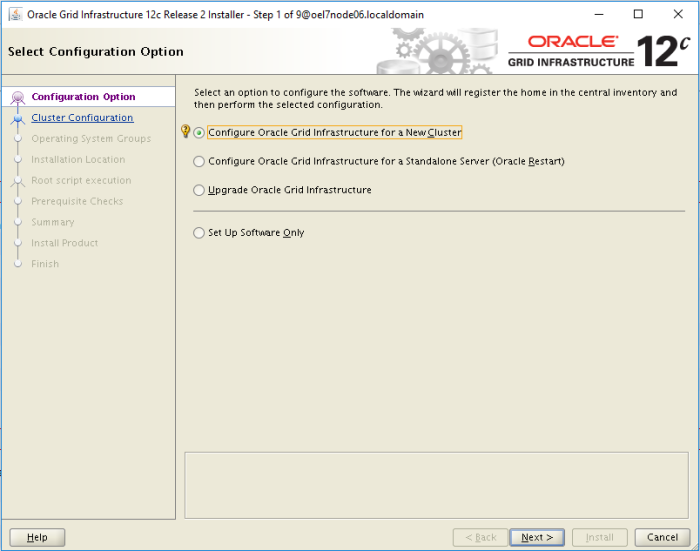
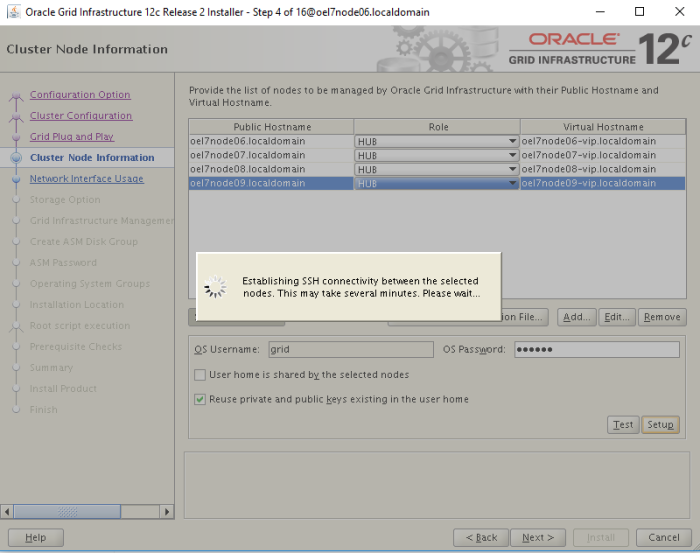
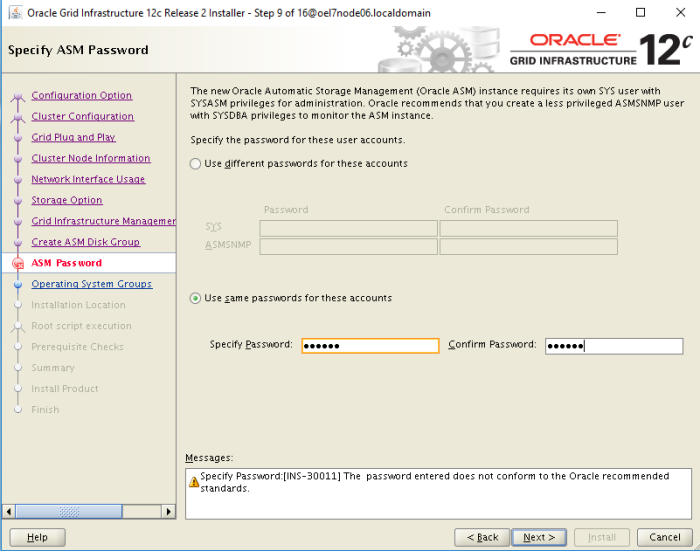
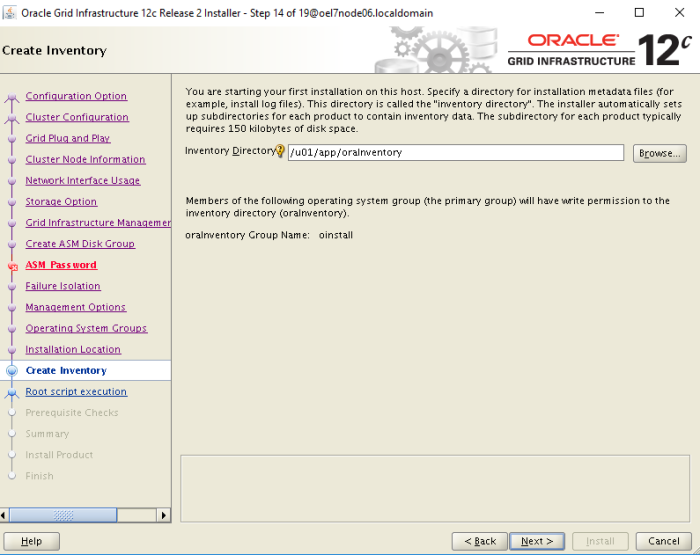
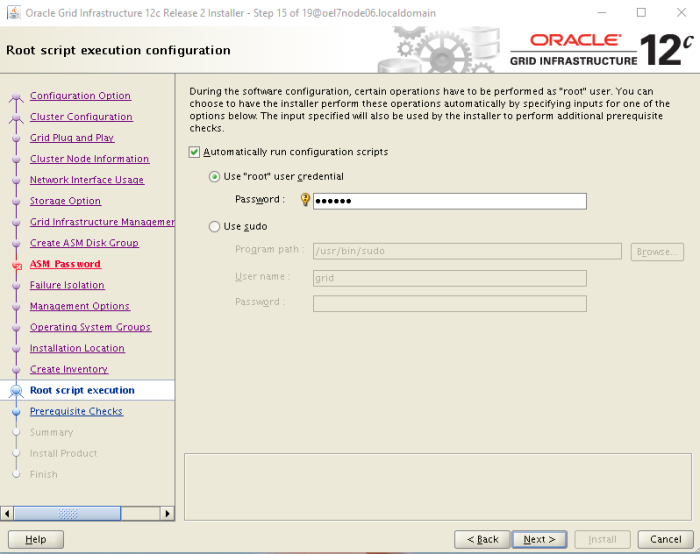
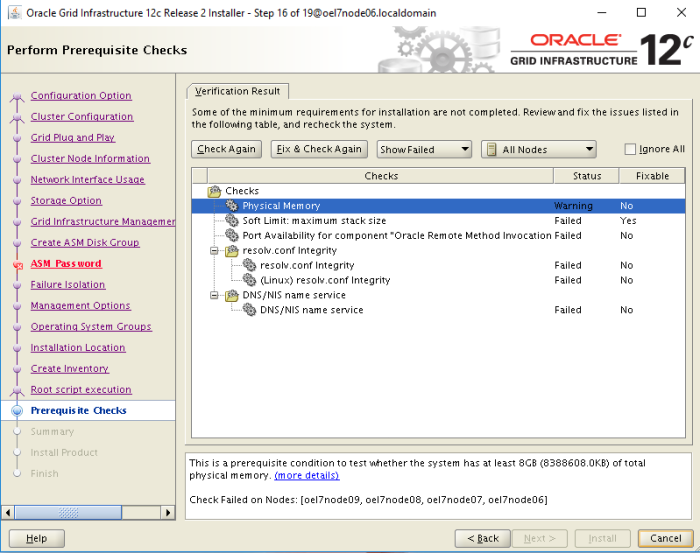
It has been an exciting week, Oracle 12c R2 came out and suddenly was time to refresh the RAC test environments. My friend Jacques opted for an upgrade from 12.1.0.2 to 12.2.0.1 (here the link to his blog post),  I started with a fresh installation, because I also upgraded the Operating System to OEL  7.3.

Compared to 12c R1 there are new options on the installation process, but general speaking the wizard is quite similar.

The first breakthrough is about the installation simplified with an image based, no more runIstaller.sh to invoke but …

Unpack the .Zip file directly inside the Grid Infrastructure Home of the first cluster node as described below:

[grid@oel7node06 ~]$ mkdir -p /u01/app/12.2.0.1/grid 
[grid@oel7node06 ~]$ chown grid:oinstall /u01/app/12.2.0.1/grid 
[grid@oel7node06 ~]$ cd /u01/app/12.2.0.1/grid 
[grid@oel7node06 grid]$ unzip -q download_location/grid_home_image.zip

# From an X session invoke the Grid Infrastructure wizard: 
[grid@oel7node06 grid]$ ./gridSetup.sh


01


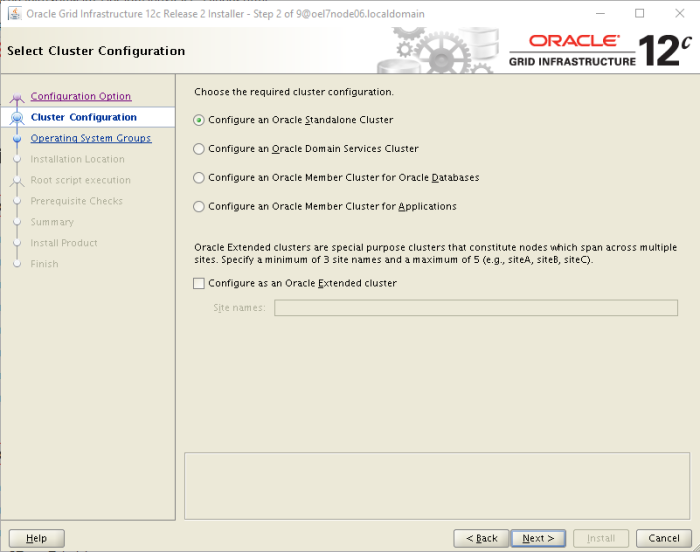
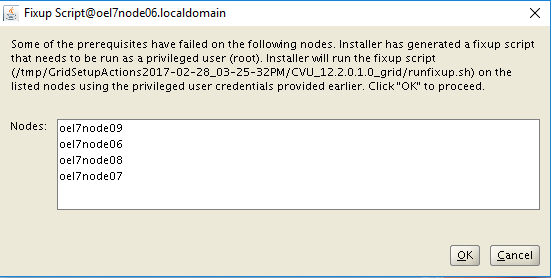
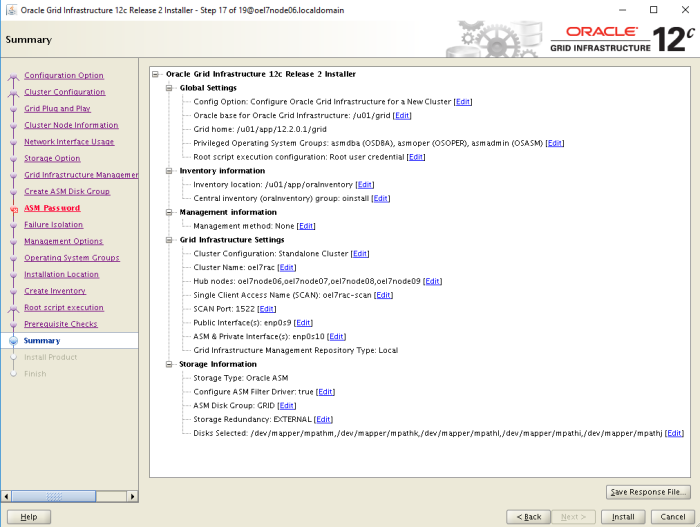
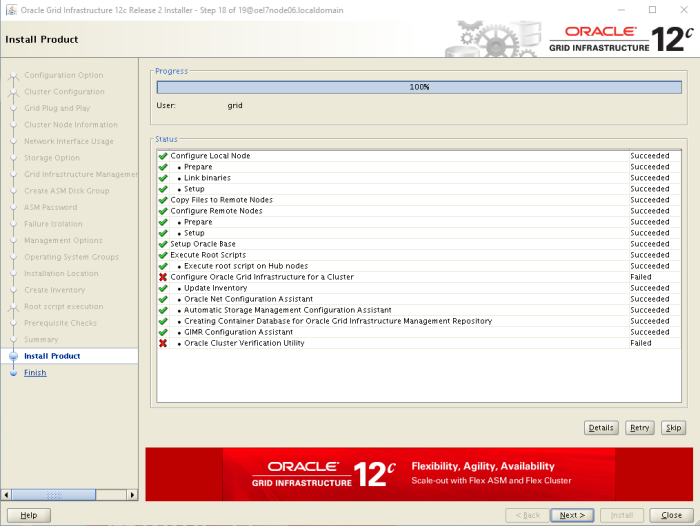
The second screenshot list the new Cluster typoligies available on 12c R2:

  • Oracle Standalone Cluster
  • Oracle Cluster Domain
    • Oracle Domain Services Cluster
    • Oracle Member Clusters
      • Oracle Member Cluster for Oracle Database
      • Oracle Member Cluster for Applications


In my case I’m installing an Oracle Standalone Cluster

02


03

04


05


06


07


08


09


10


11


12


13


14


15


16


17


18

19


20


21


22


And now time for testing.


New Oracle version (12.2.0.1) old BUG!


In June 2016 I posted the following BUG: Bug on Oracle 12c Multitenant & PDB Clone as Snapshot Copypromising to post an update once the version 12cR2 is available, because in the service request, originally opened with the version 12.1.0.2 Oracle stated that the bug would be fixed in 12cR2.

I was so impatient, that just few hours after the general availability of the Oracle Database 12c Release 2  I created a new cluster and tested the resolution.


For the record, it states that the resolution of this bug is important for one of my clients, where we have implemented the snapshot PDB on the application development lifecycle.


So let’s see if the bug has been fixed!

SQL*Plus: Release 12.2.0.1.0 Production on Wed Mar 1 21:06:54 2017

Copyright (c) 1982, 2016, Oracle. All rights reserved.

Connected to:
Oracle Database 12c Enterprise Edition Release 12.2.0.1.0 - 64bit Production


SQL> CREATE PLUGGABLE DATABASE PDBACFS1_SNAP1 from PDBACFS1 SNAPSHOT COPY;

Pluggable database created.

SQL> ALTER PLUGGABLE DATABASE PDBACFS1_SNAP1 OPEN instances=all;

Pluggable database altered.

SQL> select CON_ID, NAME, OPEN_MODE, SNAPSHOT_PARENT_CON_ID from v$pdbs where NAME in ('PDBACFS1','PDBACFS1_SNAP1');

 CON_ID     NAME               OPEN_MODE  SNAPSHOT_PARENT_CON_ID
---------- ------------------- ---------- ----------------------
 5          PDBACFS1            READ WRITE
 6          PDBACFS1_SNAP1      READ WRITE               <-- This should be 5 but is NULL

2 rows selected.


To a certain point of view progress has been made, in version 12.1.0.2 the column SNAPSHOT_PARENT_CON_ID was always zero (0) now is null!

I’m sorry for my customer, I’ll keep testing hoping …


Oracle Performance Impact of High % User Rollbacks

Recently one of my customers asked to investigate a database performance problem on a system where for multiple reasons I wasn’t having direct access.

To troubleshoot the performance, I started asking few AWR reports; at the first glance I didn’t spot any bottleneck, but while re-reading the statistics I found a strange ration between number of Transactions and Rollbacks.


Extract of AWR Load Profile

 — Per Second Per Transaction
Rollbacks 476.8 0.9
Transactions 546.6


Because all others OS and database statistics were quite good, I decided to follow the trail of the high percentage of transactions rolled back.

Before any fast conclusion I checked the nature of the rollbacks:

  • transaction rollbacks: Oracle is automatically executing a rollback, this happens for example in case of constraint violation (i.e. Primary Key violation).
  • user rollbacks: number of times users manually issue the ROLLBACK statement or an error occurs during users’ transactions.


Extract of AWR Activity Stats

Total      per Second per Trans
user commits

125,878

69.90 0.13

user rollbacks

858,562 476.76

0.87

transaction rollbacks

2,704

0.75

0.00

rollback changes – undo records applied

46,132

25.60

0.06

data blocks consistent reads – undo records applied

423,396

235.14

0.49

transaction tables consistent reads – undo records applied

128

0.08

0.00

consistent changes

5,599,562

3,109.48

12.7


From the AWR analysis has emerged the following data:

  • 87% of the user’s transactions ended with a rollback.
  • While rolling back, Oracle applies 25.6 undo records/sec. which means that at least a certain percentage of user rollbacks generates “real work“.
  • Even more important in term of performance analysis
    • number of data block consistent reads 235.14 records/sec.
    • number of consistent changes 3109.48 times/sec.


Because the database load profile is 90% SELECT and 10% DML, and there are important values about data block consistent reads and consisten changes, we can assume that most of the activity is concentrated in a small number of user objects.


Next step: I have to gain access to the system and continue the investigation…


Linux for DBA: Basic “vi” Editor Tutorial


UNIX/Linux “vi” is a very powerful text editor, unfortunately at the beginning the utilization can be difficult. To help our memory, I wrote this post.

This is NOT an exhaustive guide, but a concentrate of the most useful commands and options.


vi Operation Modes:

Command mode: allows to execute administrative tasks (run command, move cursor, serch/replace string, save, etc.). This is the default mode when started.
When Insert mode is active press ESC to revert to Command mode.

Insert mode:  enables to write into the file. To switch to Insert mode you simply type i.


To open a file in edit mode:

# vi filename


Basic Moving commands

Enable Command mode (pressing ESC twice)
j  -- Cursor down one line
k  -- Cursor up one line
h  -- Cursor left one line
l  -- Cursor right one line
Multiple lines/columns move ex.: 5h -- Cursor 5 move left

$   -- Cursor at the end of the line.
0   -- Cursor at the beginning of the line. Same than |
b   -- Cursor at the next word.
w   -- Cursor at the next word.
G   -- Cursor at the end of the file.
1G  -- Cursor at the beginning of the line.
:,4 -- Cursor at the 4th line.


Basic Editing commands

Enable Insert mode (pressing i)

a  -- Insert text after the cursor location. 
A  -- Insert text at the end of the line. 
i  -- Insert text before the cursor location. 
I  -- Insert text at the beginning of the line. 
o  -- Insert a new line below the cursor location. 
O  -- Insert a new line above the cursor location.
dd -- Delete the current line.
x  -- Delete the character under the cursor location.
cw -- Change the word under the cursor location.
r  -- Replace the character under the cursor location.
R  -- Replace multiple characters starting from the cursor location. ESC to stop the replacement.
yy -- Copy the current line.
yw -- Copy the current word.
p  -- Paste the copied text before the current cursor location
P  -- Paste the copied text after the current cursor location


Basic Search and  Replace options

Enable Command mode (pressing ESC twice)

:set ic -- Ingnore case when searching.
:set nu -- Disply line number on the left side.
:%s/<search_string>/<replacement_string>/g -- Global search and replace


Exiting from vi

:q  -- Exit without Saving
:q! -- Force Exit without Saving
:w  -- Save the file
:wq -- Save & Exit


Linux for DBA: Red Hat 7 removed and deprecated few commands


Linux Red Hat 7 and derived distributions have removed and deprecated few commands. Among them netstat and lsof,  which are popular between DBAs.

This post shows how to obtain the network information in compliance with the new OS commands.


NETSTAT

netstat – is now considered obsolete, and it has been replaced by ss:

root@oel7qa01:~$ ss -t
State       Recv-Q Send-Q       Local Address:Port           Peer Address:Port 
ESTAB       0      0            192.168.1.117:54360          192.0.78.23:https 
ESTAB       0      0            192.168.1.117:48538          198.252.206.25:https 
ESTAB       0      0            192.168.1.117:42744          162.125.18.133:https 
ESTAB       0      0            127.0.0.1:38106              127.0.0.1:52828 
ESTAB       0      0            192.168.1.117:54008          192.0.78.23:https 
CLOSE-WAIT  1      0            192.168.1.117:60054          51.2xx.195.xx:https 
ESTAB       0      0            192.168.1.117:47904          198.2xx.202.xx:https 
CLOSE-WAIT  32     0            192.168.1.117:56724          108.1xx.172.xxx:https 
CLOSE-WAIT  32     0            192.168.1.117:47050          54.xx.201.xxx:https 
ESTAB       0      0            127.0.0.1:52828              127.0.0.1:38106 
CLOSE-WAIT  32     0            192.168.1.117:44728          108.1xx.xxx.6x:https 
ESTAB       0      0            192.168.1.117:41848          195.xxx.2xx.xxx:https 
ESTAB       0      0            192.168.7.50:41268           192.168.7.60:ssh 
ESTAB       0      0            2a02:1203:ecb0:7b80:58d9:f6e5:90d9:f266:53060 2a00:1450:400e:800::2003:https 
ESTAB       0      0            2a02:1203:ecb0:7b80:58d9:f6e5:90d9:f266:37978 2a00:1450:400a:804::200e:https 
ESTAB       0      0            2a02:1203:ecb0:7b80:58d9:f6e5:90d9:f266:51682 2a00:1450:400a:804::2003:https


The netstat -r information is now provided by the command ip route:

--Until Red Hat 6
[root@oel7node00 ~]# netstat -r
Kernel IP routing table
Destination     Gateway     Genmask        Flags  MSS Window irtt Iface
default         gateway     0.0.0.0        UG       0 0         0 enp0s8
default         gateway     0.0.0.0        UG       0 0         0 enp0s3
10.0.2.0        0.0.0.0     255.255.255.0  U        0 0         0 enp0s3
172.31.100.0    0.0.0.0     255.255.255.0  U        0 0         0 enp0s9
192.168.7.0     0.0.0.0     255.255.255.0  U        0 0         0 enp0s8
192.168.200.0   0.0.0.0     255.255.255.0  U        0 0         0 enp0s10


--As of Red Hat 7
[root@oel7node00 ~]# ip route
default via 192.168.7.50 dev enp0s8 proto static metric 100 
default via 10.0.2.2 dev enp0s3 proto static metric 101 
10.0.2.0/24 dev enp0s3 proto kernel scope link src 10.0.2.15 metric 100 
172.31.100.0/24 dev enp0s9 proto kernel scope link src 172.31.100.10 metric 100 
192.168.7.0/24 dev enp0s8 proto kernel scope link src 192.168.7.60 metric 100 
192.168.200.0/24 dev enp0s10 proto kernel scope link src 192.168.200.10 metric 100 


The netstat -i information is now provided by the command ip route:

--Until Red Hat 6
[root@oel7node00 ~]# netstat -i
Kernel Interface table
Iface     MTU    RX-OK RX-ERR RX-DRP RX-OVR   TX-OK TX-ERR TX-DRP TX-OVR Flg
enp0s3   1500       66      0      0 0           72      0      0      0 BMRU
enp0s8   1500     1201      0      0 0          687      0      0      0 BMRU
enp0s9   1500        2      0      0 0            2      0      0      0 BMRU
enp0s10  1500        2      0      0 0            7      0      0      0 BMRU
lo      65536        0      0      0 0            0      0      0      0 LRU


--As of Red Hat 7
[root@oel7node00 ~]# ip -s link
1: lo: <LOOPBACK,UP,LOWER_UP> mtu 65536 qdisc noqueue state UNKNOWN mode DEFAULT 
 link/loopback 00:00:00:00:00:00 brd 00:00:00:00:00:00
 RX: bytes packets errors dropped overrun mcast 
 0         0       0      0       0       0 
 TX: bytes packets errors dropped carrier collsns 
 0         0       0      0       0       0 
2: enp0s3: <BROADCAST,MULTICAST,UP,LOWER_UP> mtu 1500 qdisc pfifo_fast state UP mode DEFAULT qlen 1000
 link/ether 08:00:27:4c:63:1b brd ff:ff:ff:ff:ff:ff
 RX: bytes packets errors dropped overrun mcast 
 5860      66      0      0       0       0 
 TX: bytes packets errors dropped carrier collsns 
 5662      72      0      0       0       0 
3: enp0s8: <BROADCAST,MULTICAST,UP,LOWER_UP> mtu 1500 qdisc pfifo_fast state UP mode DEFAULT qlen 1000
 link/ether 08:00:27:2b:ca:66 brd ff:ff:ff:ff:ff:ff
 RX: bytes packets errors dropped overrun mcast 
 131645    1237    0      0       0       0 
 TX: bytes packets errors dropped carrier collsns 
 223396    704     0      0       0       0 
4: enp0s9: <BROADCAST,MULTICAST,UP,LOWER_UP> mtu 1500 qdisc pfifo_fast state UP mode DEFAULT qlen 1000
 link/ether 08:00:27:cc:fb:2e brd ff:ff:ff:ff:ff:ff
 RX: bytes packets errors dropped overrun mcast 
 120        2      0      0       0       0 
 TX: bytes packets errors dropped carrier collsns 
 120       2       0      0       0       0 
5: enp0s10: <BROADCAST,MULTICAST,UP,LOWER_UP> mtu 1500 qdisc pfifo_fast state UP mode DEFAULT qlen 1000
 link/ether 08:00:27:6f:7e:47 brd ff:ff:ff:ff:ff:ff
 RX: bytes packets errors dropped overrun mcast 
 120       2       0      0       0       0 
 TX: bytes packets errors dropped carrier collsns 
 558       7       0      0       0       0


The netstat -g information is now provided by the command ip maddr:

--Until Red Hat 6
[root@oel7node00 ~]# netstat -g
IPv6/IPv4 Group Memberships
Interface RefCnt Group
--------------- ------ ---------------------
lo 1 all-systems.mcast.net
enp0s3 1 all-systems.mcast.net
enp0s8 1 all-systems.mcast.net
enp0s9 1 all-systems.mcast.net
enp0s10 1 all-systems.mcast.net
lo 1 ff02::1
lo 1 ff01::1
enp0s3 1 ff02::1
enp0s3 1 ff01::1
enp0s8 1 ff02::1
enp0s8 1 ff01::1
enp0s9 1 ff02::1
enp0s9 1 ff01::1
enp0s10 1 ff02::1
enp0s10 1 ff01::1


--As of Red Hat 7
[root@oel7node00 ~]# ip maddr
1: lo
 inet 224.0.0.1
 inet6 ff02::1
 inet6 ff01::1
2: enp0s3
 link 01:00:5e:00:00:01
 inet 224.0.0.1
 inet6 ff02::1
 inet6 ff01::1
3: enp0s8
 link 01:00:5e:00:00:01
 inet 224.0.0.1
 inet6 ff02::1
 inet6 ff01::1
4: enp0s9
 link 01:00:5e:00:00:01
 inet 224.0.0.1
 inet6 ff02::1
 inet6 ff01::1
5: enp0s10
 link 01:00:5e:00:00:01
 inet 224.0.0.1
 inet6 ff02::1
 inet6 ff01::1


LSOF

lsof is no longer included on the OS minimal installation, but not considered as obsolete or deprecated, therefore simply use yun to intall the missing package:

[root@oel7node00 ~]# which lsof
/usr/bin/which: no lsof in (/usr/local/sbin:/usr/local/bin:/usr/sbin:/usr/bin:/root/bin)

[root@oel7node00 ~]# yum install lsof
Loaded plugins: ulninfo
Resolving Dependencies
--> Running transaction check
---> Package lsof.x86_64 0:4.87-4.el7 will be installed
--> Finished Dependency Resolution

Dependencies Resolved

=========================================================================================================================================================
 Package Arch Version Repository Size
=========================================================================================================================================================
Installing:
 lsof x86_64 4.87-4.el7 ol7_latest 330 k

Transaction Summary
=========================================================================================================================================================
Install 1 Package

Total download size: 330 k
Installed size: 927 k
Is this ok [y/d/N]: y
Downloading packages:
Delta RPMs disabled because /usr/bin/applydeltarpm not installed.
lsof-4.87-4.el7.x86_64.rpm | 330 kB 00:00:00 
Running transaction check
Running transaction test
Transaction test succeeded
Running transaction
 Installing : lsof-4.87-4.el7.x86_64 1/1 
 Verifying : lsof-4.87-4.el7.x86_64 1/1

Installed:
 lsof.x86_64 0:4.87-4.el7

Complete!


Oracle 12c – Unified Audit Trail


Oracle 12c introduces “Unified Audit Trail” a faster, easier to access and more secure audit system.

It optionally allows to stage the audit records in a dedicated memory buffer (UNIFIED_AUDIT_SGA_QUEUE_SIZE), where they are temporarily grouped before being written into the audit table via batch transactions.

This new audit configuration substantially reduces the transactional overhead generated by the auditing.


Important improvements have also done to simplify the utilization:

– One single audit trail for any audit data, in fact  UNIFIED_AUDIT_TRAIL view replaces SYS.AUD$/DBA_AUDIT_TRAIL, SYS.FGA_LOGS$/DBA_FGA_AUDIT_TRAIL, DVSYS.AUDIT_TRAIL$, V$XML_AUDIT_TRAIL and the OS audit files in adump.

– All audit data stored in Oracle secure files.

– Role segregation between:

  • DBA responsible to maintain free space and backup.
  •  AUDIT_ADMIN responsible to manage the audit policies and define the data retention.
  • AUDIT_VIEWER in charge of the reports.


Unified Audit Trail introduces also new security options important to mention:

– It is activated with a kernel relink and it doesn’t require additional steps or parameters.

– The new AUDSYS table has a Read-Only Protection for all users. Even the DBA privilege can’t manipulate the audit records!


How to activate Unified Audit Trail

--Stop all Oracle processes: databases, listener and Enterprise Manager agent.

--Relink Oracle with the uniaud_on option.
$ cd $ORACLE_HOME/rdbms/lib
$ make -f ins_rdbms.mk uniaud_on ioracle

--Restart all Oracle processes: databases, listener and Enterprise Manager agent.

--Check is Unified Audit Trail is active
SQL> select * from v$option where PARAMETER='Unified Auditing';

INST_ID PARAMETER                       VALUE              CON_ID
------- ------------------------------ ------------------- ----------
 1      Unified Auditing                TRUE                0


Optional, but strongly recommended it is possible to relocate the AUDIT segments  from SYSAUX Tablespace to a dedicated one.

SQL> Create tablespace TBS_AUDIT datafile SIZE 2G AUTOEXTEND ON;

BEGIN
DBMS_AUDIT_MGMT.SET_AUDIT_TRAIL_LOCATION(
 audit_trail_type => dbms_audit_mgmt.audit_trail_unified,
 audit_trail_location_value => 'TBS_AUDIT');
END;
/


SQL> select OWNER, SEGMENT_NAME, PARTITION_NAME, SEGMENT_TYPE, BYTES from dba_segments where TABLESPACE_NAME='TBS_AUDIT';

OWNER           SEGMENT_NAME                    PARTITION_NAME                SEGMENT_TYPE       BYTES
--------------- ------------------------------ ------------------------------ ------------------ ----------
AUDSYS           CLI_SWP$1b2a49f1$1$1           HIGH_PART                      TABLE PARTITION   65536
AUDSYS           CLI_SWP$1b2a49f1$1$1           PART_2                         TABLE PARTITION   65536
AUDSYS           CLI_LOB$1b2a49f1$1$1           HIGH_PART                      INDEX PARTITION   65536
AUDSYS           CLI_TIME$1b2a49f1$1$1          HIGH_PART                      INDEX PARTITION   65536
AUDSYS           CLI_LOB$1b2a49f1$1$1           PART_2                         INDEX PARTITION   65536
AUDSYS           CLI_TIME$1b2a49f1$1$1          PART_2                         INDEX PARTITION   65536
AUDSYS           CLI_SCN$1b2a49f1$1$1           PART_2                         INDEX PARTITION   65536
AUDSYS           SYS_IL0000091784C00014$$       SYS_IL_P241                    INDEX PARTITION   65536
AUDSYS           CLI_SCN$1b2a49f1$1$1           HIGH_PART                      INDEX PARTITION   65536
AUDSYS           SYS_IL0000091784C00014$$       SYS_IL_P246                    INDEX PARTITION   65536
AUDSYS           SYS_LOB0000091784C00014$$      SYS_LOB_P244                   LOB PARTITION     131072
AUDSYS           SYS_LOB0000091784C00014$$      SYS_LOB_P239                   LOB PARTITION     131072

12 rows selected.


The introduction of Audit Policies have brought flexibility and granularity on what it is possible to audit, here an example using Oracle sys_context function.

CREATE AUDIT POLICY hr_employees
 PRIVILEGES CREATE TABLE
 ACTIONS UPDATE ON HR.EMPLOYEES
 WHEN 'SYS_CONTEXT(''USERENV'', ''SESSION_USER'') != ''HR_ADMIN'''
 EVALUATE PER STATEMENT;

AUDIT POLICY hr_employees;


Linux for DBA: How disable the ssh banner for a given user

Ready to install a new Oracle RAC cluster, but the ssh banner (in /etc/issue.net protected by root privileges) is compromising the non-interactive ssh commands issued by grid & oracle?

Here the trick to disable it:

--Add this empty file to the grid and oracle UNIX home
touch ~/.hushlogin 

--or
mkdir -p .ssh
chmod 700 .ssh 
echo "LogLevel quiet" > ~/.ssh/config

Oracle DB stored on ASM vs ACFS

Nowadays a new Oracle database environment with Grid Infrastructure has three main storage options:

  1. Third party clustered file system
  2. ASM Disk Groups
  3. ACFS File System

While the first option was not in scope, this blog compares the result of the tests between ASM and ACFS, highlighting when to use one or the other to store 12c NON-CDB or CDB Databases.

The tests conducted on different environments using Oracle version 12.1.0.2 July PSU have shown controversial results compared to what Oracle  is promoting for the Oracle Database Appliance (ODA) in the following paper: “Frequently Asked Questions Storing Database Files in ACFS on Oracle Database Appliance


Outcome of the tests

ASM remains the preferred option to achieve the best I/O performance, while ACFS introduces interesting features like DB snapshot to quickly and space efficiently provision new databases.

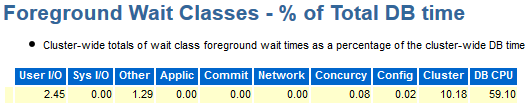
The performance gap between the two solutions is not negligible as reported below by the  AWR – TOP Timed Events sections of two PDBs, sharing the same infrastructure, executing the same workload but respectively using ASM and ACFS storage:

  • PDBASM: Pluggable Database stored on  ASM Disk Group
  • PDBACFS:Pluggable Database stored on ACFS File System


PDBASM AWR – TOP Timed Events and Other Stats

topevents_asm

fg_asm


PDBACFS AWR – TOP Timed Events and Other Stats

TopEvents_ACFS.png

fg_acfs


Due to the different characteristics and results when ASM or ACFS is in use, it is not possible to give a generic recommendation. But case by case the choise should be driven by business needs like maximum performance versus fast and efficient database clone.


Severe Oracle instability due to new RedHat 7.2 feature which releases IPC objects

I have recently installed a two node RAC version 12.1.0.2 on top of RedHat 7.2 and few hours after the initial setup I started experiencing ASM and database crashes.

Checking in the alert log I found the following errors:

Tue Oct 04 05:25:17 2016
Dumping diagnostic data in directory=[cdmp_20161004052517], requested by (instance=1, osid=84872 (MMAN)), summary=[abnormal instance termination].
Tue Oct 04 05:25:18 2016
Instance terminated by USER, pid = 84872
Tue Oct 04 05:25:18 2016
Errors in file /oams/base/diag/rdbms/txdop/txdop1/trace/txdop1_mman_84872.trc:
ORA-27300: OS system dependent operation:semctl failed with status: 22
ORA-27301: OS failure message: Invalid argument
ORA-27302: failure occurred at: sskgpwrm1
ORA-27157: OS post/wait facility removed
ORA-27300: OS system dependent operation:semop failed with status: 43
ORA-27301: OS failure message: Identifier removed
ORA-27302: failure occurred at: sskgpwwait1


The errors pointed to the OS and in particular to the possibility that semaphores in use by Oracle have been removed.

Because this is a fresh installation and I was the only person using the cluster, it was easy to exclude any third party activity. Then I double-checked the kernel parameters and all other system pre-requisites without finding any wrong configuration.

Finally, on MOS and I found the followinfg note ALERT: Setting RemoveIPC=yes on Redhat 7.2 Crashes ASM and Database Instances as Well as Any Application That Uses a Shared Memory Segment (SHM) or Semaphores (SEM) (Doc ID 2081410.1)”

Redhat 7.2, systemd-logind service introduced a new feature to remove all IPC objects when a user fully logs out.
The feature is controled by the option RemoveIPC in the /etc/systemd/logind.conf configuration file, see man logind.conf(5) for details.

The default value for RemoveIPC in RHEL7.2 is yes.

As a result, when the last oracle or grid user disconnects, the OS removes shared memory segments and semaphores for those users.
As Oracle ASM and Databases use shared memory segments for SGA, removing shared memory segments will crash the Oracle ASM and database instances.