ASM Storage Reclamation Utility (ASRU) for HP 3PAR Thin Provisioning


ASM Storage Reclamation Utility (ASRU) reclaims storage from an ASM disk group that was previously allocated but is no longer in use. In example after decommissioning a database. This Perl script writes blocks of Zeros where space is currently unallocated; the Zeros blocks are interpreted by the 3PAR Storage Server, as physical space to reclaim.

The execution of the ASRU script consists in three sequential phases:

  1. Compaction the disks are logically resized keeping 25% of free space for future needs and without affecting the physical size of the disks. This operation triggers the ASM disk group rebalance which compact the data at the beginning of the disks.
  2. Deallocation this phase writes Zeros blocks above the current data High Water Mark, those blocks of Zeros are interpreted by the storage as space available for reclaiming.
  3. Expansion here the utility resize the logical disks to the original size, because data remains untouched no ASM rebalance operation is required.


How to use ASRU

ASM Disk Groups


ASMCMD> lsdg
State Type Rebal Sector Block AU Total_MB Free_MB Req_mir_free_MB Usable_file_MB Offline_disks Voting_files Name
MOUNTED NORMAL N 512 4096 4194304 3071904 1220008 511984 354012 0 N DATA/
MOUNTED NORMAL N 512 4096 4194304 7167776 3631252 511984 1559634 0 N FRA/
MOUNTED HIGH N 512 4096 1048576 41886 40621 20448 6405 0 Y OCRVOTING/
ASMCMD>

——————————————————————
Invoke the ASRU utility wirh the Grid Infrastructure owner
——————————————————————

[grid@xxxxxxxx space_reclaim]$ bash ASRU DATA
Checking the system ...done
Calculating the sizes of the disks ...done
Writing the data to a file ...done
Resizing the disks...done
Calculating the sizes of the disks ...done

/u01/GRID/11.2.0.4/perl/bin/perl -I /u01/GRID/11.2.0.4/perl/lib/5.10.0 /cloudfs/space_reclaim/zerofill 7 /dev/mapper/asm500GB_360002ac0000000000000000c0000964bp1 385789 511984 /dev/mapper/asm500GB_360002ac000000000000000150000964cp1 385841 511984 /dev/mapper/asm500GB_360002ac000000000000000160000964cp1 385813 511984 /dev/mapper/asm500GB_360002ac000000000000000110000964bp1 385869 511984 /dev/mapper/asm500GB_360002ac000000000000000120000964bp1 385789 511984 /dev/mapper/asm500GB_360002ac000000000000000140000964cp1 385789 511984
126171+0 records in
126171+0 records out
132299882496 bytes (132 GB) copied, 519.831 s, 255 MB/s
126195+0 records in
126195+0 records out
132325048320 bytes (132 GB) copied, 519.927 s, 255 MB/s
126195+0 records in
126195+0 records out
132325048320 bytes (132 GB) copied, 520.045 s, 254 MB/s
126143+0 records in
126143+0 records out
132270522368 bytes (132 GB) copied, 520.064 s, 254 MB/s
126115+0 records in
126115+0 records out
132241162240 bytes (132 GB) copied, 520.076 s, 254 MB/s
126195+0 records in
126195+0 records out
132325048320 bytes (132 GB) copied, 520.174 s, 254 MB/s

Calculating the sizes of the disks ...done
Resizing the disks...done
Calculating the sizes of the disks ...done
Dropping the file ...done


The second phase of the script called Deallocation uses dd to reset to zero the blocks beyond the HWM. One dd process per ASM Disk is started:

[grid@xxxxxxxx space_reclaim]$ top
top - 10:13:02 up 44 days, 16:16, 4 users, load average: 16.63, 16.45, 13.75
Tasks: 732 total, 6 running, 726 sleeping, 0 stopped, 0 zombie
Cpu(s): 2.8%us, 13.8%sy, 0.0%ni, 37.1%id, 43.9%wa, 0.0%hi, 2.4%si, 0.0%st
Mem: 131998748k total, 131419200k used, 579548k free, 42266420k buffers
Swap: 16777212k total, 0k used, 16777212k free, 3394532k cached
PID USER PR NI VIRT RES SHR S %CPU %MEM TIME+ COMMAND
 101 root 20 0 0 0 0 R 39.4 0.0 8:38.60 kswapd0
20332 grid 20 0 103m 1564 572 R 19.5 0.0 1:46.35 dd
20333 grid 20 0 103m 1568 572 D 18.2 0.0 1:44.93 dd
20325 grid 20 0 103m 1568 572 D 17.2 0.0 1:44.53 dd
20324 grid 20 0 103m 1568 572 R 15.6 0.0 1:20.63 dd
20328 grid 20 0 103m 1564 572 R 15.2 0.0 1:21.55 dd
20331 grid 20 0 103m 1568 572 D 14.6 0.0 1:21.42 dd
26113 oracle 20 0 60.2g 32m 26m S 14.6 0.0 0:00.75 oracle
20335 root 20 0 0 0 0 D 14.2 0.0 1:18.94 flush-252:24
20322 grid 20 0 103m 1568 572 D 13.9 0.0 1:21.51 dd
20342 root 20 0 0 0 0 D 13.2 0.0 1:16.61 flush-252:25
20338 root 20 0 0 0 0 R 12.9 0.0 1:17.42 flush-252:30
20336 root 20 0 0 0 0 D 10.9 0.0 1:00.66 flush-252:55
20339 root 20 0 0 0 0 D 10.9 0.0 0:57.79 flush-252:50
20340 root 20 0 0 0 0 D 10.3 0.0 0:58.42 flush-252:54
20337 root 20 0 0 0 0 D 9.6 0.0 0:58.24 flush-252:60
24409 root RT 0 889m 96m 57m S 5.3 0.1 2570:35 osysmond.bin
24861 root 0 -20 0 0 0 S 1.7 0.0 41:31.95 kworker/1:1H
21086 root 0 -20 0 0 0 S 1.3 0.0 36:24.40 kworker/7

[grid@xxxxxxxxxx~]$ ps -ef|grep 20332
grid 20332 20326 17 10:02 pts/0 00:01:16 /bin/dd if=/dev/zero of=/dev/mapper/asm500GB_360002ac000000000000000110000964cp1 seek=315461 bs=1024k count=196523

[grid@xxxxxxxxxx ~]$ ps -ef|grep 20325
grid 20325 20319 17 10:02 pts/0 00:01:35 /bin/dd if=/dev/zero of=/dev/mapper/asm500GB_360002ac0000000000000000d0000964cp1 seek=315309 bs=1024k count=196675


——————————————————————
ASM I/O Statistics  during the disk group rebalance
——————————————————————

ASMCMD> lsop
Group_Name Dsk_Num State Power EST_WORK EST_RATE EST_TIME
DATA REBAL WAIT 7
ASMCMD>
ASMCMD> iostat -et 5
Group_Name Dsk_Name Reads Writes Read_Err Write_Err Read_Time Write_Time
DATA S1_DATA01_FG1 23030185984 2082245521408 0 0 629.202365 561627.214525
DATA S1_DATA02_FG1 9678848 2002875955200 0 0 141.271598 556226.65866
DATA S1_DATA03_FG1 101520732160 2016216610304 0 0 3024.887841 561404.578818
DATA S2_DATA01_FG1 819643435008 2062069520896 0 0 50319.400536 563116.826573
DATA S2_DATA02_FG1 1126678040576 2045156313600 0 0 56108.943316 555738.806255
DATA S2_DATA03_FG1 947842624000 1994103517696 0 0 51845.856561 545466.151177
FRA S1_FRA01_FG1 9695232 305258886144 0 0 251.129038 5234.922326
FRA S1_FRA02_FG1 9691136 324037302272 0 0 234.499119 5478.064898
FRA S1_FRA03_FG1 9674752 287679095808 0 0 237.140794 4322.92991
FRA S1_FRA04_FG1 9678848 279486220800 0 0 563.687636 3845.515979
FRA S1_FRA05_FG1 9687040 287006669312 0 0 236.97403 4162.291019
FRA S1_FRA06_FG1 9695232 305493610496 0 0 260.062194 4776.712435
FRA S1_FRA07_FG1 9691648 286196798976 0 0 236.804526 14257.967546
FRA S2_FRA01_FG1 28695552 282395977216 0 0 565.469092 3874.206606
FRA S2_FRA02_FG1 63110656 290152312832 0 0 622.124042 14264.906378
FRA S2_FRA03_FG1 10750508032 318696439808 0 0 214.440821 5200.272304
FRA S2_FRA04_FG1 102140928 311658688512 0 0 624.488925 5098.68159
FRA S2_FRA05_FG1 55187456 298768577536 0 0 587.286013 4398.231978
FRA S2_FRA06_FG1 33064960 289082719232 0 0 21.587277 4597.368455
FRA S2_FRA07_FG1 28070912 284403925504 0 0 568.334218 4320.709945
OCRVOTING S1_OCRVOTING01_FG1 9666560 4096 0 0 292.504971 .000388
OCRVOTING S1_OCRVOTING02_FG2 9674752 0 0 0 14.6555 0
OCRVOTING S2_OCRVOTING01_FG1 10866688 4096 0 0 99.140306 .000388
OCRVOTING S2_OCRVOTING02_FG2 9695232 4096 0 0 110.684821 .000388
OCRVOTING S3_OCRVOTING01_FG1 9666560 0 0 0 73.171492 0


Group_Name Dsk_Name Reads Writes Read_Err Write_Err Read_Time Write_Time
DATA S1_DATA01_FG1 1329561.60 51507.20 0.00 0.00 0.13 0.01
DATA S1_DATA02_FG1 773324.80 417792.00 0.00 0.00 0.14 0.03
DATA S1_DATA03_FG1 1255014.40 11468.80 0.00 0.00 0.18 0.00
DATA S2_DATA01_FG1 0.00 5734.40 0.00 0.00 0.00 0.00
DATA S2_DATA02_FG1 32768.00 30208.00 0.00 0.00 0.00 0.02
DATA S2_DATA03_FG1 0.00 416972.80 0.00 0.00 0.00 0.01
FRA S1_FRA01_FG1 0.00 6553.60 0.00 0.00 0.00 0.00
FRA S1_FRA02_FG1 3276.80 10649.60 0.00 0.00 0.00 0.00
FRA S1_FRA03_FG1 0.00 0.00 0.00 0.00 0.00 0.00
FRA S1_FRA04_FG1 0.00 3276.80 0.00 0.00 0.00 0.00
FRA S1_FRA05_FG1 0.00 0.00 0.00 0.00 0.00 0.00
FRA S1_FRA06_FG1 0.00 3276.80 0.00 0.00 0.00 0.00
FRA S1_FRA07_FG1 0.00 4812.80 0.00 0.00 0.00 0.00
FRA S2_FRA01_FG1 0.00 819.20 0.00 0.00 0.00 0.00
FRA S2_FRA02_FG1 0.00 3276.80 0.00 0.00 0.00 0.00
FRA S2_FRA03_FG1 0.00 6553.60 0.00 0.00 0.00 0.00
FRA S2_FRA04_FG1 0.00 6553.60 0.00 0.00 0.00 0.00
FRA S2_FRA05_FG1 0.00 3276.80 0.00 0.00 0.00 0.00
FRA S2_FRA06_FG1 0.00 4812.80 0.00 0.00 0.00 0.00
FRA S2_FRA07_FG1 0.00 3276.80 0.00 0.00 0.00 0.00
OCRVOTING S1_OCRVOTING01_FG1 0.00 819.20 0.00 0.00 0.00 0.60
OCRVOTING S1_OCRVOTING02_FG2 0.00 819.20 0.00 0.00 0.00 0.60
OCRVOTING S2_OCRVOTING01_FG1 0.00 819.20 0.00 0.00 0.00 0.60
OCRVOTING S2_OCRVOTING02_FG2 0.00 819.20 0.00 0.00 0.00 0.60
OCRVOTING S3_OCRVOTING01_FG1 0.00 819.20 0.00 0.00 0.00 0.0


Group_Name Dsk_Name Reads Writes Read_Err Write_Err Read_Time Write_Time
DATA S1_DATA01_FG1 77004.80 248217.60 0.00 0.00 0.01 0.01
DATA S1_DATA02_FG1 6553.60 819.20 0.00 0.00 0.01 0.60
DATA S1_DATA03_FG1 83558.40 11468.80 0.00 0.00 0.01 0.00
DATA S2_DATA01_FG1 0.00 235110.40 0.00 0.00 0.00 0.01
DATA S2_DATA02_FG1 36044.80 17203.20 0.00 0.00 0.00 0.60
DATA S2_DATA03_FG1 0.00 8192.00 0.00 0.00 0.00 0.00
FRA S1_FRA01_FG1 0.00 6553.60 0.00 0.00 0.00 0.00
FRA S1_FRA02_FG1 3276.80 11468.80 0.00 0.00 0.00 0.01
FRA S1_FRA03_FG1 0.00 233472.00 0.00 0.00 0.00 0.01
FRA S1_FRA04_FG1 0.00 0.00 0.00 0.00 0.00 0.00
FRA S1_FRA05_FG1 0.00 0.00 0.00 0.00 0.00 0.00
FRA S1_FRA06_FG1 0.00 6553.60 0.00 0.00 0.00 0.00
FRA S1_FRA07_FG1 0.00 0.00 0.00 0.00 0.00 0.00
FRA S2_FRA01_FG1 0.00 1638.40 0.00 0.00 0.00 0.01
FRA S2_FRA02_FG1 0.00 0.00 0.00 0.00 0.00 0.00
FRA S2_FRA03_FG1 0.00 9830.40 0.00 0.00 0.00 0.00
FRA S2_FRA04_FG1 0.00 6553.60 0.00 0.00 0.00 0.00
FRA S2_FRA05_FG1 0.00 6553.60 0.00 0.00 0.00 0.00
FRA S2_FRA06_FG1 0.00 0.00 0.00 0.00 0.00 0.00
FRA S2_FRA07_FG1 0.00 233472.00 0.00 0.00 0.00 0.01
OCRVOTING S1_OCRVOTING01_FG1 0.00 1638.40 0.00 0.00 0.00 1.20
OCRVOTING S1_OCRVOTING02_FG2 0.00 1638.40 0.00 0.00 0.00 1.20
OCRVOTING S2_OCRVOTING01_FG1 0.00 1638.40 0.00 0.00 0.00 1.20
OCRVOTING S2_OCRVOTING02_FG2 0.00 1638.40 0.00 0.00 0.00 1.20
OCRVOTING S3_OCRVOTING01_FG1 0.00 1638.40 0.00 0.00 0.00 0.01

——————————————————————
ASM Alert Log produced during the execution of the ASRU utility
——————————————————————

Mon Apr 04 09:11:39 2016
SQL> ALTER DISKGROUP DATA RESIZE DISK S2_DATA03_FG1 SIZE 385840M DISK S1_DATA01_FG1 SIZE 385788M DISK S2_DATA02_FG1 SIZE 385812M DISK S1_DATA02_FG1 SIZE 385868M DISK S2_DATA01_FG1 SIZE 385788M DISK S1_DATA03_FG1 SIZE 385788M REBALANCE WAIT/* ASRU */
NOTE: GroupBlock outside rolling migration privileged region
NOTE: requesting all-instance membership refresh for group=1
Mon Apr 04 09:12:11 2016
NOTE: membership refresh pending for group 1/0x48695261 (DATA)
Mon Apr 04 09:12:12 2016
GMON querying group 1 at 10 for pid 18, osid 25195
SUCCESS: refreshed membership for 1/0x48695261 (DATA)
NOTE: Attempting voting file refresh on diskgroup DATA
NOTE: Refresh completed on diskgroup DATA. No voting file found.
NOTE: starting rebalance of group 1/0x48695261 (DATA) at power 7
Starting background process ARB0
Mon Apr 04 09:12:15 2016
ARB0 started with pid=41, OS id=46711
NOTE: assigning ARB0 to group 1/0x48695261 (DATA) with 7 parallel I/Os
cellip.ora not found.
Mon Apr 04 09:13:38 2016
NOTE: stopping process ARB0
SUCCESS: rebalance completed for group 1/0x48695261 (DATA)
Mon Apr 04 09:13:39 2016
NOTE: GroupBlock outside rolling migration privileged region
NOTE: requesting all-instance membership refresh for group=1
Mon Apr 04 09:13:42 2016
GMON updating for reconfiguration, group 1 at 11 for pid 41, osid 47334
NOTE: group 1 PST updated.
SUCCESS: disk S1_DATA01_FG1 resized to 96447 AUs
SUCCESS: disk S1_DATA02_FG1 resized to 96467 AUs
SUCCESS: disk S2_DATA01_FG1 resized to 96447 AUs
SUCCESS: disk S2_DATA02_FG1 resized to 96453 AUs
SUCCESS: disk S2_DATA03_FG1 resized to 96460 AUs
SUCCESS: disk S1_DATA03_FG1 resized to 96447 AUs
NOTE: resizing header on grp 1 disk S1_DATA01_FG1
NOTE: resizing header on grp 1 disk S1_DATA02_FG1
NOTE: resizing header on grp 1 disk S2_DATA01_FG1
NOTE: resizing header on grp 1 disk S2_DATA02_FG1
NOTE: resizing header on grp 1 disk S2_DATA03_FG1
NOTE: resizing header on grp 1 disk S1_DATA03_FG1
NOTE: membership refresh pending for group 1/0x48695261 (DATA)
GMON querying group 1 at 12 for pid 18, osid 25195
SUCCESS: refreshed membership for 1/0x48695261 (DATA)
Mon Apr 04 09:13:48 2016
NOTE: Attempting voting file refresh on diskgroup DATA
NOTE: Refresh completed on diskgroup DATA. No voting file found.
Mon Apr 04 09:13:49 2016
SUCCESS: ALTER DISKGROUP DATA RESIZE DISK S2_DATA03_FG1 SIZE 385840M DISK S1_DATA01_FG1 SIZE 385788M DISK S2_DATA02_FG1 SIZE 385812M DISK S1_DATA02_FG1 SIZE 385868M DISK S2_DATA01_FG1 SIZE 385788M DISK S1_DATA03_FG1 SIZE 385788M REBALANCE WAIT/* ASRU */
Mon Apr 04 09:22:42 2016
SQL> ALTER DISKGROUP DATA RESIZE DISK S2_DATA03_FG1 SIZE 511984M DISK S1_DATA01_FG1 SIZE 511984M DISK S2_DATA02_FG1 SIZE 511984M DISK S1_DATA02_FG1 SIZE 511984M DISK S2_DATA01_FG1 SIZE 511984M DISK S1_DATA03_FG1 SIZE 511984M REBALANCE WAIT/* ASRU */
NOTE: GroupBlock outside rolling migration privileged region
NOTE: requesting all-instance membership refresh for group=1
NOTE: requesting all-instance disk validation for group=1
Mon Apr 04 09:22:46 2016
NOTE: disk validation pending for group 1/0x48695261 (DATA)
SUCCESS: validated disks for 1/0x48695261 (DATA)
Mon Apr 04 09:23:24 2016
NOTE: increased size in header on grp 1 disk S1_DATA01_FG1
NOTE: increased size in header on grp 1 disk S1_DATA02_FG1
NOTE: increased size in header on grp 1 disk S2_DATA01_FG1
NOTE: increased size in header on grp 1 disk S2_DATA02_FG1
NOTE: increased size in header on grp 1 disk S2_DATA03_FG1
NOTE: increased size in header on grp 1 disk S1_DATA03_FG1
Mon Apr 04 09:23:24 2016
NOTE: membership refresh pending for group 1/0x48695261 (DATA)
Mon Apr 04 09:23:26 2016
GMON querying group 1 at 13 for pid 18, osid 25195
SUCCESS: refreshed membership for 1/0x48695261 (DATA)
NOTE: starting rebalance of group 1/0x48695261 (DATA) at power 7
Starting background process ARB0
Mon Apr 04 09:23:26 2016
ARB0 started with pid=38, OS id=53105
NOTE: assigning ARB0 to group 1/0x48695261 (DATA) with 7 parallel I/Os
cellip.ora not found.
NOTE: Attempting voting file refresh on diskgroup DATA
NOTE: Refresh completed on diskgroup DATA. No voting file found.
Mon Apr 04 09:23:37 2016
NOTE: stopping process ARB0
SUCCESS: rebalance completed for group 1/0x48695261 (DATA)
Mon Apr 04 09:23:38 2016
NOTE: GroupBlock outside rolling migration privileged region
NOTE: requesting all-instance membership refresh for group=1
NOTE: membership refresh pending for group 1/0x48695261 (DATA)
Mon Apr 04 09:23:44 2016
GMON querying group 1 at 14 for pid 18, osid 25195
SUCCESS: refreshed membership for 1/0x48695261 (DATA)
Mon Apr 04 09:23:47 2016
NOTE: Attempting voting file refresh on diskgroup DATA
NOTE: Refresh completed on diskgroup DATA. No voting file found.
Mon Apr 04 09:23:48 2016
SUCCESS: ALTER DISKGROUP DATA RESIZE DISK S2_DATA03_FG1 SIZE 511984M DISK S1_DATA01_FG1 SIZE 511984M DISK S2_DATA02_FG1 SIZE 511984M DISK S1_DATA02_FG1 SIZE 511984M DISK S2_DATA01_FG1 SIZE 511984M DISK S1_DATA03_FG1 SIZE 511984M REBALANCE WAIT/* ASRU */
Mon Apr 04 09:23:50 2016
SQL> /* ASRU */alter diskgroup DATA drop file '+DATA/tpfile'
SUCCESS: /* ASRU */alter diskgroup DATA drop file '+DATA/tpfile'


Once the ASRU utility has completed, the Storage Administrator should invoke the Space Compact from the 3Par console.

How to Create and Clone PDBs

################################################
## How to create a PDB Database from Seed DB  ##
################################################

CREATE PLUGGABLE DATABASE pdb01
  ADMIN USER pdb_adm IDENTIFIED BY <password> ROLES=(DBA)
  PATH_PREFIX = '/u01/'
  STORAGE (MAXSIZE 20G MAX_SHARED_TEMP_SIZE 2048M)
  FILE_NAME_CONVERT = ('+DATA01','+DATA02')
  DEFAULT TABLESPACE users DATAFILE '+DATA02' SIZE 10G AUTOEXTEND ON MAXSIZE 20G
  TEMPFILE REUSE;

ALTER PLUGGABLE DATABASE pdb01 OPEN;  


##################################################
## How to clone a PDB Database running on ASM   ##
##################################################

ALTER PLUGGABLE DATABASE pdb01 CLOSE;  
ALTER PLUGGABLE DATABASE pdb01 OPEN READ ONLY;

CREATE PLUGGABLE DATABASE pdb02 FROM pdb01;

ALTER PLUGGABLE DATABASE pdb01 OPEN READ WRITE;
ALTER PLUGGABLE DATABASE pdb02 OPEN READ WRITE;


##################################################
## How to clone a PDB Database using ACFS Snapshot Copy
##################################################
 
ALTER PLUGGABLE DATABASE pdb03 CLOSE;
ALTER PLUGGABLE DATABASE pdb03 OPEN READ ONLY;
 
 
CREATE PLUGGABLE DATABASE pdb04 FROM pdb03
FILE_NAME_CONVERT = ('/u03/oradata/CDB2/pdb03/','/u03/oradata/CDB2/pdb04/')
SNAPSHOT COPY;

ALTER PLUGGABLE DATABASE pdb03 CLOSE;
ALTER PLUGGABLE DATABASE pdb03 OPEN READ WRITE;
ALTER PLUGGABLE DATABASE pdb04 OPEN READ WRITE;

ASM 12c

A powerful framework for storage management


1 INTRODUCTION

Oracle Automatic Storage Management (ASM) is a well-known, largely used multi-platform volume manager and file system, designed for single-instance and clustered environment. Developed for managing Oracle database files with optimal performance and native data protection, simplifying the storage management; nowadays ASM includes several functionalities for general-purpose files too.
This article focuses on the architecture and characteristics of the version 12c, where great changes and enhancements of pre-existing capabilities have been introduced by Oracle.
Dedicated sections explaining how Oracle has leveraged ASM within the Oracle Engineered Systems complete the paper.


1.1 ASM 12c Instance Architecture Diagram

Below are highlighted the functionalities and the main background components associated to an ASM instance. It is important to notice how starting from Oracle 12c a database can run within ASM Disk Groups or on top of ASM Cluster file systems (ACFS).


ASM_db


Overview ASM options available in Oracle 12c.

ACFS


1.2       ASM 12c Multi-Nodes Architecture Diagram

In a Multi-node cluster environment, ASM 12c is now available in two configurations:

  • 11gR2 like: with one ASM instance on each Grid Infrastructure node.
  • Flex ASM: a new concept, which leverages the architecture availability and performance of the cluster; removing the 1:1 hard dependency between cluster node and local ASM instance. With Flex ASM only few nodes of the cluster run an ASM instance, (the default cardinality is 3) and the database instances communicate with ASM in two possible way: locally or over the ASM Network. In case of failure of one ASM instance, the databases automatically and transparently reconnect to another surviving instance on the cluster. This major architectural change required the introduction of two new cluster resources, ASM-Listener for supporting remote client connections and ADVM-Proxy, which permits the access to the ACFS layer. In case of wide cluster installation, Flex ASM enhances the performance and the scalability of the Grid Infrastructure, reducing the amount of network traffic generated between ASM instances.


Below two graphical representations of the same Oracle cluster; on the first drawing ASM is configured with pre-12c setup, on the second one Flex ASM is in use.

ASM architecture 11gR2 like

01_NO_FlexASM_Drawing


Flex ASM architecture

01_FlexASM_Drawing


2  ASM 12c NEW FEATURES

The table below summarizes the list of new functionalities introduced on ASM 12c R1

Feature Definition
Filter Driver Filter Driver (Oracle ASMFD) is a kernel module that resides in the I/O

path of the Oracle ASM disks used to validate write I/O requests to Oracle ASM disks, eliminates accidental overwrites of Oracle ASM disks that would cause corruption. For example, the Oracle ASM Filter Driver filters out all non-Oracle I/Os which could cause accidental overwrites.

General ASM Enhancements –       Oracle ASM now replicates physically addressed metadata, such as the disk header and allocation tables, within each disk, offering a better protection against bad block disk sectors and external corruptions.

–       Increased storage limits: ASM can manage up to 511 disk groups and a maximum disk size of 32 PB.

–       New REPLACE clause on the ALTER DISKGROUP statement.

Disk Scrubbing Disk scrubbing checks logical data corruptions and repairs the corruptions automatically in normal and high redundancy disks groups. This process automatically starts during rebalance operations or the administrator can trigger it.
Disk Resync Enhancements It enables fast recovery from instance failure and faster resyncs performance. Multiple disks can be brought online simultaneously. Checkpoint functionality enables to resume from the point where the process was interrupted.
Even Read For Disk Groups If ASM mirroring is in use, each I/O request submitted to the system can be satisfied by more than one disk. With this feature, each request to read is sent to the least loaded of the possible source disks.
ASM Rebalance Enhancements The rebalance operation has been improved in term of scalability, performance, and reliability; supporting concurrent operations on multiple disk groups in a single instance.  In this version, it has been enhanced also the support for thin provisioning, user-data validation, and error handling.
ASM Password File in a Disk Group ASM Password file is now stored within the ASM disk group.
Access Control Enhancements on Windows It is now possible to use access control to separate roles in Windows environments. With Oracle Database services running as users rather than Local System, the Oracle ASM access control feature is enabled to support role separation on Windows.
Rolling Migration Framework for ASM One-off Patches This feature enhances the rolling migration framework to apply oneoff patches released for ASM in a rolling manner, without affecting the overall availability of the cluster or the database


Updated Key Management Framework This feature updates Oracle key management commands to unify the key management application programming interface (API) layer. The updated key management framework makes interacting with keys in the wallet easier and adds new key metadata that describes how the keys are being used.


2.1 ASM 12c Client Cluster

One more ASM functionality explored but still in phase of development and therefore not really documented by Oracle, is ASM Client Cluster

Designed to host applications requiring cluster functionalities (monitoring, restart and failover capabilities), without the need to provision local shared storage.

The ASM Client Cluster installation is available as configuration option of the Grid Infrastructure binaries, starting from version 12.1.0.2.1 with Oct. 2014 GI PSU.

The use of ASM Client Cluster imposes the following pre-requisites and limitations:

  • The existence of an ASM Server Cluster version 12.1.0.2.1 with Oct. 2014 GI PSU, configured with the GNS server with or without zone delegation.
  • The ASM Server Cluster becomes aware of the ASM Client Cluster by importing an ad hoc XML configuration containing all details.
  • The ASM Client Cluster uses the OCR, Voting Files and Password File of the ASM Server Cluster.
  • ASM Client Cluster communicates with the ASM Server Cluster over the ASM Network.
  • ASM Server Cluster provides remote shared storage to ASM Client Cluster.


As already mentioned, at the time of writing this feature is still under development and without official documentation available, the only possible comment is that the ASM Client Cluster looks similar to another option introduced by Oracle 12c and called Flex Cluster. In fact, Flex Cluster has the concept of HUB and LEAF nodes; the first used to run database workload with direct access to the ASM disks and the second used to host applications in HA configuration but without direct access to the ASM disks.


3  ACFS NEW FEATURES

In Oracle 12c the Automatic Storage Management Cluster File System supports more and more types of files, offering advanced functionalities like snapshot, replication, encryption, ACL and tagging.  It is also important to highlight that this cluster file system comply with the POSIX standards of Linux/UNIX and with the Windows standards.

Access to ACFS from outside the Grid Infrastructure cluster is granted by NFS protocol; the NFS export can be registered as clusterware resource becoming available from any of the cluster nodes (HANFS).

Here is an exhaustive list of files supported by ACFS: executables, trace files, logs, application reports, BFILEs, configuration files, video, audio, text, images, engineering drawings, general-purpose and Oracle database files.

The major change, introduced in this version of ACFS, is definitely the capability and support to host Oracle database files; granting access to a set of functionalities that in the past were restricted to customer files only. Among them, the most important is the snapshot image, which has been fully integrated with the database Multitenant architecture, allowing cloning entire Pluggable databases in few seconds, independently from the size and in space efficient way using copy-on-write technology.

The snapshots are created and immediately available in the “<FS_mount_point>.ASFS/snaps” directory, and can be generated and later converted from read-only to read/write and vice versa. In addition, ACFS supports nested snapshots.


Example of ACFS snapshot copy:

-- Create a read/write Snapshot copy
[grid@oel6srv02 bin]$ acfsutil snap create -w cloudfs_snap /cloudfs

-- Display Snapshot Info
[grid@oel6srv02 ~]$ acfsutil snap info cloudfs_snap /cloudfs
snapshot name:               cloudfs_snap
RO snapshot or RW snapshot:  RW
parent name:                 /cloudfs
snapshot creation time:      Wed May 27 16:54:53 2015

-- Display specific file info 
[grid@oel6srv02 ~]$ acfsutil info file /cloudfs/scripts/utl_env/NEW_SESSION.SQL
/cloudfs/scripts/utl_env/NEW_SESSION.SQL
flags:        File
inode:        42
owner:        oracle
group:        oinstall
size:         684
allocated:    4096
hardlinks:    1
device index: 1
major, minor: 251,91137
access time:  Wed May 27 10:34:18 2013
modify time:  Wed May 27 10:34:18 2013
change time:  Wed May 27 10:34:18 2013
extents:
-offset ----length | -dev --------offset
0       4096 |    1     1496457216
extent count: 1

--Convert the snapshot from Read/Write to Read-only
acfsutil snap convert -r cloudfs_snap /cloudfs

 --Drop the snapshot 
[grid@oel6srv02 ~]$ acfsutil snap delete cloudfs_snap /cloudfs

Example of Pluggable database cloned using ACFS snapshot copy List of requirements that must be met to use ACFS SNAPSHOT COPY clause:

      • All pluggable database files of the source PDB must be stored on ACFS.


      • The source PDB cannot be in a remote CDB.


      • The source PDB must be in read-only mode.


      • Dropping the parent PDB with the including datafiles clause, does not automatically remove the snapshot dependencies, manual intervention is required.


SQL> CREATE PLUGGABLE DATABASE pt02 FROM ppq01
2  FILE_NAME_CONVERT = ('/u02/oradata/CDB4/PPQ01/',
3                       '/u02/oradata/CDB4/PT02/')
4  SNAPSHOT COPY;
Pluggable database created.
Elapsed: 00:00:13.70

The PDB snapshot copy imposes few restrictions among which the source database opened in read-only. This requirement prevents the implementation on most of the production environments where the database must remain available in read/write 24h/7. For this reason, ACFS for database files is particularly recommended on test and development where flexibility, speed and space efficiency of the clones are key factors for achieving high productive environment.

Graphical representation of how efficiently create and maintain a Test & Development database environment:

DB_Snapshot


4 ASM 12c and ORACLE ENGINEERED SYSTEMS

Oracle has developed few ASM features to leverage the characteristics of the Engineered Systems. Analyzing the architecture of the Exadata Storage, we see how the unique capabilities of ASM make possible to stripe and mirror data across independent set of disks grouped in different Storage Cells.

The sections below describe the implementation of ASM on the Oracle Database Appliance (ODA) and Exadata systems.


4.1 ASM 12c on Oracle Database Appliance

Oracle Database Appliance is a simple, reliable and affordable system engineered for running database workloads. One of the key characteristics present since the first version is the pay-as-you-grow model; it permits to activate a crescendo number of CPU-cores when needed, optimizing the licensing cost. With the new version of the ODA software bundle, Oracle has introduced the configuration Solution-in-a-box; which includes the virtualization layer for hosting Oracle databases and application components on the same appliance, but on separate virtual machines. The next sections highlight how the two configurations are architected and the role played by ASM:

  • ODA Bare metal: available since version one of the appliance, this is still the default configuration proposed by Oracle. Beyond the automated installation process, it is like any other two-node cluster, with all ASM and ACFS features available.


ODA_Bare_Metal


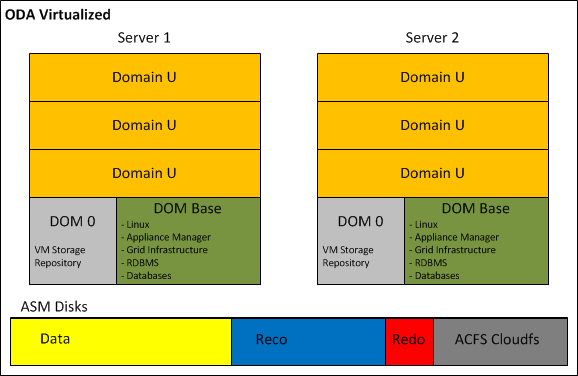
  • ODA Virtualized: on both ODA servers runs the Oracle VM Server software, also called Dom0. Each Dom0 hosts the ODA Base (or Dom Base), a privileged virtual machine where it is installed the Appliance Manager, Grid Infrastructure and RDBMS binaries. The ODA Base takes advantage of the Xen PCI Pass-through technology to provide direct access to the ODA shared disks presented and managed by ASM. This configuration reduces the VM flexibility; in fact, no VM migration is allowed, but it guarantees almost no I/O penalty in term of performance. After the Dom Base creation, it is possible to add Virtual Machine where running application components. Those optional application virtual machines are also identified with the name of Domain U.

By default, all VMs and templates are stored on a local Oracle VM Server repository, but in order to be able to migrate application virtual machines between the two Oracle VM Servers a shared repository on the ACFS file system should be created.

The implementation of the Solution-in-a-box guarantees the maximum Return on Investment of the ODA, because while licensing only the virtual CPUs allocated to Dom Base, the remaining resources are assigned to the application components as showed on the picture below.

ODA_Virtualized


4.2 ACFS Becomes the default database storage of ODA

Starting from Version 12.1.0.2, a fresh installation of the Oracle Database Appliance adopts ACFS as primary cluster file system to store database files and general-purpose data. Three file systems are created in the ASM disk groups (DATA, RECO, and REDO) and the new databases are stored in these three ACFS file systems instead of in the ASM disk groups.

In case of ODA upgrade from previous release to 12.1.0.2, all pre-existing databases are not automatically migrated to ACFS; but can coexist with the new databases created on ACFS.

At any time, the databases can be migrated from ASM to ACFS as post upgrade step.

Oracle has decided to promote ACFS as default database storage on ODA environment for the following reasons:


  • ACFS provides almost equivalent performance than Oracle ASM disk groups.
  • Additional functionalities on industry standard POSIX file system.
  • Database snapshot copy of PDBs, and NON-CDB version 11.2.0.4 of greater.
  • Advanced functionality for general-purpose files such as replication, tagging, encryption, security, and auditing.

Database created on ACFS follows the same Oracle Managed Files (OMF) standard used by ASM.


4.3 ASM 12c on Exadata Machine

Oracle Exadata Database machine is now at the fifth hardware generation; the latest software update has embraced the possibility to run virtual environments, but differently from the ODA or other Engineered System like Oracle Virtual Appliance, the VMs are not intended to host application components. ASM plays a key role on the success of the Exadata, because it orchestrates all Storage Cells in a way that appear as a single entity, while in reality, they do not know and they do not talk to each other.

The Exadata, available in a wide range of hardware configurations from 1/8 to multi-racks, offers a great flexibility on the storage setup too. The sections below illustrate what is possible to achieve in term of storage configuration when the Exadata is exploited bare metal and virtualized:

  • Exadata Bare Metal: despite the default storage configuration, which foresees three disk groups striped across all Storage Cells, guaranteeing the best I/O performance; as post-installation step, it is possible to deploy a different configuration. Before changing the storage setup, it is vital to understand and evaluate all associated consequences. In fact, even though in specific cases can be a meaningful decision, any storage configuration different from the default one, has as result a shift from optimal performance to flexibility and workload isolation.

Shown below a graphical representation of the default Exadata storage setup, compared to a custom configuration, where the Storage Cells have been divided in multiple groups, segmenting the I/O workloads and avoiding disruption between environments.

Exa_BareMetal_Disks_Default

Exa_BareMetal_Disks_Segmented.png

  • Exadata Virtualized: the installation of the Exadata with the virtualization option foresees a first step of meticulous capacity planning, defining the resources to allocate to the virtual machines (CPU and memory) and the size of each ASM disk group (DBFS, Data, Reco) of the clusters. This last step is particularly important, because unlike the VM resources, the characteristics of the ASM disk groups cannot be changed.

The new version of the Exadata Deployment Assistant, which generates the configuration file to submit to the Exadata installation process, now in conjunction with the use of Oracle Virtual Machines, permits to enter the information related to multiple Grid Infrastructure clusters.

The hardware-based I/O virtualization (so called Xen SR-IOV Virtualization), implemented on the Oracle VMs running on the Exadata Database servers, guarantees almost native I/O and Networking performance over InfiniBand; with lower CPU consumption when compared to a Xen Software I/O virtualization. Unfortunately, this performance advantage comes at the detriment of other virtualization features like Load Balancing, Live Migration and VM Save/Restore operations.

If the Exadata combined with the virtualization open new horizon in term of database consolidation and licensing optimization, do not leave any option to the storage configuration. In fact, the only possible user definition is the amount of space to allocate to each disk group; with this information, the installation procedure defines the size of the Grid Disks on all available Storage Cells.

Following a graphical representation of the Exadata Storage Cells, partitioned for holding three virtualized clusters. For each cluster, ASM access is automatically restricted to the associated Grid Disks.

Exa_BareMetal_Disk_Virtual


4.4 ACFS on Linux Exadata Database Machine

Starting from version 12.1.0.2, the Exadata Database Machine running Oracle Linux, supports ACFS for database file and general-purpose, with no functional restriction.

This makes ACFS an attractive storage alternative for holding: external tables, data loads, scripts and general-purpose files.

In addition, Oracle ACFS on Exadata Database Machines supports database files for the following database versions:

  • Oracle Database 10g Rel. 2 (10.2.0.4 and 10.2.0.5)
  • Oracle Database 11g (11.2.0.4 and higher)
  • Oracle Database 12c (12.1.0.1 and higher)

Since Exadata Storage Cell does not support database version 10g, ACFS becomes an important storage option for customers wishing to host older databases on their Exadata system.

However, those new configuration options and flexibility come with one major performance restriction. When ACFS for database files is in use, the Exadata is still not supporting the Smart Scan operations and is not able to push database operations directly to the storage. Hence, for a best performance result, it is recommended to store database files on the Exadata Storage using ASM disk groups.

As per any other system, when implementing ACFS on Exadata Database Machine, snapshots and tagging are supported for database and general-purpose files, while replication, security, encryption, audit and high availability NFS functionalities are only supported with general-purpose files.


 5 Conclusion

Oracle Automatic Storage Management 12c is a single integrated solution, designed to manage database files and general-purpose data under different hardware and software configurations. The adoption of ASM and ACFS not only eliminates the need for third party volume managers and file systems, but also simplifies the storage management offering the best I/O performance, enforcing Oracle best practices. In addition, ASM 12c with the Flex ASM setup removes previous important architecture limitations:

  • Availability: the hard dependency between the local ASM and database instance, was a single point of failure. In fact, without Flex ASM, the failure of the ASM instance causes the crash of all local database instances.
  • Performance: Flex ASM reduces the network traffic generated among the ASM instances, leveraging the architecture scalability; and it is easier and faster to keep the ASM metadata synchronized across large clusters. Finally yet importantly, only few nodes of the cluster have to support the burden of an ASM instance, leaving additional resources to application processing.


Oracle ASM offers a large set of configurations and options; it is now our duty to understand case-by-case, when it is relevant to use one setup or another, with the aim to maximize performance, availability and flexibility of the infrastructure.


ASM 11gR2 Create ACFS Cluster FS

#####################################################
##           Step by step how to create Oracle ACFS Cluster Filesystem       ##
#####################################################

[grid@lnxcld02 trace]$ asmcmd


  Type "help [command]" to get help on a specific ASMCMD command.

        commands:
        --------

        md_backup, md_restore

        lsattr, setattr

        cd, cp, du, find, help, ls, lsct, lsdg, lsof, mkalias
        mkdir, pwd, rm, rmalias

        chdg, chkdg, dropdg, iostat, lsdsk, lsod, mkdg, mount
        offline, online, rebal, remap, umount

        dsget, dsset, lsop, shutdown, spbackup, spcopy, spget
        spmove, spset, startup

        chtmpl, lstmpl, mktmpl, rmtmpl

        chgrp, chmod, chown, groups, grpmod, lsgrp, lspwusr, lsusr
        mkgrp, mkusr, orapwusr, passwd, rmgrp, rmusr

        volcreate, voldelete, voldisable, volenable, volinfo
        volresize, volset, volstat


ASMCMD>     
ASMCMD> volcreate -G FRA1 -s 5G Vol_ACFS01
ASMCMD> volinfo -a
Diskgroup Name: FRA1

         Volume Name: VOL_ACFS01
         Volume Device: /dev/asm/vol_acfs01-199
         State: ENABLED
         Size (MB): 5120
         Resize Unit (MB): 32
         Redundancy: UNPROT
         Stripe Columns: 4
         Stripe Width (K): 128
         Usage:
         Mountpath:

ASMCMD> volenable -a
ASMCMD>
ASMCMD> exit


[grid@lnxcld02 trace]$ acfsdriverstate version
ACFS-9325:     Driver OS kernel version = 2.6.18-8.el5(i386).
ACFS-9326:     Driver Oracle version = 110803.1.
[grid@lnxcld02 trace]$ acfsdriverstate loaded
ACFS-9203: true


SQL> SELECT volume_name, volume_device FROM V$ASM_VOLUME;

VOLUME_NAME                    VOLUME_DEVICE
------------------------------ ----------------------------------------
VOL_ACFS01                     /dev/asm/vol_acfs01-199

1 row selected.

---------------------------------------------------------------------------------

[root@lnxcld02 adump]# ls -la /dev/asm/vol_acfs01-199
brwxrwx--- 1 root asmadmin 252, 101889 Nov  1 20:03 /dev/asm/vol_acfs01-199

[root@lnxcld02 adump]# mkdir /cloud_FS
[root@lnxcld01 adump]# mkdir /cloud_FS


[root@lnxcld02 adump]# mkfs -t acfs /dev/asm/vol_acfs01-199
mkfs.acfs: version                   = 11.2.0.3.0
mkfs.acfs: on-disk version           = 39.0
mkfs.acfs: volume                    = /dev/asm/vol_acfs01-199
mkfs.acfs: volume size               = 5368709120
mkfs.acfs: Format complete.


[root@lnxcld02 adump]# acfsutil registry -a -f /dev/asm/vol_acfs01-199 /cloud_FS
acfsutil registry: mount point /cloud_FS successfully added to Oracle Registry


[root@lnxcld02 adump]# df -h
Filesystem            Size  Used Avail Use% Mounted on
/dev/hda1              11G  3.6G  6.0G  38% /
/dev/hdb1              12G  7.2G  3.9G  66% /home
tmpfs                 1.5G  634M  867M  43% /dev/shm
Oracle_Software       293G  180G  114G  62% /media/sf_Oracle_Software
/dev/hdc               40G   18G    22  45% /u01
/dev/asm/vol_acfs01-199
                      5.0G   75M  5.0G   2% /cloud_FS


SQL> select * from v$asm_volume;

GROUP_NUMBER VOLUME_NAME                    COMPOUND_INDEX    SIZE_MB VOLUME_NUMBER REDUND STRIPE_COLUMNS STRIPE_WIDTH_K STATE            FILE_NUMBER
------------ ------------------------------ -------------- ---------- ------------- ------ -------------- -------------- ---------------- -----------
INCARNATION DRL_FILE_NUMBER RESIZE_UNIT_MB USAGE                          VOLUME_DEVICE                            MOUNTPATH
----------- --------------- -------------- ------------------------------ ---------------------------------------- --------------------
           2 VOL_ACFS01                           33554433       5120             1 UNPROT              4            128 ENABLED                  270   
766094623               0             32    ACFS                           /dev/asm/vol_acfs01-199                  /cloud_FS


1 row selected.


Installation Oracle Grid Infrastrucure 12c

####################################

LINUX Setup click here

####################################

Setup OS

– Disable the Firewall

[root@oel6srv01 ~]# service iptables save
[root@oel6srv01 ~]# service iptables stop
[root@oel6srv01 ~]# chkconfig iptables off
[root@oel6srv01 ~]# service iptables status
-- If you are using IPv6 firewall, enter:
 [root@oel6srv01 ~]# service ip6tables save
 [root@oel6srv01 ~]# service ip6tables stop
 [root@oel6srv01 ~]# chkconfig ip6tables off
 [root@oel6srv01 ~]# service ip6tables status


– Disable the SELinux

[root@oel6srv01 ~]# vi /etc/sysconfig/selinux


– DISABLED kdump

[root@oel6srv01 ~]# chkconfig kdump on
[root@oel6srv01 ~]# chkconfig --list |grep kdump
kdump           0:off   1:off   2:off   3:off   4:off   5:off   6:off


– Network Setup

Public Cluster interphases, VIPs and SCAN

Subnet 10.0.0.x
Netmask 255.255.255.0

Private Cluster interphases

Subnet  192.168.0.x
Netmask 255.255.255.0


– Kernel add or amend the following lines  to the “/etc/sysctl.conf” file.

# vi /etc/sysctl.conf
fs.aio-max-nr = 1048576
 fs.file-max = 6815744
 kernel.shmall = 2097152
 kernel.shmmax = 1062637568
 kernel.shmmni = 4096
 # semaphores: semmsl, semmns, semopm, semmni
 kernel.sem = 250 32000 100 128
 net.ipv4.ip_local_port_range = 9000 65500
 net.core.rmem_default=262144
 net.core.rmem_max=4194304
 net.core.wmem_default=262144
 net.core.wmem_max=1048586
--Activate the current Kernel parameters:
/sbin/sysctl -p

– Add the following lines to /etc/security/limits.conf

# vi  /etc/security/limits.conf
## Go to the end
 grid     soft     nproc      2047
 grid     hard     nproc     16384
 grid     soft     nofile     1024
 grid     hard     nofile    65536
 oracle   soft     nproc      2047
 oracle   hard     nproc     16384
 oracle   soft     nofile     1024
 oracle   hard     nofile    65536

– Add the following line to /etc/pam.d/login

# vi /etc/pam.d/login
session     required    pam_limits.so


– Disable secure linux

–making sure the SELINUX flag is set as follows.

# vi /etc/selinux/config
SELINUX=disabled


– NTP Setup

–If you are using NTP, you must add the “-x” option into the following line in the “/etc/sysconfig/ntpd” file.

# vi /etc/sysconfig/ntpd
OPTIONS="-x -u ntp:ntp -p /var/run/ntpd.pid"
# service ntpd restart
 -- OR STOP NTP SERVER the Grid will start CSSD in Active mode instead of Observe:
 # service ntpd stop
 # chkconfig ntpd off
---------------------------------------------
 - Mandatory Packages for Oracle Linux 6  and Red Hat Enterprise Linux 6
 ---------------------------------------------
 binutils-2.20.51.0.2-5.11.el6 (x86_64)
 compat-libcap1-1.10-1 (x86_64)
 compat-libstdc++-33-3.2.3-69.el6 (x86_64)
 compat-libstdc++-33-3.2.3-69.el6.i686
 gcc-4.4.4-13.el6 (x86_64)
 gcc-c++-4.4.4-13.el6 (x86_64)
 glibc-2.12-1.7.el6 (i686)
 glibc-2.12-1.7.el6 (x86_64)
 glibc-devel-2.12-1.7.el6 (x86_64)
 glibc-devel-2.12-1.7.el6.i686
 ksh
 libgcc-4.4.4-13.el6 (i686)
 libgcc-4.4.4-13.el6 (x86_64)
 libstdc++-4.4.4-13.el6 (x86_64)
 libstdc++-4.4.4-13.el6.i686
 libstdc++-devel-4.4.4-13.el6 (x86_64)
 libstdc++-devel-4.4.4-13.el6.i686
 libaio-0.3.107-10.el6 (x86_64)
 libaio-0.3.107-10.el6.i686
 libaio-devel-0.3.107-10.el6 (x86_64)
 libaio-devel-0.3.107-10.el6.i686
 make-3.81-19.el6
 sysstat-9.0.4-11.el6 (x86_64)

–Install the cvuqdisk RPM. Without cvuqdisk, Cluster Verification Utility cannot discover shared disks,
–and it raises the following error message “Package cvuqdisk not installed” when Cluster Verification Utility is executed.

–A copy of the cvuqdisk  package is present on the 1st Grid Infrastructure ZIP file.

— Log in as root.

  1. Use the following command to find if you have an existing version of the cvuqdisk package:
# rpm -qi cvuqdisk

2.  If you have an existing version, then enter the following command to deinstall the existing version:

rpm -e cvuqdisk

  1. Set the environment variable CVUQDISK_GRP to point to the group that will own cvuqdisk, typically oinstall. For example:
# CVUQDISK_GRP=oinstall; export CVUQDISK_GRP
4. Install the cvuqdisk package:
rpm -iv package
# rpm -iv cvuqdisk-1.0.9-1.rpm
--OR
you install oracle-rdbms-server-12cR1-preinstall


– OPTIONAL RPMs

--Minimum ODBC Drivers for Oracle and Red Hat Linux 6 on x86-64
 unixODBC-2.2.14-11.el6 (64-bit) or later
 unixODBC-devel-2.2.14-11.el6 (64-bit) or later

– UNIX Groups

/usr/sbin/groupadd -g 1000 oinstall
/usr/sbin/groupadd -g 1001 asmadmin
/usr/sbin/groupadd -g 1002 dba
/usr/sbin/groupadd -g 1003 asmdba
/usr/sbin/groupadd -g 1004 asmoper

–New optional roles which grant access to specific features like Data Guard, RMAN and Security have been added in 12c, but not implemented in this example.


– UNIX Users

useradd -u 1100 -g oinstall -G asmadmin,asmdba,asmoper grid
useradd -u 1101 -g oinstall -G asmdba,dba oracle


– Set SSH timeout wait to unlimited

# vi /etc/ssh/sshd_config
LoginGraceTime 0


– Create the u01 file system

[root@oel6srv01 ~]# fdisk /dev/sdb
The number of cylinders for this disk is set to 2871.
 There is nothing wrong with that, but this is larger than 1024,
 and could in certain setups cause problems with:
 1) software that runs at boot time (e.g., old versions of LILO)
 2) booting and partitioning software from other OSs
 (e.g., DOS FDISK, OS/2 FDISK)
Command (m for help): n
 Command action
 e   extended
 p   primary partition (1-4)
 p
Partition number (1-4): 1
 First cylinder (1-2871, default 1):
 Using default value 1
 Last cylinder or +size or +sizeM or +sizeK (1-2871, default 2871):
 Using default value 2871
Command (m for help): w
 The partition table has been altered!
Calling ioctl() to re-read partition table.
WARNING: Re-reading the partition table failed with error 16: Device or resource busy.
 The kernel still uses the old table.
 The new table will be used at the next reboot.
 Syncing disks.
 [root@oel6srv01 ~]#
 [root@oel6srv01 ~]# fdisk -l
Disk /dev/sda: 21.4 GB, 21474836480 bytes
 255 heads, 63 sectors/track, 2610 cylinders
 Units = cylinders of 16065 * 512 = 8225280 bytes
Device Boot      Start         End      Blocks   Id  System
 /dev/sda1   *           1          13      104391   83  Linux
 /dev/sda2              14        2610    20860402+  8e  Linux LVM
Disk /dev/sdb: 23.6 GB, 23622320128 bytes
 255 heads, 63 sectors/track, 2871 cylinders
 Units = cylinders of 16065 * 512 = 8225280 bytes
Device Boot      Start         End      Blocks   Id  System
 /dev/sdb1               1        2871    23061276   83  Linux
[root@oel6srv01 ~]# mkfs.ext4 /dev/sdb1
 mke4fs 1.41.12 (17-May-2010)
 Filesystem label=
 OS type: Linux
 Block size=4096 (log=2)
 Fragment size=4096 (log=2)
 Stride=0 blocks, Stripe width=0 blocks
 1441792 inodes, 5765319 blocks
 288265 blocks (5.00%) reserved for the super user
 First data block=0
 Maximum filesystem blocks=4294967296
 176 block groups
 32768 blocks per group, 32768 fragments per group
 8192 inodes per group
 Superblock backups stored on blocks:
 32768, 98304, 163840, 229376, 294912, 819200, 884736, 1605632, 2654208,
 4096000
Writing inode tables: done
 Creating journal (32768 blocks): done
 Writing superblocks and filesystem accounting information: done
This filesystem will be automatically checked every 37 mounts or
 180 days, whichever comes first.  Use tune4fs -c or -i to override.
 [root@oel6srv01 ~]#
[root@oel6srv01 /]# mkdir u01
 [root@oel6srv01 /]# cat /etc/fstab
..
..
/dev/sdb1               /u01                    ext4    defaults        0 0
[root@oel6srv01 /]# mount /u01
 [root@oel6srv01 /]# df -h
Filesystem            Size  Used Avail Use% Mounted on
/dev/mapper/VolGroup00-LogVol00
 15G  3.2G   12G  22% /
 /dev/sda1              99M   24M   71M  25% /boot
 tmpfs                 1.3G     0  1.3G   0% /dev/shm
 /dev/sdb1              22G  172M   21G   1% /u01

– Creation of GI and RDBMS directories

mkdir -p /u01/GRID/12.1.0.1
 mkdir -p /u01/app/product/12.1.0.1
#Oracle Base
 chown -R oracle:oinstall /u01/app
 chmod -R 775 /u01/app
#Oracle RDBMS Home
 chown -R oracle:oinstall /u01/app/product/12.1.0.1
 chmod -R 775 /u01/app/product/12.1.0.1
#Grid Home
 chown -R grid:oinstall /u01/GRID
 chmod -R 775 /u01/GRID/12.1.0.1

– Add this entries to the generic User Profile

# vi /etc/profile
if [ $USER = "oracle" ] || [ $USER = "grid" ]; then
 if [ $SHELL = "/bin/ksh" ]; then
 ulimit -p 16384
 ulimit -n 65536
 else
 ulimit -u 16384 -n 65536
 fi
 umask 022
 fi
 if [ $USER = "root" ]; then
 umask 022
 fi

— Configure the shared storage for ASM

##########################################################
##  Installation Oracle Grid Infrastructure
##########################################################

--Run 12c Cluvfy with the following options to verify that all prerequisites are met:
 ./runcluvfy.sh stage -post hwos -n oel6srv01,oel6srv02,oel6srv03,oel6srv04 -verbose

# Start the Grid Installation…..

[grid@oel6srv01 grid]$ ./runInstaller
 Starting Oracle Universal Installer...
Checking Temp space: must be greater than 120 MB.   Actual 39776 MB    Passed
 Checking swap space: must be greater than 150 MB.   Actual 4031 MB    Passed
 Checking monitor: must be configured to display at least 256 colors.    Actual 16777216    Passed
 Preparing to launch Oracle Universal Installer from /tmp/OraInstall2013-06-25_08-23-26PM. Please wait ..


##############################################################
##  Grid Infrastructure crsctl output
##############################################################

[grid@oel6srv01 ~]$ crsctl stat res -t
 --------------------------------------------------------------------------------
 Name           Target  State        Server                   State details
 --------------------------------------------------------------------------------
 Local Resources
 --------------------------------------------------------------------------------
 ora.ASMNET2LSNR_ASM.lsnr
 ONLINE  ONLINE       oel6srv01                STABLE
 ONLINE  ONLINE       oel6srv02                STABLE
 ONLINE  ONLINE       oel6srv03                STABLE
 ONLINE  ONLINE       oel6srv04                STABLE
 ora.DATA1.VOL_CLOUD01.advm
 ONLINE  ONLINE       oel6srv01                Volume device /dev/a
 sm/vol_cloud01-178 i
 s online,STABLE
 ONLINE  ONLINE       oel6srv02                Volume device /dev/a
 sm/vol_cloud01-178 i
 s online,STABLE
 ONLINE  ONLINE       oel6srv03                Volume device /dev/a
 sm/vol_cloud01-178 i
 s online,STABLE
 ONLINE  ONLINE       oel6srv04                Volume device /dev/a
 sm/vol_cloud01-178 i
 s online,STABLE
 ora.DATA1.dg
 OFFLINE OFFLINE      oel6srv01               STABLE
 OFFLINE OFFLINE      oel6srv02               STABLE
 ONLINE  ONLINE       oel6srv03                STABLE
 ONLINE  ONLINE       oel6srv04                STABLE
 ora.FRA1.dg
 OFFLINE OFFLINE      oel6srv01               STABLE
 OFFLINE OFFLINE      oel6srv02               STABLE
 ONLINE  ONLINE       oel6srv03                STABLE
 ONLINE  ONLINE       oel6srv04                STABLE
 ora.LISTENER.lsnr
 ONLINE  ONLINE       oel6srv01                STABLE
 ONLINE  ONLINE       oel6srv02                STABLE
 ONLINE  ONLINE       oel6srv03                STABLE
 ONLINE  ONLINE       oel6srv04                STABLE
 ora.OCRVOTING.dg
 OFFLINE OFFLINE      oel6srv01               STABLE
 OFFLINE OFFLINE      oel6srv02               STABLE
 ONLINE  ONLINE       oel6srv03                STABLE
 ONLINE  ONLINE       oel6srv04                STABLE
 ora.data1.vol_cloud01.acfs
 ONLINE  ONLINE       oel6srv01                mounted on /cloudfs,
 STABLE
 ONLINE  ONLINE       oel6srv02                mounted on /cloudfs,
 STABLE
 ONLINE  ONLINE       oel6srv03                mounted on /cloudfs,
 STABLE
 ONLINE  ONLINE       oel6srv04                mounted on /cloudfs,
 STABLE
 ora.net1.network
 ONLINE  ONLINE       oel6srv01                STABLE
 ONLINE  ONLINE       oel6srv02                STABLE
 ONLINE  ONLINE       oel6srv03                STABLE
 ONLINE  ONLINE       oel6srv04                STABLE
 ora.ons
 ONLINE  ONLINE       oel6srv01                STABLE
 ONLINE  ONLINE       oel6srv02                STABLE
 ONLINE  ONLINE       oel6srv03                STABLE
 ONLINE  ONLINE       oel6srv04                STABLE
 ora.proxy_advm
 ONLINE  ONLINE       oel6srv01                STABLE
 ONLINE  ONLINE       oel6srv02                STABLE
 ONLINE  ONLINE       oel6srv03                STABLE
 ONLINE  ONLINE       oel6srv04                STABLE
 --------------------------------------------------------------------------------
 Cluster Resources
 --------------------------------------------------------------------------------
 ora.LISTENER_SCAN1.lsnr
 1        ONLINE  ONLINE       oel6srv04                STABLE
 ora.MGMTLSNR
 1        ONLINE  ONLINE       oel6srv04                169.254.25.188 192.1
 68.0.114 192.168.0.1
 24,STABLE
 ora.asm
 1        ONLINE  ONLINE       oel6srv04                STABLE
 3        ONLINE  ONLINE       oel6srv03                STABLE
 ora.cvu
 1        ONLINE  ONLINE       oel6srv04                STABLE
 ora.mgmtdb
 1        ONLINE  ONLINE       oel6srv04                Open,STABLE
 ora.oc4j
 1        ONLINE  ONLINE       oel6srv01                STABLE
 ora.oel6srv01.vip
 1        ONLINE  ONLINE       oel6srv01                STABLE
 ora.oel6srv02.vip
 1        ONLINE  ONLINE       oel6srv02                STABLE
 ora.oel6srv03.vip
 1        ONLINE  ONLINE       oel6srv03                STABLE
 ora.oel6srv04.vip
 1        ONLINE  ONLINE       oel6srv04                STABLE
 ora.scan1.vip
 1        ONLINE  ONLINE       oel6srv04                STABLE
 --------------------------------------------------------------------------------

ASM Commands

################################################################
# Adding/Removing/Managing ASM instances
################################################################

--Use the following syntax to add configuration information about an existing ASM instance:
 srvctl add asm -n node_name -i +asm_instance_name -o oracle_home

--Use the following syntax to remove an ASM instance:
 srvctl remove asm -n node_name [-i +asm_instance_name]

--Use the following syntax to enable an ASM instance:
 srvctl enable asm -n node_name [-i ] +asm_instance_name

--Use the following syntax to disable an ASM instance:
 srvctl disable asm -n node_name [-i +asm_instance_name]

--Use the following syntax to start an ASM instance:
 srvctl start asm -n node_name [-i +asm_instance_name] [-o start_options]

--Use the following syntax to stop an ASM instance:
 srvctl stop asm -n node_name [-i +asm_instance_name] [-o stop_options]

--Use the following syntax to show the configuration of an ASM instance:
 srvctl config asm -n node_name

--Use the following syntax to obtain the status of an ASM instance:
 srvctl status asm -n node_name

P.S.:

For all of the SRVCTL commands in this section for which an option is not required, if the instance name “-i” is not specified the command applies  to all ASM instances.


###################################
# Managing DiskGroup inside ASM:
###################################

–Note that adding or dropping disks will initiate a rebalance of the data on the disks.
–The status of these processes can be shown by selecting from v$asm_operation.

--Quering ASM Disk Groups
 col name format a25
 col DATABASE_COMPATIBILITY format a10
 col COMPATIBILITY format a10
 select * from v$asm_diskgroup;
 --or
 select name, state, type, total_mb, free_mb from v$asm_diskgroup;
--Quering ASM Disks
 col PATH format a55
 col name format a25
 select name, path, group_number, TOTAL_MB, FREE_MB, READS, WRITES, READ_TIME,
 WRITE_TIME from v$asm_disk order by 3,1;
 --or
 col PATH format a50
 col HEADER_STATUS  format a12
 col name format a25
 --select INCARNATION,
 select name, path, MOUNT_STATUS,HEADER_STATUS, MODE_STATUS, STATE, group_number,
 OS_MB, TOTAL_MB, FREE_MB, READS, WRITES, READ_TIME, WRITE_TIME, BYTES_READ,
 BYTES_WRITTEN, REPAIR_TIMER, MOUNT_DATE, CREATE_DATE from v$asm_disk;


################################################################
# Tuning and Analysis
################################################################

–Performance Statistics

–N.B Time in Hundred seconds!

 col READ_TIME format 9999999999.99
 col WRITE_TIME format 9999999999.99
 col BYTES_READ format 99999999999999.99
 col BYTES_WRITTEN  format 99999999999999.99
 select name, STATE, group_number, TOTAL_MB, FREE_MB,READS, WRITES, READ_TIME,
 WRITE_TIME, BYTES_READ, BYTES_WRITTEN, REPAIR_TIMER,MOUNT_DATE
 from v$asm_disk order by group_number, name;


--Check the Num of Extents in use per Disk inside one Disk Group.
 select max(substr(name,1,30)) group_name, count(PXN_KFFXP) extents_per_disk,
 DISK_KFFXP, GROUP_KFFXP from x$kffxp, v$ASM_DISKGROUP gr
 where GROUP_KFFXP=&group_nr and GROUP_KFFXP=GROUP_NUMBER
 group by GROUP_KFFXP, DISK_KFFXP order by GROUP_KFFXP, DISK_KFFXP;

--Find The File distribution Between Disks
 SELECT * FROM v$asm_alias  WHERE  name='PWX_DATA.272.669293645';

SELECT GROUP_KFFXP Group#,DISK_KFFXP Disk#,AU_KFFXP AU#,XNUM_KFFXP Extent#
 FROM   X$KFFXP WHERE  number_kffxp=(SELECT file_number FROM v$asm_alias
 WHERE name='PWX_DATA.272.669293645');

--or

SELECT GROUP_KFFXP Group#,DISK_KFFXP Disk#,AU_KFFXP AU#,XNUM_KFFXP Extent#
 FROM X$KFFXP WHERE  number_kffxp=&DataFile_Number;

--or
 select d.name, XV.GROUP_KFFXP Group#, XV.DISK_KFFXP Disk#,
 XV.NUMBER_KFFXP File_Number, XV.AU_KFFXP AU#, XV.XNUM_KFFXP Extent#,
 XV.ADDR, XV.INDX, XV.INST_ID, XV.COMPOUND_KFFXP, XV.INCARN_KFFXP,
 XV.PXN_KFFXP, XV.XNUM_KFFXP,XV.LXN_KFFXP, XV.FLAGS_KFFXP,
 XV.CHK_KFFXP, XV.SIZE_KFFXP from v$asm_disk d, X$KFFXP XV
 where d.GROUP_NUMBER=XV.GROUP_KFFXP and d.DISK_NUMBER=XV.DISK_KFFXP
 and number_kffxp=&File_NUM order by 2,3,4;

--List the hierarchical tree of files stored in the diskgroup
 SELECT concat('+'||gname, sys_connect_by_path(aname, '/')) full_alias_path FROM
 (SELECT g.name gname, a.parent_index pindex, a.name aname,
 a.reference_index rindex FROM v$asm_alias a, v$asm_diskgroup g
 WHERE a.group_number = g.group_number)
 START WITH (mod(pindex, power(2, 24))) = 0
 CONNECT BY PRIOR rindex = pindex;


###################################
#Create and Modify Disk Group
###################################

create diskgroup FRA1 external redundancy disk '/dev/vx/rdsk/oraASMdg/fra1'
 ATTRIBUTE 'compatible.rdbms' = '11.1', 'compatible.asm' = '11.1';

alter diskgroup FRA1  check all;

--on +ASM2 :
 alter diskgroup FRA1 mount;

--Add a second disk:
 alter diskgroup FRA1 add disk '/dev/vx/rdsk/oraASMdg/fra2';

--Add several disks with a wildcard:
 alter diskgroup FRA1 add disk '/dev/vx/rdsk/oraASMdg/fra*';

--Remove a disk from a diskgroup:
 alter diskgroup FRA1 drop disk 'FRA1_0002';

--Drop the entire DiskGroup
 drop diskgroup DATA1 including contents;

--How to DROP the entire DiskGroup when it is in NOMOUNT Status
 --Generate the dd command which will reset the header of all the
 --disks belong the GROUP_NUMBER=0!!!!
 select 'dd if=/dev/zero of=''' ||PATH||''' bs=8192 count=100' from v$asm_disk
 where GROUP_NUMBER=0;

select * from v$asm_operation;

————————————————————————–

alter diskgroup FRA1 drop disk 'FRA1_0002';
 alter diskgroup FRA1 add disk '/dev/vx/rdsk/fra1dg/fra3';

alter diskgroup FRA1 drop disk 'FRA1_0003';
 alter diskgroup FRA1 add disk '/dev/vx/rdsk/fra1dg/fra4';


When a new diskgroup is created, it is only mounted on the local instance,
and only the instance-specific entry for the asm_diskgroups parameter is updated.
By manually mounting the diskgroup on other instances, the asm_diskgroups parameter on those instances are updated.

--on +ASM1 :
 create diskgroup FRA1 external redundancy disk '/dev/vx/rdsk/fradg/fra1'
 ATTRIBUTE 'compatible.rdbms' = '11.1', 'compatible.asm' = '11.1';

--on +ASM2 :
 alter diskgroup FRA1 mount;

--It works even for on going balances!!!
 alter diskgroup DATA1 rebalance power 10;


################################################################
# New ASM Command Line Utility (ASMCMD) Commands and Options
################################################################

ASMCMD Command Reference:

Command Description
 --------------------
 - cd Command Changes the current directory to the specified directory.
 - cp Command Enables you to copy files between ASM disk groups on a local instance and remote instances.
 - du Command Displays the total disk space occupied by ASM files in the specified
 - ASM directory and all of its subdirectories, recursively.
 - exit Command Exits ASMCMD.
 - find Command Lists the paths of all occurrences of the specified name (with wildcards) under the specified directory.
 - help Command Displays the syntax and description of ASMCMD commands.
 - ls Command Lists the contents of an ASM directory, the attributes of the specified
 - file, or the names and attributes of all disk groups.
 - lsct Command Lists information about current ASM clients.
 - lsdg Command Lists all disk groups and their attributes.
 - lsdsk Command Lists disks visible to ASM.
 - md_backup Command Creates a backup of all of the mounted disk groups.
 - md_restore Command Restores disk groups from a backup.
 - mkalias Command Creates an alias for system-generated filenames.
 - mkdir Command Creates ASM directories.
 - pwd Command Displays the path of the current ASM directory.
 - remap Command Repairs a range of physical blocks on a disk.
 - rm Command Deletes the specified ASM files or directories.
 - rmalias Command Deletes the specified alias, retaining the file that the alias points to.

--------
 -- kfed tool From Unix Prompt for reading ASM disk header.
 kfed read /dev/vx/rdsk/fra1dg/fra1


################################################################
# CREATE and Manage Tablespaces and Datafiles on ASM
################################################################

CREATE TABLESPACE my_ts DATAFILE '+disk_group_1' SIZE 100M AUTOEXTEND ON;

ALTER TABLESPACE sysaux ADD DATAFILE '+disk_group_1' SIZE 100M;

ALTER DATABASE DATAFILE '+DATA1/dbname/datafile/audit.259.668957419' RESIZE 150M;
-------------------------
 create diskgroup DATA1 external redundancy disk '/dev/vx/rdsk/oraASMdg/fra1'
 ATTRIBUTE 'compatible.rdbms' = '11.1', 'compatible.asm' = '11.1';

select 'alter diskgroup DATA1 add disk ''' || PATH || ''';' from v$asm_disk
 where GROUP_NUMBER=0 and rownum<=&Num_Disks_to_add;

select 'alter diskgroup FRA1 add disk ''' || PATH || ''';' from v$asm_disk
 where GROUP_NUMBER=0 and rownum<=&Num_Disks_to_add;

--Remove ASM header
 select 'dd if=/dev/zero of=''' ||PATH||''' bs=8192 count=100' from v$asm_disk
 where GROUP_NUMBER=0;

Setup ASM Lib

#####################################
##       How to install and setup ASMLib packages         ##
#####################################

###### List of Platform depenfent but Kernel independent packages ######
 oracleasm-support-2.1.3-1.<distro>.x86_64.rpm
 oracleasmlib-2.0.4-1.<distro>.x86_64.rpm
###### List of Platform and Kernel dependent packages ######
 oracleasm-2.6.16.46-0.12-smp-2.0.3-1.x86_64.rpm
 oracleasm-2.6.16.46-0.12-default-2.0.3-1.x86_64.rpm
-- Install the packages using the command rpm –ivh on all the nodes
###### ASMLib Configuration (to repeat on all nodes of the cluster)  ######
 [root@lrh-node1 /]# /etc/init.d/oracleasm configure
 Configuring the Oracle ASM library driver.
This will configure the on-boot properties of the Oracle ASM library
 driver. The following questions will determine whether the driver is
 loaded on boot and what permissions it will have. The current values
 will be shown in brackets ('[]'). Hitting without typing an
 answer will keep that current value. Ctrl-C will abort.
Default user to own the driver interface []: grid
 Default group to own the driver interface []: asmdba
 Start Oracle ASM library driver on boot (y/n) [n]: y
 Fix permissions of Oracle ASM disks on boot (y/n) [y]: y
 Writing Oracle ASM library driver configuration [ OK ]
 Creating /dev/oracleasm mount point [ OK ]
 Loading module "oracleasm" [ OK ]
 Mounting ASMlib driver filesystem [ OK ]
 Scanning system for ASM disks [ OK ]
--------------------------------------------------------
 -- Create disk partitions and  ASM disks
 -- (from one of the nodes of the cluster)
 --------------------------------------------------------
-- Having a list of devices dedicated to ASM create one primary partition per disk or LUN using fdisk
 -- command and than use ASMLib utility to implement one ASM Disk per device.
lrh-node1:/u01 # fdisk -l /dev/sdh
Disk /dev/sdh: 38.6 GB, 38654705664 bytes
 255 heads, 63 sectors/track, 4699 cylinders
 Units = cylinders of 16065 * 512 = 8225280 bytes
Device Boot      Start         End      Blocks   Id  System
 /dev/sdh1               1        4700    37747712   83  Linux
 lrh-node1:/u01 # fdisk -l /dev/sdi
Disk /dev/sdi: 38.6 GB, 38654705664 bytes
 255 heads, 63 sectors/track, 4699 cylinders
 Units = cylinders of 16065 * 512 = 8225280 bytes
Device Boot      Start         End      Blocks   Id  System
 /dev/sdi1               1        4700    37747712   83  Linux
 lrh-node1:/u01 # fdisk -l /dev/sdj
Disk /dev/sdj: 38.6 GB, 38654705664 bytes
 255 heads, 63 sectors/track, 4699 cylinders
 Units = cylinders of 16065 * 512 = 8225280 bytes
Device Boot      Start         End      Blocks   Id  System
 /dev/sdj1               1        4699    37744686   83  Linux
 lrh-node1:/u01 #
 lrh-node1:/u01 # fdisk /dev/sdh
The number of cylinders for this disk is set to 4699.
 There is nothing wrong with that, but this is larger than 1024,
 and could in certain setups cause problems with:
 1) software that runs at boot time (e.g., old versions of LILO)
 2) booting and partitioning software from other OSs
 (e.g., DOS FDISK, OS/2 FDISK)
Command (m for help): d
 Selected partition 1
Command (m for help): p
Disk /dev/sdh: 38.6 GB, 38654705664 bytes
 255 heads, 63 sectors/track, 4699 cylinders
 Units = cylinders of 16065 * 512 = 8225280 bytes
Device Boot      Start         End      Blocks   Id  System
Command (m for help): n
 Command action
 e   extended
 p   primary partition (1-4)
 p
 Partition number (1-4): 1
 First cylinder (1-4699, default 1): 1
 Last cylinder or +size or +sizeM or +sizeK (1-4699, default 4699): +1024M
Command (m for help): p
Disk /dev/sdh: 38.6 GB, 38654705664 bytes
 255 heads, 63 sectors/track, 4699 cylinders
 Units = cylinders of 16065 * 512 = 8225280 bytes
Device Boot      Start         End      Blocks   Id  System
 /dev/sdh1               1         125     1004031   83  Linux
Command (m for help): n
 Command action
 e   extended
 p   primary partition (1-4)
 p
 Partition number (1-4): 2
 First cylinder (126-4699, default 126):
 Using default value 126
 Last cylinder or +size or +sizeM or +sizeK (126-4699, default 4699):
 Using default value 4699
Command (m for help): p
Disk /dev/sdh: 38.6 GB, 38654705664 bytes
 255 heads, 63 sectors/track, 4699 cylinders
 Units = cylinders of 16065 * 512 = 8225280 bytes
Device Boot      Start         End      Blocks   Id  System
 /dev/sdh1               1         125     1004031   83  Linux
 /dev/sdh2             126        4699    36740655   83  Linux
Command (m for help): w
 The partition table has been altered!
Calling ioctl() to re-read partition table.
 Syncing disks.
 lrh-node1:/u01 #partprobe
######  Once the disks have been sliced the ASM Disks can be created ######
 lrh-node1:/u01 # /etc/init.d/oracleasm
 Usage: /etc/init.d/oracleasm {start|stop|restart|enable|disable|configure|createdisk|deletedisk|querydisk|listdisks|scandisks|status}
 lrh-node1:/u01 # /etc/init.d/oracleasm createdisk OCR1 /dev/sdh1
 Marking disk "/dev/sdh1" as an ASM disk:                              done
 lrh-node1:/u01 # /etc/init.d/oracleasm createdisk DATA1 /dev/sdh2
 Marking disk "/dev/sdh2" as an ASM disk:                              done
 lrh-node1:/u01 # /etc/init.d/oracleasm scandisks
 Scanning system for ASM disks:                                           done
 lrh-node1:/u01 #
--  After having created all the ASM Disks runs the utility scandisks  on all nodes of the cluster,
 --  this allows ASM to discover all the new ASM Disks created.
lrh-node2:/dev/oracleasm/disks # /etc/init.d/oracleasm scandisks
 Scanning system for ASM disks:                                          done
 lrh-node2:/dev/oracleasm/disks # /etc/init.d/oracleasm listdisks
 DATA1
 DATA2
 DATA3
 OCR1
 OCR2
 OCR3
######  ASM diskstring and diskgroup parameters ######
 *.asm_diskstring='ORCL:*'
 *.asm_diskgroups='OCR_VOT','DATA1','FRA1'