Oracle DB stored on ASM vs ACFS

Nowadays a new Oracle database environment with Grid Infrastructure has three main storage options:

  1. Third party clustered file system
  2. ASM Disk Groups
  3. ACFS File System

While the first option was not in scope, this blog compares the result of the tests between ASM and ACFS, highlighting when to use one or the other to store 12c NON-CDB or CDB Databases.

The tests conducted on different environments using Oracle version 12.1.0.2 July PSU have shown controversial results compared to what Oracle  is promoting for the Oracle Database Appliance (ODA) in the following paper: “Frequently Asked Questions Storing Database Files in ACFS on Oracle Database Appliance


Outcome of the tests

ASM remains the preferred option to achieve the best I/O performance, while ACFS introduces interesting features like DB snapshot to quickly and space efficiently provision new databases.

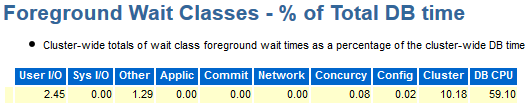
The performance gap between the two solutions is not negligible as reported below by the  AWR – TOP Timed Events sections of two PDBs, sharing the same infrastructure, executing the same workload but respectively using ASM and ACFS storage:

  • PDBASM: Pluggable Database stored on  ASM Disk Group
  • PDBACFS:Pluggable Database stored on ACFS File System


PDBASM AWR – TOP Timed Events and Other Stats

topevents_asm

fg_asm


PDBACFS AWR – TOP Timed Events and Other Stats

TopEvents_ACFS.png

fg_acfs


Due to the different characteristics and results when ASM or ACFS is in use, it is not possible to give a generic recommendation. But case by case the choise should be driven by business needs like maximum performance versus fast and efficient database clone.


Severe Oracle instability due to new RedHat 7.2 feature which releases IPC objects

I have recently installed a two node RAC version 12.1.0.2 on top of RedHat 7.2 and few hours after the initial setup I started experiencing ASM and database crashes.

Checking in the alert log I found the following errors:

Tue Oct 04 05:25:17 2016
Dumping diagnostic data in directory=[cdmp_20161004052517], requested by (instance=1, osid=84872 (MMAN)), summary=[abnormal instance termination].
Tue Oct 04 05:25:18 2016
Instance terminated by USER, pid = 84872
Tue Oct 04 05:25:18 2016
Errors in file /oams/base/diag/rdbms/txdop/txdop1/trace/txdop1_mman_84872.trc:
ORA-27300: OS system dependent operation:semctl failed with status: 22
ORA-27301: OS failure message: Invalid argument
ORA-27302: failure occurred at: sskgpwrm1
ORA-27157: OS post/wait facility removed
ORA-27300: OS system dependent operation:semop failed with status: 43
ORA-27301: OS failure message: Identifier removed
ORA-27302: failure occurred at: sskgpwwait1


The errors pointed to the OS and in particular to the possibility that semaphores in use by Oracle have been removed.

Because this is a fresh installation and I was the only person using the cluster, it was easy to exclude any third party activity. Then I double-checked the kernel parameters and all other system pre-requisites without finding any wrong configuration.

Finally, on MOS and I found the followinfg note ALERT: Setting RemoveIPC=yes on Redhat 7.2 Crashes ASM and Database Instances as Well as Any Application That Uses a Shared Memory Segment (SHM) or Semaphores (SEM) (Doc ID 2081410.1)”

Redhat 7.2, systemd-logind service introduced a new feature to remove all IPC objects when a user fully logs out.
The feature is controled by the option RemoveIPC in the /etc/systemd/logind.conf configuration file, see man logind.conf(5) for details.

The default value for RemoveIPC in RHEL7.2 is yes.

As a result, when the last oracle or grid user disconnects, the OS removes shared memory segments and semaphores for those users.
As Oracle ASM and Databases use shared memory segments for SGA, removing shared memory segments will crash the Oracle ASM and database instances.


New to Oracle Multitenant?

Multitenant is the biggest architectural change of Oracle 12c and the enabler of many new database options in the years to come. Therefore I have decided to write over the time, few blog posts with basic examples of what should be done and not in a multitenant database environment.


Rule #1   – What should not be done

If you are a CDB DBA, always pay attention to which container you are connected to and remember that application data should be stored on Application PDB only!

Unfortunately this golden rule is not-enforced by the RDBMS, but it is left in our responsibility as shown on the example below:

oracle@lxoel7n01:~/ [CDB_TEST] sqlplus / as sysdba

SQL*Plus: Release 12.1.0.2.0 Production on Wed Sep 21 18:28:23 2016

Copyright (c) 1982, 2014, Oracle. All rights reserved.


Connected to:
Oracle Database 12c Enterprise Edition Release 12.1.0.2.0 - 64bit Production
With the Partitioning, Automatic Storage Management, OLAP, Advanced Analytics
and Real Application Testing options

CDB$ROOT SQL>
CDB$ROOT SQL> show user
USER is "SYS"
CDB$ROOT SQL> show con_name

CON_NAME
------------------------------
CDB$ROOT


Once connected to the ROOT container let see if I can mistakenly create an application table:

CDB$ROOT SQL> CREATE TABLE EMP_1
(emp_id NUMBER,
emp_name VARCHAR2(25),
start_date DATE,
emp_status VARCHAR2(10) DEFAULT 'ACTIVE',
resume CLOB); 2 3 4 5 6

Table created.

CDB$ROOT SQL> desc emp_1
 Name                                Null?    Type
 ----------------------------------- -------- ----------------------------
 EMP_ID                                        NUMBER
 EMP_NAME                                      VARCHAR2(25)
 START_DATE                                    DATE
 EMP_STATUS                                    VARCHAR2(10)
 RESUME                                        CLOB


CDB$ROOT SQL> insert into emp_1 values (1, 'Emiliano', sysdate, 'active', ' ');

1 row created.

CDB$ROOT SQL> commit;

Commit complete.


CDB$ROOT SQL> select * from emp_1;

EMP_ID     EMP_NAME                  START_DAT EMP_STATUS RESUME
---------- ------------------------- --------- ---------- ----------------
 1          Emiliano                  21-SEP-16 active

CDB$ROOT SQL> show con_name

CON_NAME
------------------------------
CDB$ROOT

The answer is “YES” and the consequences can be devastating…


Rule #2   – Overview of Local and Common Entities

Non-schema entities can be created as local or common.  Local entities exist only in one PDB similar to a non-CDB architecture, while Common entities exist in every current and future container.

List of possible Local / Common entities in a Multitenant database:

  • Users
  • Roles
  • Profiles
  • Audit Policies

All Local entities are created from the local PDB and all Common entities are created from the CDB$ROOT container.

Common-user-defined Users, Roles and Profiles require a standard database prefix, defined by the spfile parameter COMMON_USER_PREFIX:

SQL> show parameter common_user_prefix

NAME                              TYPE        VALUE
--------------------------------- ----------- -----------------
common_user_prefix                string      C##


Example of Common User creation:

SQL> CREATE USER C##CDB_DBA1 IDENTIFIED BY PWD CONTAINER=ALL;

User created.


SQL> SELECT con_id, username, user_id, common

  2  FROM cdb_users where username='C##CDB_DBA1'  ORDER BY con_id;

    CON_ID USERNAME                USER_ID COMMON
---------- -------------------- ---------- ------
         1 C##CDB_DBA1               102    YES
         2 C##CDB_DBA1               101    YES
         3 C##CDB_DBA1               107    YES
         4 C##CDB_DBA1               105    YES
         5 C##CDB_DBA1               109    YES
         ...


Example of Local user creation:

SQL> show con_name

CON_NAME
------------------------------
MYPDB

SQL> CREATE USER application IDENTIFIED BY pwd CONTAINER=CURRENT;

User created.

If we try to create a Local User from the CDB$ROOT container the following error occurs: ORA-65049: creation of local user or role is not allowed in CDB$ROOT

SQL> show con_name

CON_NAME
------------------------------
CDB$ROOT

SQL> CREATE USER application IDENTIFIED BY pwd   CONTAINER=CURRENT;

CREATE USER application IDENTIFIED BY pwd   CONTAINER=CURRENT

                                      *

ERROR at line 1:
ORA-65049: creation of local user or role is not allowed in CDB$ROOT


Rule #3  – Application should connect through user-defined database services only

We have been avoiding to create user-defined database services for many years, sometimes even for RAC databases. But in Multitenet or Singletenant architecture the importance of user-defined database service is even greater. For each CDB and PDB Oracle is still automatically creating a default service, but as in the past the default services should never be exposed to the applications.


To create user-defined database service in stand-alone environment use the package DBMS_SERVICE while connected to the corresponding PDB:

BEGIN
 DBMS_SERVICE.CREATE_SERVICE(
     SERVICE_NAME     => 'mypdb_app.emilianofusaglia.net',
     NETWORK_NAME     => 'mypdb_app.emilianofusaglia.net',
     FAILOVER_METHOD  =>
     ...
      );
 DBMS_SERVICE.START_SERVICE('mypdp_app.emilianofusaglia.net ');
END;
/

The database services will not start automatically after opening a PDB!  Create a database trigger for this purpose.


To create user-defined database service in clustered environment use the srvctl utility from the corresponding RDBMS ORACLE_HOME:

oracle@oel7n01:~/ [EFU1] srvctl add service -db EFU \
> -pdb MYPDB -service mypdb_app.emilianofusaglia.net \
> -failovertype SELECT -failovermethod BASIC \
> -failoverdelay 2 -failoverretry 90


List all CDB database services order by Container ID:

SQL> SELECT con_id, name, pdb FROM v$services ORDER BY con_id;

    CON_ID NAME                                     PDB
---------- --------------------------------------- -----------------

         1 EFUXDB                                   CDB$ROOT   <-- CDB Default Service 
         1 SYS$BACKGROUND                           CDB$ROOT   <-- CDB Default Service 
         1 SYS$USERS                                CDB$ROOT   <-- CDB Default Service 
         1 EFU.emilianofusaglia.net                 CDB$ROOT   <-- CDB Default Service 
         1 EFU_ADMIN.emilianofusaglia.net           CDB$ROOT   <-- CDB User-defined Service  
         3 mypdb.emilianofusaglia.net               MYPDB      <-- PDB Default Service 
         3 mypdb_app.emilianofusaglia.net           MYPDB      <-- PDB User-defined Service  

7 rows selected.


EZCONNECT to a PDB using the user-defined service:

sqlplus <username>/<password>@<host_name>:<local-listener-port>/<service-name>
sqlplus application/pwd@oel7c-scan:1522/mypdb_app.emilianofusaglia.net


Rule #4  –  Backup/Recovery strategy in Multitenant

As database administrator one of the first responsibility to fulfil is the “Backup/Recovery” strategy. The migration to multitenant database, due to the high level of consolidation density requires to review existing procedures. Few infrastructure operations, like creating a Data Guard or executing a backup, have been shifted from per-database to per-container consolidating the number of tasks.

RMAN in 12c covers all CDB, PDB backup/restore combinations, even though the best practice suggests to run the daily backup at CDB level, and in case of restore needed, the granularity goes down to the single block of one PDB.  Below are reported few basic backup/restore operations in Multitenant environment.


Backup a full CDB:

RMAN> connect target /;
RMAN> backup database plus archivelog;


Backup a list of PDBs:

RMAN> connect target /;
RMAN> backup pluggable database mypdb, hrpdb plus archivelog;


Backup one PDB directly connecting to it:

RMAN> connect target sys/manager@mypdb.emilianofusaglia.net;
RMAN> backup incremental level 0 database;


Backup a PDB tablespace:

RMAN> connect target /;
RMAN> backup tablespace mypdb:system;


Generate RMAN report:

RMAN> report need backup pluggable database mypdb;


Complete PDB Restore

RMAN> connect target /;
RMAN> alter pluggable database mypdb close;
RMAN> restore pluggable database mypdb;
RMAN> recover pluggable database mypdb;
RMAN> alter pluggable database mypdb open;


Rule #5  –  Before moving to Multitenant

Oracle Multitenant has introduced many architectural changes that force the DBA to evolve how databases are administered. My last golden rule suggests to thoroughly study the multitenant/singletenant architecture before starting any implementation.

During my experiences implementing multitenant/singletenant architectures, I found great dependencies with the following database areas:

  • Provisioning/Decommissioning
  • Patching and Upgrade
  • Backup/recovery
  • Capacity Planning and Management
  • Tuning
  • Separation of duties between CDB and PDB


Bug on Oracle 12c Multitenant & PDB Clone as Snapshot Copy

While automating the refresh of the test databases on Oracle 12c Multitenant environment with ACFS and PDB snapshot copy, I encountered the following BUG:

The column SNAPSHOT_PARENT_CON_ID of the view V$PDBS shows 0 (zero) in case of PDBs created as Snapshot Copy.

This bug prevents to identify the parent-child relationship between a PDB and its own Snapshots Copies.

The test case below explains the problem:

SQL> CREATE PLUGGABLE DATABASE LARTE3SEFU from LARTE3 SNAPSHOT COPY; 
 
 Pluggable database created. 
 
 SQL> select CON_ID, NAME, OPEN_MODE, SNAPSHOT_PARENT_CON_ID from v$pdbs where NAME in ('LARTE3SEFU','LARTE3'); 
 
 CON_ID      NAME          OPEN_MODE  SNAPSHOT_PARENT_CON_ID 
 ---------- -------------- ---------- ---------------------- 
 5          LARTE3         READ ONLY  0 
 16         LARTE3SEFU     MOUNTED    0  <-- This should be 5
 
 2 rows selected. 

A Service Request to Oracle has been opened, I’ll update this post once I have the official answer.

Update from the Service Request: BUG Fixed on version 12.2

Patching ODA X5-2 Virtualized to version 12.1.2.6

Here is described the procedure to upgrade the ODA to the Bundle Patch 12.1.2.6.0.

This Bundle contains a BIG change because it replaces Oracle Enterprise Linux 5.11 with the version 6.7.

One critical requirement: this patch can only be installed on top of 12.1.2.5.0, to check the exisitng ODA version run:

# /opt/oracle/oak/bin/oakcli show version
Version
12.1.2.5.0

The patch can be downloaded from MOS selecting the following note: 22328442 ORACLE DATABASE APPLIANCE PATCH BUNDLE 12.1.2.6.0 (Patch)


And now let’s start with the installation:

  • Upload the patch on both ODA_Base (Dom1)  on /tmp
  • Remove any Extra RPM installed by the user on the ODA_Base
  • Unpack both ZIP files of the patch on both ODA_Base using the following oakcli command:
[root@oda_base01 / ] # cd /tmp/Patch_12.1.2.6.0
[root@oda_base01 patch]# oakcli unpack -package /tmp/patch/p22328442_121260_Linux-x86-64_1of2.zip
Unpacking takes a while, pls wait....
Successfully unpacked the files to repository.
[root@oda_base01 patch]#
[root@oda_base01 patch]#
[root@oda_base01 patch]# oakcli unpack -package /tmp/patch/p22328442_121260_Linux-x86-64_2of2.zip
Unpacking takes a while, pls wait....
Successfully unpacked the files to repository.
[root@oda_base01 patch]#


Verify the patch compatibility on both ODA_Base with the following check:

[root@oda_base01 patch]# oakcli update -patch 12.1.2.6.0 -verify

INFO: 2016-03-31 17:07:29: Reading the metadata file now...
 Component Name Installed Version Proposed Patch Version
 --------------- ------------------ -----------------
 Controller_INT     4.230.40-3739       Up-to-date
 Controller_EXT     06.00.02.00         Up-to-date
 Expander           0018                Up-to-date
 SSD_SHARED {
 [ c1d20,c1d21,c1d22, A29A              Up-to-date
 c1d23 ]
 [ c1d16,c1d17,c1d18, A29A              Up-to-date
 c1d19 ]
 }
 HDD_LOCAL            A720              Up-to-date
 HDD_SHARED           P554              Up-to-date
 ILOM             3.2.4.42 r99377     3.2.4.52 r101649
 BIOS               30040200              30050100
 IPMI               1.8.12.0              1.8.12.4
 HMP                2.3.2.4.1             2.3.4.0.1
 OAK               12.1.2.5.0            12.1.2.6.0
 OL                    5.11                  6.7
 OVM                  3.2.9              Up-to-date
 GI_HOME           12.1.0.2.5(21359755, 12.1.0.2.160119(2194
                              21359758) 8354,21948344)
 DB_HOME {
 [ OraDb11204_home1 ] 11.2.0.4.8(21352635, 11.2.0.4.160119(2194
 21352649) 8347,21948348)
 [ OraDb12102_home2,O 12.1.0.2.5(21359755, 12.1.0.2.160119(2194
 raDb12102_home1 ] 21359758) 8354,21948344)
 }
[root@oda_base01 patch]#

Validate the Upgrade to OEL6 checking:

  • The minimum required version
  • The space requirement
  • The list of valid ol5 rpms.
[root@oda_base01 patch]# oakcli validate -c ol6upgrade -prechecks
INFO: Validating the OL6 upgrade -prechecks
INFO: 2016-04-09 17:11:41: Checking for minimum compatible version
SUCCESS: 2016-04-09 17:11:41: Minimum compatible version check passed

INFO: 2016-04-09 17:11:41: Checking available free space on /u01
INFO: 2016-04-09 17:11:41: Free space on /u01 is 39734588 1K-blocks
SUCCESS: 2016-04-09 17:11:41: Check for available free space passed

INFO: 2016-04-09 17:11:42: Checking for additional RPMs
SUCCESS: 2016-04-09 17:11:42: Check for additional RPMs passed

INFO: 2016-04-09 17:11:42: Checking for expected RPMs installed
INFO: 2016-04-09 17:11:42: Please take backup of ODA_BASE. Ensure ODA_BASE, Share Repos and all the VMs are shutdown cleanly before taking backup.
INFO: 2016-04-09 17:11:42: You may use eg tar -cvzf oakDom1.<node>.tar.gz /OVS/Repositories/odabaseRepo/VirtualMachines/oakDom1.
SUCCESS: 2016-04-09 17:11:42: All the expected ol5 RPMs are installed
SUCCESS: Node is ready for upgrade
[root@oda_base01 patch]#

Apply the patch to the first node using the flag -local

[root@oda_base01 patch]# /opt/oracle/oak/bin/oakcli update -patch 12.1.2.6.0 --infra -local
INFO: Local patch is running on the Node <0>
INFO: ***************************************************
INFO: ** Please do not patch both nodes simultaneously **
INFO: ***************************************************
INFO: DB, ASM, Clusterware may be stopped during the patch if required
INFO: Local Node may get rebooted automatically during the patch if necessary
Do you want to continue: [Y/N]?: Y
INFO: User has confirmed for the reboot
INFO: 2016-04-09 17:14:22: Checking for minimum compatible version
SUCCESS: 2016-04-09 17:14:22: Minimum compatible version check passed

INFO: 2016-04-09 17:14:22: Checking available free space on /u01
INFO: 2016-04-09 17:14:22: Free space on /u01 is 39733684 1K-blocks
SUCCESS: 2016-04-09 17:14:22: Check for available free space passed

INFO: 2016-04-09 17:14:22: Checking for additional RPMs
SUCCESS: 2016-04-09 17:14:22: Check for additional RPMs passed

INFO: 2016-04-09 17:14:22: Checking for expected RPMs installed
INFO: 2016-04-09 17:14:22: Please take backup of ODA_BASE. Ensure ODA_BASE, Share Repos and all the VMs are shutdown cleanly before taking backup.
INFO: 2016-04-09 17:14:22: You may use eg tar -cvzf oakDom1.<node>.tar.gz /OVS/Repositories/odabaseRepo/VirtualMachines/oakDom1.
SUCCESS: 2016-04-09 17:14:22: All the expected ol5 RPMs are installed
INFO: All the VMs except the ODABASE will be shutdown forcefully if needed
Do you want to continue : [Y/N]? : Y
INFO: Running pre-install scripts
INFO: Running prepatching on local node
INFO: Completed pre-install scripts
INFO: local patching code START
INFO: Stopping local VMs, repos and oakd...
INFO: Shutdown of local VM, Repo and OAKD on node <0>.
INFO: Stopping OAKD on the local node.
INFO: Stopped Oakd on local node
INFO: Waiting for processes to sync up...
INFO: Oakd running on remote node
INFO: Stopping local VMs...
INFO: Stopping local shared repos...
INFO: Patching Dom0 components

INFO: Patching dom0 components on Local Node... <12.1.2.6.0>
INFO: 2016-04-09 17:27:02: Attempting to patch the HMP on Dom0...
SUCCESS: 2016-04-09 17:27:08: Successfully updated the device HMP to the version 2.3.4.0.1 on Dom0
INFO: 2016-04-09 17:27:08: Attempting to patch the IPMI on Dom0...
INFO: 2016-04-09 17:27:08: Successfully updated the IPMI on Dom0
INFO: 2016-04-09 17:27:08: Attempting to patch OS on Dom0...
INFO: 2016-04-09 17:27:18: Clusterware is running on local node
INFO: 2016-04-09 17:27:18: Attempting to stop clusterware and its resources locally
SUCCESS: 2016-04-09 17:29:12: Successfully stopped the clusterware on local node

SUCCESS: 2016-04-09 17:31:36: Successfully updated the device OVM to 3.2.9

INFO: Patching ODABASE components

INFO: Patching Infrastructure on the Local Node...

INFO: 2016-04-09 17:31:38: ------------------Patching OS-------------------------
INFO: 2016-04-09 17:31:38: OSPatching : Patching will start from step 0
INFO: 2016-04-09 17:31:38: OSPatching : Performing the step 0
INFO: 2016-04-09 17:31:39: OSPatching : step 0 completed
==================================================================================
INFO: 2016-04-09 17:31:39: OSPatching : Performing the step 1
INFO: 2016-04-09 17:31:39: OSPatching : step 1 completed
==================================================================================
INFO: 2016-04-09 17:31:39: OSPatching : Performing the step 2
INFO: 2016-04-09 17:31:42: OSPatching : step 2 completed.
==================================================================================
INFO: 2016-04-09 17:31:42: OSPatching : Performing the step 3
INFO: 2016-04-09 17:31:51: OSPatching : step 3 completed
==================================================================================
INFO: 2016-04-09 17:31:51: OSPatching : Performing the step 4
INFO: 2016-04-09 17:31:51: OSPatching : step 4 completed.
==================================================================================
INFO: 2016-04-09 17:31:51: OSPatching : Performing the step 5
INFO: 2016-04-09 17:31:52: OSPatching : step 5 completed
==================================================================================
INFO: 2016-04-09 17:31:52: OSPatching : Performing the step 6
INFO: 2016-04-09 17:31:52: OSPatching : Installing OL6 RPMs. Please wait...
INFO: 2016-04-09 17:35:05: OSPatching : step 6 completed
==================================================================================
INFO: 2016-04-09 17:35:05: OSPatching : Performing the step 7
INFO: 2016-04-09 17:37:36: OSPatching : step 7 completed
==================================================================================
INFO: 2016-04-09 17:37:36: OSPatching : Performing the step 8
INFO: 2016-04-09 17:37:37: OSPatching : step 8 completed
==================================================================================
INFO: 2016-04-09 17:37:37: OSPatching : Performing the step 9
INFO: 2016-04-09 17:38:14: OSPatching : step 9 completed
==================================================================================
INFO: 2016-04-09 17:38:14: OSPatching : Performing the step 10
INFO: 2016-04-09 17:38:50: OSPatching : step 10 completed
==================================================================================
INFO: 2016-04-09 17:38:50: OSPatching : Performing the step 11
INFO: 2016-04-09 17:38:50: OSPatching : step 11 completed
==================================================================================
INFO: 2016-04-09 17:38:50: OSPatching : Performing the step 12
INFO: 2016-04-09 17:38:50: Checking for expected RPMs installed
SUCCESS: 2016-04-09 17:38:51: All the expected ol6 RPMs are installed
INFO: 2016-04-09 17:38:51: OSPatching : step 12 completed
==================================================================================
SUCCESS: 2016-04-09 17:38:51: Successfully upgraded the OS

INFO: 2016-04-09 17:38:52: ----------------------Patching IPMI---------------------
INFO: 2016-04-09 17:38:52: IPMI is already upgraded or running with the latest version

INFO: 2016-04-09 17:38:52: ------------------Patching HMP-------------------------
INFO: 2016-04-09 17:38:53: HMP is already Up-to-date
INFO: 2016-04-09 17:38:53: /usr/lib64/sun-ssm already exists.

INFO: 2016-04-09 17:38:53: ----------------------Patching OAK---------------------
SUCCESS: 2016-04-09 17:39:27: Successfully upgraded OAK

INFO: 2016-04-09 17:39:31: ----------------------Patching JDK---------------------
SUCCESS: 2016-04-09 17:39:36: Successfully upgraded JDK

INFO: local patching code END

INFO: patching summary on local node
SUCCESS: 2016-04-09 17:39:39: Successfully upgraded the HMP on Dom0
SUCCESS: 2016-04-09 17:39:39: Successfully updated the device OVM
SUCCESS: 2016-04-09 17:39:39: Successfully upgraded the OS
INFO: 2016-04-09 17:39:39: IPMI is already upgraded
INFO: 2016-04-09 17:39:39: HMP is already updated
SUCCESS: 2016-04-09 17:39:39: Successfully updated the OAK
SUCCESS: 2016-04-09 17:39:39: Successfully updated the JDK

INFO: Running post-install scripts
INFO: Running postpatch on local node
INFO: Dom0 Needs to be rebooted, will be rebooting the Dom0

Broadcast message from root@oda_base01
 (unknown) at 17:40 ...

The system is going down for power off NOW!

Validate the steps with the  infrastructure post patch checks:

[root@oda_base01 ~]# /u01/app/12.1.0.2/grid/bin/crsctl check crs
CRS-4638: Oracle High Availability Services is online
CRS-4537: Cluster Ready Services is online
CRS-4529: Cluster Synchronization Services is online
CRS-4533: Event Manager is online

[root@oda_base01 ~]# /opt/oracle/oak/bin/oakcli validate -c ol6upgrade -postchecks
INFO: Validating the OL6 upgrade -postchecks

INFO: 2016-04-09 19:50:40: Current kernel is OL6
INFO: 2016-04-09 19:50:43: Checking for expected RPMs installed
SUCCESS: 2016-04-09 19:50:43: All the expected ol6 RPMs are installed

Apply the patch to the second node using the flag -local

[root@oda_base02 patch]# /opt/oracle/oak/bin/oakcli update -patch 12.1.2.6.0 --infra -local
INFO: Local patch is running on the Node <1>
INFO: ***************************************************
INFO: ** Please do not patch both nodes simultaneously **
INFO: ***************************************************
INFO: DB, ASM, Clusterware may be stopped during the patch if required
INFO: Local Node may get rebooted automatically during the patch if necessary
Do you want to continue: [Y/N]?: Y
INFO: User has confirmed for the reboot
INFO: 2016-04-09 19:58:07: Checking for minimum compatible version
SUCCESS: 2016-04-09 19:58:07: Minimum compatible version check passed

INFO: 2016-04-09 19:58:07: Checking available free space on /u01
INFO: 2016-04-09 19:58:07: Free space on /u01 is 45790328 1K-blocks
SUCCESS: 2016-04-09 19:58:07: Check for available free space passed

INFO: 2016-04-09 19:58:07: Checking for additional RPMs
SUCCESS: 2016-04-09 19:58:07: Check for additional RPMs passed

INFO: 2016-04-09 19:58:07: Checking for expected RPMs installed
INFO: 2016-04-09 19:58:08: Please take backup of ODA_BASE. Ensure ODA_BASE, Share Repos and all the VMs are shutdown cleanly before taking backup.
INFO: 2016-04-09 19:58:08: You may use eg tar -cvzf oakDom1.<node>.tar.gz /OVS/Repositories/odabaseRepo/VirtualMachines/oakDom1.
SUCCESS: 2016-04-09 19:58:08: All the expected ol5 RPMs are installed
INFO: All the VMs except the ODABASE will be shutdown forcefully if needed
Do you want to continue : [Y/N]? : Y
INFO: Running pre-install scripts
INFO: Running prepatching on local node
INFO: Completed pre-install scripts
INFO: local patching code START
INFO: Stopping local VMs, repos and oakd...
INFO: Shutdown of local VM, Repo and OAKD on node <1>.
INFO: Stopping OAKD on the local node.
INFO: Stopped Oakd on local node
INFO: Waiting for processes to sync up...
INFO: Oakd running on remote node
INFO: Stopping local VMs...
INFO: Stopping local shared repos...
INFO: Patching Dom0 components

INFO: Patching dom0 components on Local Node... <12.1.2.6.0>
INFO: 2016-04-09 20:04:26: Attempting to patch the HMP on Dom0...
SUCCESS: 2016-04-09 20:04:33: Successfully updated the device HMP to the version 2.3.4.0.1 on Dom0
INFO: 2016-04-09 20:04:33: Attempting to patch the IPMI on Dom0...
INFO: 2016-04-09 20:04:33: Successfully updated the IPMI on Dom0
INFO: 2016-04-09 20:04:33: Attempting to patch OS on Dom0...
INFO: 2016-04-09 20:04:43: Clusterware is running on local node
INFO: 2016-04-09 20:04:43: Attempting to stop clusterware and its resources locally
SUCCESS: 2016-04-09 20:08:20: Successfully stopped the clusterware on local node

SUCCESS: 2016-04-09 20:10:44: Successfully updated the device OVM to 3.2.9

INFO: Patching ODABASE components

INFO: Patching Infrastructure on the Local Node...

INFO: 2016-04-09 20:10:48: ------------------Patching OS-------------------------
INFO: 2016-04-09 20:10:48: OSPatching : Patching will start from step 0
INFO: 2016-04-09 20:10:48: OSPatching : Performing the step 0
INFO: 2016-04-09 20:10:51: OSPatching : step 0 completed
==================================================================================
INFO: 2016-04-09 20:10:51: OSPatching : Performing the step 1
INFO: 2016-04-09 20:10:51: OSPatching : step 1 completed
==================================================================================
INFO: 2016-04-09 20:10:51: OSPatching : Performing the step 2
INFO: 2016-04-09 20:10:53: OSPatching : step 2 completed.
==================================================================================
INFO: 2016-04-09 20:10:53: OSPatching : Performing the step 3
INFO: 2016-04-09 20:11:00: OSPatching : step 3 completed
==================================================================================
INFO: 2016-04-09 20:11:00: OSPatching : Performing the step 4
INFO: 2016-04-09 20:11:00: OSPatching : step 4 completed.
==================================================================================
INFO: 2016-04-09 20:11:00: OSPatching : Performing the step 5
INFO: 2016-04-09 20:11:00: OSPatching : step 5 completed
==================================================================================
INFO: 2016-04-09 20:11:00: OSPatching : Performing the step 6
INFO: 2016-04-09 20:11:00: OSPatching : Installing OL6 RPMs. Please wait...
INFO: 2016-04-09 20:14:25: OSPatching : step 6 completed
==================================================================================
INFO: 2016-04-09 20:14:25: OSPatching : Performing the step 7
INFO: 2016-04-09 20:16:58: OSPatching : step 7 completed
==================================================================================
INFO: 2016-04-09 20:16:58: OSPatching : Performing the step 8
INFO: 2016-04-09 20:16:59: OSPatching : step 8 completed
==================================================================================
INFO: 2016-04-09 20:16:59: OSPatching : Performing the step 9
INFO: 2016-04-09 20:17:35: OSPatching : step 9 completed
==================================================================================
INFO: 2016-04-09 20:17:35: OSPatching : Performing the step 10
INFO: 2016-04-09 20:18:11: OSPatching : step 10 completed
==================================================================================
INFO: 2016-04-09 20:18:11: OSPatching : Performing the step 11
INFO: 2016-04-09 20:18:11: OSPatching : step 11 completed
==================================================================================
INFO: 2016-04-09 20:18:11: OSPatching : Performing the step 12
INFO: 2016-04-09 20:18:12: Checking for expected RPMs installed
SUCCESS: 2016-04-09 20:18:12: All the expected ol6 RPMs are installed
INFO: 2016-04-09 20:18:12: OSPatching : step 12 completed
==================================================================================
SUCCESS: 2016-04-09 20:18:12: Successfully upgraded the OS

INFO: 2016-04-09 20:18:12: ----------------------Patching IPMI---------------------
INFO: 2016-04-09 20:18:13: IPMI is already upgraded or running with the latest version

INFO: 2016-04-09 20:18:13: ------------------Patching HMP-------------------------
INFO: 2016-04-09 20:18:15: HMP is already Up-to-date
INFO: 2016-04-09 20:18:15: /usr/lib64/sun-ssm already exists.

INFO: 2016-04-09 20:18:15: ----------------------Patching OAK---------------------
SUCCESS: 2016-04-09 20:18:53: Successfully upgraded OAK

INFO: 2016-04-09 20:18:56: ----------------------Patching JDK---------------------
SUCCESS: 2016-04-09 20:19:02: Successfully upgraded JDK

INFO: local patching code END

INFO: patching summary on local node
SUCCESS: 2016-04-09 20:19:06: Successfully upgraded the HMP on Dom0
SUCCESS: 2016-04-09 20:19:06: Successfully updated the device OVM
SUCCESS: 2016-04-09 20:19:06: Successfully upgraded the OS
INFO: 2016-04-09 20:19:06: IPMI is already upgraded
INFO: 2016-04-09 20:19:06: HMP is already updated
SUCCESS: 2016-04-09 20:19:06: Successfully updated the OAK
SUCCESS: 2016-04-09 20:19:06: Successfully updated the JDK

INFO: Running post-install scripts
INFO: Running postpatch on local node
INFO: Dom0 Needs to be rebooted, will be rebooting the Dom0

Broadcast message from root@oda_base02
 (unknown) at 20:20 ...

The system is going down for power off NOW!

From the first ODA_Base apply the fix to the InfiniBand connection:

[root@oda_base01 ~]# python /opt/oracle/oak/bin/infiniFixSetup.py
IB Fix requires nodes reboot. Do you want to continue? [Y/N] : Y
INFO: Checking version for IB Fix setup
INFO: Checking whether IB Fix setup is already done or not
INFO: Checking default HAVIP for IB Fix setup
INFO: Setting up IB fix
INFO: Enabling IB fix and rebooting all nodes....
[root@oda_base01 ~]#
Broadcast message from root@oda_base01
 (unknown) at 20:40 ...

The system is going down for power off NOW!

Check the correct application of the InfiniBand patch, the value of the file below should be 1

[root@oda_base01 ~]#  view /opt/oracle/oak/conf/ib_fix
1

Installation of the Grid Infrastructure patch, two available methods:

  • Full Downtime
  • Rolling Upgrade

The example below show the first method

[root@oda_base01 ~]# oakcli update -patch 12.1.2.6.0 --gi

Please enter the 'SYSASM' password : (During deployment we set the SYSASM password to 'welcome1'):
Please re-enter the 'SYSASM' password:
INFO: Running pre-install scripts
INFO: Running prepatching on node 0
INFO: Running prepatching on node 1
INFO: Completed pre-install scripts
...
...
INFO: Stopped Oakd
...
...

......
SUCCESS: All nodes in /opt/oracle/oak/temp_clunodes.txt are pingable and alive.
INFO: 2016-04-09 22:32:16: Setting up SSH for grid User
......
SUCCESS: All nodes in /opt/oracle/oak/temp_clunodes.txt are pingable and alive.
INFO: 2016-04-09 22:32:34: Patching the GI Home on the Node oda_base01 ...
INFO: 2016-04-09 22:32:34: Updating OPATCH...
INFO: 2016-04-09 22:32:36: Rolling back GI on oda_base01 (if necessary)...
INFO: 2016-04-09 22:32:39: Rolling back GI on oda_base02 (if necessary)...
INFO: 2016-04-09 22:32:46: Patching the GI Home on the Node oda_base01
INFO: 2016-04-09 22:34:02: Performing the conflict checks...
SUCCESS: 2016-04-09 22:34:16: Conflict checks passed for all the Homes
INFO: 2016-04-09 22:34:16: Checking if the patch is already applied on any of the Homes
INFO: 2016-04-09 22:34:28: Home is not Up-to-date
SUCCESS: 2016-04-09 22:37:01: Successfully stopped the Database consoles
SUCCESS: 2016-04-09 22:37:18: Successfully stopped the EM agents
INFO: 2016-04-09 22:37:23: Applying patch on /u01/app/12.1.0.2/grid Homes
INFO: 2016-04-09 22:37:23: It may take upto 15 mins. Please wait...
SUCCESS: 2016-04-09 22:50:57: Successfully applied the patch on the Home : /u01/app/12.1.0.2/grid
SUCCESS: 2016-04-09 22:51:24: Successfully started the Database consoles
SUCCESS: 2016-04-09 22:51:40: Successfully started the EM Agents
INFO: 2016-04-09 22:51:41: Patching the GI Home on the Node oda_base02
...
INFO: 2016-04-09 23:16:27: ASM is running in Flex mode


INFO: GI patching summary on node: oda_base01
SUCCESS: 2016-04-09 23:16:28: Successfully applied the patch on the Home /u01/app/12.1.0.2/grid

INFO: GI patching summary on node: oda_base02
SUCCESS: 2016-04-09 23:16:28: Successfully applied the patch on the Home /u01/app/12.1.0.2/grid

INFO: GI versions: installed <12.1.0.2.160119> expected <12.1.0.2.160119>
INFO: Running post-install scripts
INFO: Running postpatch on node 1...
INFO: Running postpatch on node 0...
...
...
INFO: Started Oakd

Installation of the RDBMS patch, two available methods:

  • Full Downtime
  • Rolling Upgrade

The example below show the first method

[root@oda_base01 ~]# oakcli update -patch 12.1.2.6.0 --database
INFO: Running pre-install scripts
INFO: Running prepatching on node 0
INFO: Running prepatching on node 1
INFO: Completed pre-install scripts
...
...

......
SUCCESS: All nodes in /opt/oracle/oak/temp_clunodes.txt are pingable and alive.
INFO: 2016-04-09 23:27:31: Getting all the possible Database Homes for patching
...
INFO: 2016-04-09 23:27:42: Patching 11.2.0.4 Database Homes on the Node oda_base01

Found the following 11.2.0.4 homes possible for patching:

HOME_NAME HOME_LOCATION
--------- -------------
OraDb11204_home1 /u01/app/oracle/product/11.2.0.4/dbhome_1

[Please note that few of the above Database Homes may be already up-to-date. They will be automatically ignored]

Would you like to patch all the above homes: Y | N ? : Y
INFO: 2016-04-09 23:29:17: Setting up SSH for the User oracle
......
SUCCESS: All nodes in /opt/oracle/oak/temp_clunodes.txt are pingable and alive.
INFO: 2016-04-09 23:29:35: Updating OPATCH
Fixing home : /u01/app/oracle/product/11.2.0.4/dbhome_1...done
INFO: 2016-04-09 23:30:33: Performing the conflict checks...
SUCCESS: 2016-04-09 23:30:43: Conflict checks passed for all the Homes
INFO: 2016-04-09 23:30:43: Checking if the patch is already applied on any of the Homes
INFO: 2016-04-09 23:30:47: Home is not Up-to-date
SUCCESS: 2016-04-09 23:31:13: Successfully stopped the Database consoles
SUCCESS: 2016-04-09 23:31:31: Successfully stopped the EM agents
INFO: 2016-04-09 23:31:36: Applying the patch on oracle home : /u01/app/oracle/product/11.2.0.4/dbhome_1 ...
SUCCESS: 2016-04-09 23:32:52: Successfully applied the patch on the Home : /u01/app/oracle/product/11.2.0.4/dbhome_1
SUCCESS: 2016-04-09 23:32:52: Successfully started the Database consoles
SUCCESS: 2016-04-09 23:33:08: Successfully started the EM Agents
INFO: 2016-04-09 23:33:17: Patching 11.2.0.4 Database Homes on the Node oda_base02
INFO: 2016-04-09 23:40:45: Running the catbundle.sql
INFO: 2016-04-09 23:40:52: Running catbundle.sql on the Database XXXXXXX
INFO: 2016-04-09 23:41:29: Running catbundle.sql on the Database YYYYYYY
INFO: 2016-04-09 23:42:07: Running catbundle.sql on the Database ZZZZZZZ
INFO: 2016-04-09 23:42:42: Running catbundle.sql on the Database WWWWWWW
...
INFO: 2016-04-09 23:47:56: Patching 12.1.0.2 Database Homes on the Node oda_base01

Found the following 12.1.0.2 homes possible for patching:

HOME_NAME HOME_LOCATION
--------- -------------
OraDb12102_home1 /u01/app/oracle/product/12.1.0.2/dbhome_1
OraDb12102_home2 /u01/app/oracle/product/12.1.0.2/dbhome_2

[Please note that few of the above Database Homes may be already up-to-date. They will be automatically ignored]

Would you like to patch all the above homes: Y | N ? : Y
INFO: 2016-04-09 23:49:11: Updating OPATCH
INFO: 2016-04-09 23:49:55: Performing the conflict checks...
SUCCESS: 2016-04-09 23:50:21: Conflict checks passed for all the Homes
INFO: 2016-04-09 23:50:21: Checking if the patch is already applied on any of the Homes
INFO: 2016-04-09 23:50:28: Home is not Up-to-date
SUCCESS: 2016-04-09 23:50:47: Successfully stopped the Database consoles
SUCCESS: 2016-04-09 23:51:04: Successfully stopped the EM agents
INFO: 2016-04-09 23:51:10: Applying patch on /u01/app/oracle/product/12.1.0.2/dbhome_1,/u01/app/oracle/product/12.1.0.2/dbhome_2 Homes
INFO: 2016-04-09 23:51:10: It may take upto 30 mins. Please wait...
SUCCESS: 2016-04-09 23:54:20: Successfully applied the patch on the Home : /u01/app/oracle/product/12.1.0.2/dbhome_1,/u01/app/oracle/product/12.1.0.2/dbhome_2
SUCCESS: 2016-04-09 23:54:20: Successfully started the Database consoles
SUCCESS: 2016-04-09 23:54:37: Successfully started the EM Agents
INFO: 2016-04-09 23:54:47: Patching 12.1.0.2 Database Homes on the Node oda_base02


INFO: DB patching summary on node: oda_base01
SUCCESS: 2016-04-01 00:03:19: Successfully applied the patch on the Home /u01/app/oracle/product/11.2.0.4/dbhome_1
SUCCESS: 2016-04-01 00:03:19: Successfully applied the patch on the Home /u01/app/oracle/product/12.1.0.2/dbhome_1,/u01/app/oracle/product/12.1.0.2/dbhome_2

INFO: DB patching summary on node: oda_base02
SUCCESS: 2016-04-01 00:03:20: Successfully applied the patch on the Home /u01/app/oracle/product/11.2.0.4/dbhome_1
SUCCESS: 2016-04-01 00:03:20: Successfully applied the patch on the Home /u01/app/oracle/product/12.1.0.2/dbhome_1,/u01/app/oracle/product/12.1.0.2/dbhome_2

Post patching validation:

[root@oda_base01 ~]# /opt/oracle/oak/bin/oakcli validate -d
INFO: oak system information and Validations
RESULT: System Software inventory details
 Reading the metadata. It takes a while...
 System Version Component Name Installed Version Supported Version
 -------------- --------------- ------------------ -----------------
 12.1.2.6.0
                  Controller_INT   4.230.40-3739     Up-to-date
                  Controller_EXT   06.00.02.00       Up-to-date
                  Expander         0018              Up-to-date
 SSD_SHARED {
 [ c1d20,c1d21,c1d22,              A29A               Up-to-date
 c1d23 ]
 [ c1d16,c1d17,c1d18,              A29A               Up-to-date
 c1d19 ]
 }
 HDD_LOCAL                         A720               Up-to-date
 HDD_SHARED                        P554               Up-to-date
 ILOM                              3.2.4.42 r99377    Up-to-date
 BIOS                              30040200           Up-to-date
 IPMI                              1.8.12.4           Up-to-date
 HMP                               2.3.4.0.1          Up-to-date
 OAK                               12.1.2.6.0         Up-to-date
 OL                                6.7                Up-to-date
 OVM                               3.2.9              Up-to-date
 GI_HOME                         12.1.0.2.160119(2194 Up-to-date
                                 8354,21948344)
 DB_HOME {
 [ OraDb11204_home1 ]            11.2.0.4.160119(2194 Up-to-date
                                 8347,21948348)
 [ OraDb12102_home2,O            12.1.0.2.160119(2194 Up-to-date
 raDb12102_home1 ]               8354,21948344)
 }
RESULT: System Information:-
 Manufacturer:Oracle Corporation
 Product Name:ORACLE SERVER X5-2
 Serial Number:1548NM102F
RESULT: BIOS Information:-
 Vendor:American Megatrends Inc.
 Version:30040200
 Release Date:04/29/2015
 BIOS Revision:4.2
 Firmware Revision:3.2
SUCCESS: Controller p1 has the IR Bypass mode set correctly
SUCCESS: Controller p2 has the IR Bypass mode set correctly
INFO: Reading ilom data, may take short while..
INFO: Read the ilom data. Doing Validations
RESULT: System ILOM Version: 3.2.4.42 r99377
RESULT: System BMC firmware version 3.02
RESULT: Powersupply PS0 V_IN=230 Volts IN_POWER=180 Watts OUT_POWER=170 Watts
RESULT: Powersupply PS1 V_IN=230 Volts IN_POWER=190 Watts OUT_POWER=160 Watts
SUCCESS: Both the powersupply are ok and functioning
RESULT: Cooling Unit FM0 fan speed F0=5000 RPM F1=4500 RPM
RESULT: Cooling Unit FM1 fan speed F0=9100 RPM F1=8000 RPM
SUCCESS: Both the cooling unit are present
RESULT: Processor P0 present Details:-
 Version:Intel(R) Xeon(R) CPU E5-2699 v3 @ 2.30GHz
 Current Speed:2300 MHz Core Enabled:18 Thread Count:36
SUCCESS: All 4 memory modules of CPU P0 ok, each module is of Size:32767 MB Type:Other Speed:2133 MHz manufacturer:Samsung
RESULT: Processor P1 present Details:-
 Version:Intel(R) Xeon(R) CPU E5-2699 v3 @ 2.30GHz
 Current Speed:2300 MHz Core Enabled:18 Thread Count:36
SUCCESS: All 4 memory modules of CPU P1 ok, each module is of Size:32767 MB Type:Other Speed:2133 MHz manufacturer:Samsung
RESULT: Total Physical System Memory is 132037124 kB
SUCCESS: All OS Disks are present and in ok state
RESULT: Power Supply=24 degrees C
INFO: Checking Operating System Storage
SUCCESS: The OS disks have the boot stamp
RESULT: Device /dev/xvda2 is mounted on / of type ext3 in (rw)
RESULT: Device /dev/xvda1 is mounted on /boot of type ext3 in (rw)
RESULT: Device /dev/xvdb1 is mounted on /u01 of type ext3 in (rw)
RESULT: / has 19218 MB free out of total 55852 MB
RESULT: /boot has 384 MB free out of total 460 MB
RESULT: /u01 has 34501 MB free out of total 93868 MB
INFO: Checking Shared Storage
RESULT: Disk HDD_E0_S00_993971920 path1 status active device sdy with status active path2 status active device sda with status active
SUCCESS: HDD_E0_S00_993971920 has both the paths up and active
RESULT: Disk HDD_E0_S01_993379760 path1 status active device sdz with status active path2 status active device sdb with status active
SUCCESS: HDD_E0_S01_993379760 has both the paths up and active
RESULT: Disk HDD_E0_S02_993993052 path1 status active device sdaa with status active path2 status active device sdc with status active
SUCCESS: HDD_E0_S02_993993052 has both the paths up and active
RESULT: Disk HDD_E0_S03_993310956 path1 status active device sdab with status active path2 status active device sdd with status active
SUCCESS: HDD_E0_S03_993310956 has both the paths up and active
RESULT: Disk HDD_E0_S04_993385276 path1 status active device sdac with status active path2 status active device sde with status active
SUCCESS: HDD_E0_S04_993385276 has both the paths up and active
RESULT: Disk HDD_E0_S05_993388928 path1 status active device sdf with status active path2 status active device sdad with status active
SUCCESS: HDD_E0_S05_993388928 has both the paths up and active
RESULT: Disk HDD_E0_S06_993310572 path1 status active device sdae with status active path2 status active device sdg with status active
SUCCESS: HDD_E0_S06_993310572 has both the paths up and active
RESULT: Disk HDD_E0_S07_991849548 path1 status active device sdh with status active path2 status active device sdaf with status active
SUCCESS: HDD_E0_S07_991849548 has both the paths up and active
RESULT: Disk HDD_E0_S08_992415004 path1 status active device sdag with status active path2 status active device sdi with status active
SUCCESS: HDD_E0_S08_992415004 has both the paths up and active
RESULT: Disk HDD_E0_S09_992392444 path1 status active device sdj with status active path2 status active device sdah with status active
SUCCESS: HDD_E0_S09_992392444 has both the paths up and active
RESULT: Disk HDD_E0_S10_992233592 path1 status active device sdai with status active path2 status active device sdk with status active
SUCCESS: HDD_E0_S10_992233592 has both the paths up and active
RESULT: Disk HDD_E0_S11_992337644 path1 status active device sdl with status active path2 status active device sdaj with status active
SUCCESS: HDD_E0_S11_992337644 has both the paths up and active
RESULT: Disk HDD_E0_S12_993363524 path1 status active device sdm with status active path2 status active device sdak with status active
SUCCESS: HDD_E0_S12_993363524 has both the paths up and active
RESULT: Disk HDD_E0_S13_992394252 path1 status active device sdn with status active path2 status active device sdal with status active
SUCCESS: HDD_E0_S13_992394252 has both the paths up and active
RESULT: Disk HDD_E0_S14_993366344 path1 status active device sdam with status active path2 status active device sdo with status active
SUCCESS: HDD_E0_S14_993366344 has both the paths up and active
RESULT: Disk HDD_E0_S15_993407552 path1 status active device sdp with status active path2 status active device sdan with status active
SUCCESS: HDD_E0_S15_993407552 has both the paths up and active
RESULT: Disk SSD_E0_S16_1313537708 path1 status active device sdq with status active path2 status active device sdao with status active
SUCCESS: SSD_E0_S16_1313537708 has both the paths up and active
RESULT: Disk SSD_E0_S17_1313522352 path1 status active device sdr with status active path2 status active device sdap with status active
SUCCESS: SSD_E0_S17_1313522352 has both the paths up and active
RESULT: Disk SSD_E0_S18_1313531936 path1 status active device sds with status active path2 status active device sdaq with status active
SUCCESS: SSD_E0_S18_1313531936 has both the paths up and active
RESULT: Disk SSD_E0_S19_1313534520 path1 status active device sdt with status active path2 status active device sdar with status active
SUCCESS: SSD_E0_S19_1313534520 has both the paths up and active
RESULT: Disk SSD_E0_S20_1313568492 path1 status active device sdu with status active path2 status active device sdas with status active
SUCCESS: SSD_E0_S20_1313568492 has both the paths up and active
RESULT: Disk SSD_E0_S21_1313571440 path1 status active device sdv with status active path2 status active device sdat with status active
SUCCESS: SSD_E0_S21_1313571440 has both the paths up and active
RESULT: Disk SSD_E0_S22_1313568380 path1 status active device sdw with status active path2 status active device sdau with status active
SUCCESS: SSD_E0_S22_1313568380 has both the paths up and active
RESULT: Disk SSD_E0_S23_1313568480 path1 status active device sdx with status active path2 status active device sdav with status active
SUCCESS: SSD_E0_S23_1313568480 has both the paths up and active
INFO: Doing oak network checks
RESULT: Detected active link for interface eth0 with link speed 10000Mb/s and cable type as TwistedPair
RESULT: Detected active link for interface eth1 with link speed 10000Mb/s and cable type as TwistedPair
WARNING: No Link detected for interface eth2 with cable type as TwistedPair
WARNING: No Link detected for interface eth3 with cable type as TwistedPair
INFO: Checking bonding interface status
RESULT: No Bond Interface Found
SUCCESS: ibbond0 is running 192.168.16.27
 It may take a while. Please wait...
 INFO : ODA Topology Verification
 INFO : Running on Node0
 INFO : Check hardware type
 SUCCESS : Type of hardware found : X5-2
 INFO : Check for Environment(Bare Metal or Virtual Machine)
 SUCCESS : Type of environment found : Virtual Machine(ODA BASE)
 SUCCESS : Number of External SCSI controllers found : 2
 INFO : Check for Controllers correct PCIe slot address
 SUCCESS : External LSI SAS controller 0 : 00:04.0
 SUCCESS : External LSI SAS controller 1 : 00:05.0
 INFO : Check if JBOD powered on
 SUCCESS : 1JBOD : Powered-on
 INFO : Check for correct number of EBODS(2 or 4)
 SUCCESS : EBOD found : 2
 INFO : Check for External Controller 0
 SUCCESS : Controller connected to correct EBOD number
 SUCCESS : Controller port connected to correct EBOD port
 SUCCESS : Overall Cable check for controller 0
 INFO : Check for External Controller 1
 SUCCESS : Controller connected to correct EBOD number
 SUCCESS : Controller port connected to correct EBOD port
 SUCCESS : Overall Cable check for Controller 1
 INFO : Check for overall status of cable validation on Node0
 SUCCESS : Overall Cable Validation on Node0
 INFO : Check Node Identification status
 SUCCESS : Node Identification
 SUCCESS : Node name based on cable configuration found : NODE0
 INFO : Check JBOD Nickname
 SUCCESS : JBOD Nickname set correctly : Oracle Database Appliance - E0
 INFO : The details for Storage Topology Validation can also be found in the log file=/opt/oracle/oak/log/oda_base01/storagetopology/StorageTopology-2016-04-01-00:06:34_28446_1789.log

 One takeaway

Despite the fact that patching an Oracle Engineered system should be a straight forward task, it is recommended to carefully read the instructions (README), and the MOS notes continuously updated with bug, known issues and other related information.


ASM 12c

A powerful framework for storage management


1 INTRODUCTION

Oracle Automatic Storage Management (ASM) is a well-known, largely used multi-platform volume manager and file system, designed for single-instance and clustered environment. Developed for managing Oracle database files with optimal performance and native data protection, simplifying the storage management; nowadays ASM includes several functionalities for general-purpose files too.
This article focuses on the architecture and characteristics of the version 12c, where great changes and enhancements of pre-existing capabilities have been introduced by Oracle.
Dedicated sections explaining how Oracle has leveraged ASM within the Oracle Engineered Systems complete the paper.


1.1 ASM 12c Instance Architecture Diagram

Below are highlighted the functionalities and the main background components associated to an ASM instance. It is important to notice how starting from Oracle 12c a database can run within ASM Disk Groups or on top of ASM Cluster file systems (ACFS).


ASM_db


Overview ASM options available in Oracle 12c.

ACFS


1.2       ASM 12c Multi-Nodes Architecture Diagram

In a Multi-node cluster environment, ASM 12c is now available in two configurations:

  • 11gR2 like: with one ASM instance on each Grid Infrastructure node.
  • Flex ASM: a new concept, which leverages the architecture availability and performance of the cluster; removing the 1:1 hard dependency between cluster node and local ASM instance. With Flex ASM only few nodes of the cluster run an ASM instance, (the default cardinality is 3) and the database instances communicate with ASM in two possible way: locally or over the ASM Network. In case of failure of one ASM instance, the databases automatically and transparently reconnect to another surviving instance on the cluster. This major architectural change required the introduction of two new cluster resources, ASM-Listener for supporting remote client connections and ADVM-Proxy, which permits the access to the ACFS layer. In case of wide cluster installation, Flex ASM enhances the performance and the scalability of the Grid Infrastructure, reducing the amount of network traffic generated between ASM instances.


Below two graphical representations of the same Oracle cluster; on the first drawing ASM is configured with pre-12c setup, on the second one Flex ASM is in use.

ASM architecture 11gR2 like

01_NO_FlexASM_Drawing


Flex ASM architecture

01_FlexASM_Drawing


2  ASM 12c NEW FEATURES

The table below summarizes the list of new functionalities introduced on ASM 12c R1

Feature Definition
Filter Driver Filter Driver (Oracle ASMFD) is a kernel module that resides in the I/O

path of the Oracle ASM disks used to validate write I/O requests to Oracle ASM disks, eliminates accidental overwrites of Oracle ASM disks that would cause corruption. For example, the Oracle ASM Filter Driver filters out all non-Oracle I/Os which could cause accidental overwrites.

General ASM Enhancements –       Oracle ASM now replicates physically addressed metadata, such as the disk header and allocation tables, within each disk, offering a better protection against bad block disk sectors and external corruptions.

–       Increased storage limits: ASM can manage up to 511 disk groups and a maximum disk size of 32 PB.

–       New REPLACE clause on the ALTER DISKGROUP statement.

Disk Scrubbing Disk scrubbing checks logical data corruptions and repairs the corruptions automatically in normal and high redundancy disks groups. This process automatically starts during rebalance operations or the administrator can trigger it.
Disk Resync Enhancements It enables fast recovery from instance failure and faster resyncs performance. Multiple disks can be brought online simultaneously. Checkpoint functionality enables to resume from the point where the process was interrupted.
Even Read For Disk Groups If ASM mirroring is in use, each I/O request submitted to the system can be satisfied by more than one disk. With this feature, each request to read is sent to the least loaded of the possible source disks.
ASM Rebalance Enhancements The rebalance operation has been improved in term of scalability, performance, and reliability; supporting concurrent operations on multiple disk groups in a single instance.  In this version, it has been enhanced also the support for thin provisioning, user-data validation, and error handling.
ASM Password File in a Disk Group ASM Password file is now stored within the ASM disk group.
Access Control Enhancements on Windows It is now possible to use access control to separate roles in Windows environments. With Oracle Database services running as users rather than Local System, the Oracle ASM access control feature is enabled to support role separation on Windows.
Rolling Migration Framework for ASM One-off Patches This feature enhances the rolling migration framework to apply oneoff patches released for ASM in a rolling manner, without affecting the overall availability of the cluster or the database


Updated Key Management Framework This feature updates Oracle key management commands to unify the key management application programming interface (API) layer. The updated key management framework makes interacting with keys in the wallet easier and adds new key metadata that describes how the keys are being used.


2.1 ASM 12c Client Cluster

One more ASM functionality explored but still in phase of development and therefore not really documented by Oracle, is ASM Client Cluster

Designed to host applications requiring cluster functionalities (monitoring, restart and failover capabilities), without the need to provision local shared storage.

The ASM Client Cluster installation is available as configuration option of the Grid Infrastructure binaries, starting from version 12.1.0.2.1 with Oct. 2014 GI PSU.

The use of ASM Client Cluster imposes the following pre-requisites and limitations:

  • The existence of an ASM Server Cluster version 12.1.0.2.1 with Oct. 2014 GI PSU, configured with the GNS server with or without zone delegation.
  • The ASM Server Cluster becomes aware of the ASM Client Cluster by importing an ad hoc XML configuration containing all details.
  • The ASM Client Cluster uses the OCR, Voting Files and Password File of the ASM Server Cluster.
  • ASM Client Cluster communicates with the ASM Server Cluster over the ASM Network.
  • ASM Server Cluster provides remote shared storage to ASM Client Cluster.


As already mentioned, at the time of writing this feature is still under development and without official documentation available, the only possible comment is that the ASM Client Cluster looks similar to another option introduced by Oracle 12c and called Flex Cluster. In fact, Flex Cluster has the concept of HUB and LEAF nodes; the first used to run database workload with direct access to the ASM disks and the second used to host applications in HA configuration but without direct access to the ASM disks.


3  ACFS NEW FEATURES

In Oracle 12c the Automatic Storage Management Cluster File System supports more and more types of files, offering advanced functionalities like snapshot, replication, encryption, ACL and tagging.  It is also important to highlight that this cluster file system comply with the POSIX standards of Linux/UNIX and with the Windows standards.

Access to ACFS from outside the Grid Infrastructure cluster is granted by NFS protocol; the NFS export can be registered as clusterware resource becoming available from any of the cluster nodes (HANFS).

Here is an exhaustive list of files supported by ACFS: executables, trace files, logs, application reports, BFILEs, configuration files, video, audio, text, images, engineering drawings, general-purpose and Oracle database files.

The major change, introduced in this version of ACFS, is definitely the capability and support to host Oracle database files; granting access to a set of functionalities that in the past were restricted to customer files only. Among them, the most important is the snapshot image, which has been fully integrated with the database Multitenant architecture, allowing cloning entire Pluggable databases in few seconds, independently from the size and in space efficient way using copy-on-write technology.

The snapshots are created and immediately available in the “<FS_mount_point>.ASFS/snaps” directory, and can be generated and later converted from read-only to read/write and vice versa. In addition, ACFS supports nested snapshots.


Example of ACFS snapshot copy:

-- Create a read/write Snapshot copy
[grid@oel6srv02 bin]$ acfsutil snap create -w cloudfs_snap /cloudfs

-- Display Snapshot Info
[grid@oel6srv02 ~]$ acfsutil snap info cloudfs_snap /cloudfs
snapshot name:               cloudfs_snap
RO snapshot or RW snapshot:  RW
parent name:                 /cloudfs
snapshot creation time:      Wed May 27 16:54:53 2015

-- Display specific file info 
[grid@oel6srv02 ~]$ acfsutil info file /cloudfs/scripts/utl_env/NEW_SESSION.SQL
/cloudfs/scripts/utl_env/NEW_SESSION.SQL
flags:        File
inode:        42
owner:        oracle
group:        oinstall
size:         684
allocated:    4096
hardlinks:    1
device index: 1
major, minor: 251,91137
access time:  Wed May 27 10:34:18 2013
modify time:  Wed May 27 10:34:18 2013
change time:  Wed May 27 10:34:18 2013
extents:
-offset ----length | -dev --------offset
0       4096 |    1     1496457216
extent count: 1

--Convert the snapshot from Read/Write to Read-only
acfsutil snap convert -r cloudfs_snap /cloudfs

 --Drop the snapshot 
[grid@oel6srv02 ~]$ acfsutil snap delete cloudfs_snap /cloudfs

Example of Pluggable database cloned using ACFS snapshot copy List of requirements that must be met to use ACFS SNAPSHOT COPY clause:

      • All pluggable database files of the source PDB must be stored on ACFS.


      • The source PDB cannot be in a remote CDB.


      • The source PDB must be in read-only mode.


      • Dropping the parent PDB with the including datafiles clause, does not automatically remove the snapshot dependencies, manual intervention is required.


SQL> CREATE PLUGGABLE DATABASE pt02 FROM ppq01
2  FILE_NAME_CONVERT = ('/u02/oradata/CDB4/PPQ01/',
3                       '/u02/oradata/CDB4/PT02/')
4  SNAPSHOT COPY;
Pluggable database created.
Elapsed: 00:00:13.70

The PDB snapshot copy imposes few restrictions among which the source database opened in read-only. This requirement prevents the implementation on most of the production environments where the database must remain available in read/write 24h/7. For this reason, ACFS for database files is particularly recommended on test and development where flexibility, speed and space efficiency of the clones are key factors for achieving high productive environment.

Graphical representation of how efficiently create and maintain a Test & Development database environment:

DB_Snapshot


4 ASM 12c and ORACLE ENGINEERED SYSTEMS

Oracle has developed few ASM features to leverage the characteristics of the Engineered Systems. Analyzing the architecture of the Exadata Storage, we see how the unique capabilities of ASM make possible to stripe and mirror data across independent set of disks grouped in different Storage Cells.

The sections below describe the implementation of ASM on the Oracle Database Appliance (ODA) and Exadata systems.


4.1 ASM 12c on Oracle Database Appliance

Oracle Database Appliance is a simple, reliable and affordable system engineered for running database workloads. One of the key characteristics present since the first version is the pay-as-you-grow model; it permits to activate a crescendo number of CPU-cores when needed, optimizing the licensing cost. With the new version of the ODA software bundle, Oracle has introduced the configuration Solution-in-a-box; which includes the virtualization layer for hosting Oracle databases and application components on the same appliance, but on separate virtual machines. The next sections highlight how the two configurations are architected and the role played by ASM:

  • ODA Bare metal: available since version one of the appliance, this is still the default configuration proposed by Oracle. Beyond the automated installation process, it is like any other two-node cluster, with all ASM and ACFS features available.


ODA_Bare_Metal


  • ODA Virtualized: on both ODA servers runs the Oracle VM Server software, also called Dom0. Each Dom0 hosts the ODA Base (or Dom Base), a privileged virtual machine where it is installed the Appliance Manager, Grid Infrastructure and RDBMS binaries. The ODA Base takes advantage of the Xen PCI Pass-through technology to provide direct access to the ODA shared disks presented and managed by ASM. This configuration reduces the VM flexibility; in fact, no VM migration is allowed, but it guarantees almost no I/O penalty in term of performance. After the Dom Base creation, it is possible to add Virtual Machine where running application components. Those optional application virtual machines are also identified with the name of Domain U.

By default, all VMs and templates are stored on a local Oracle VM Server repository, but in order to be able to migrate application virtual machines between the two Oracle VM Servers a shared repository on the ACFS file system should be created.

The implementation of the Solution-in-a-box guarantees the maximum Return on Investment of the ODA, because while licensing only the virtual CPUs allocated to Dom Base, the remaining resources are assigned to the application components as showed on the picture below.
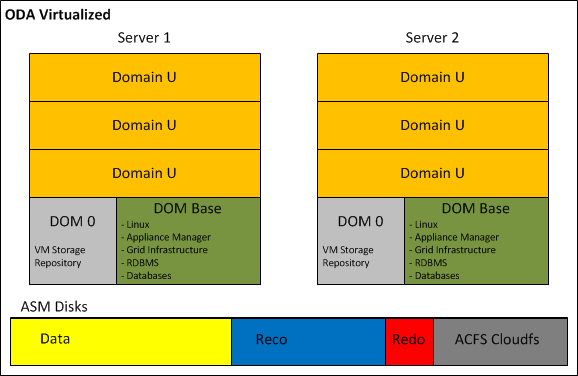
ODA_Virtualized


4.2 ACFS Becomes the default database storage of ODA

Starting from Version 12.1.0.2, a fresh installation of the Oracle Database Appliance adopts ACFS as primary cluster file system to store database files and general-purpose data. Three file systems are created in the ASM disk groups (DATA, RECO, and REDO) and the new databases are stored in these three ACFS file systems instead of in the ASM disk groups.

In case of ODA upgrade from previous release to 12.1.0.2, all pre-existing databases are not automatically migrated to ACFS; but can coexist with the new databases created on ACFS.

At any time, the databases can be migrated from ASM to ACFS as post upgrade step.

Oracle has decided to promote ACFS as default database storage on ODA environment for the following reasons:


  • ACFS provides almost equivalent performance than Oracle ASM disk groups.
  • Additional functionalities on industry standard POSIX file system.
  • Database snapshot copy of PDBs, and NON-CDB version 11.2.0.4 of greater.
  • Advanced functionality for general-purpose files such as replication, tagging, encryption, security, and auditing.

Database created on ACFS follows the same Oracle Managed Files (OMF) standard used by ASM.


4.3 ASM 12c on Exadata Machine

Oracle Exadata Database machine is now at the fifth hardware generation; the latest software update has embraced the possibility to run virtual environments, but differently from the ODA or other Engineered System like Oracle Virtual Appliance, the VMs are not intended to host application components. ASM plays a key role on the success of the Exadata, because it orchestrates all Storage Cells in a way that appear as a single entity, while in reality, they do not know and they do not talk to each other.

The Exadata, available in a wide range of hardware configurations from 1/8 to multi-racks, offers a great flexibility on the storage setup too. The sections below illustrate what is possible to achieve in term of storage configuration when the Exadata is exploited bare metal and virtualized:

  • Exadata Bare Metal: despite the default storage configuration, which foresees three disk groups striped across all Storage Cells, guaranteeing the best I/O performance; as post-installation step, it is possible to deploy a different configuration. Before changing the storage setup, it is vital to understand and evaluate all associated consequences. In fact, even though in specific cases can be a meaningful decision, any storage configuration different from the default one, has as result a shift from optimal performance to flexibility and workload isolation.

Shown below a graphical representation of the default Exadata storage setup, compared to a custom configuration, where the Storage Cells have been divided in multiple groups, segmenting the I/O workloads and avoiding disruption between environments.

Exa_BareMetal_Disks_Default

Exa_BareMetal_Disks_Segmented.png

  • Exadata Virtualized: the installation of the Exadata with the virtualization option foresees a first step of meticulous capacity planning, defining the resources to allocate to the virtual machines (CPU and memory) and the size of each ASM disk group (DBFS, Data, Reco) of the clusters. This last step is particularly important, because unlike the VM resources, the characteristics of the ASM disk groups cannot be changed.

The new version of the Exadata Deployment Assistant, which generates the configuration file to submit to the Exadata installation process, now in conjunction with the use of Oracle Virtual Machines, permits to enter the information related to multiple Grid Infrastructure clusters.

The hardware-based I/O virtualization (so called Xen SR-IOV Virtualization), implemented on the Oracle VMs running on the Exadata Database servers, guarantees almost native I/O and Networking performance over InfiniBand; with lower CPU consumption when compared to a Xen Software I/O virtualization. Unfortunately, this performance advantage comes at the detriment of other virtualization features like Load Balancing, Live Migration and VM Save/Restore operations.

If the Exadata combined with the virtualization open new horizon in term of database consolidation and licensing optimization, do not leave any option to the storage configuration. In fact, the only possible user definition is the amount of space to allocate to each disk group; with this information, the installation procedure defines the size of the Grid Disks on all available Storage Cells.

Following a graphical representation of the Exadata Storage Cells, partitioned for holding three virtualized clusters. For each cluster, ASM access is automatically restricted to the associated Grid Disks.

Exa_BareMetal_Disk_Virtual


4.4 ACFS on Linux Exadata Database Machine

Starting from version 12.1.0.2, the Exadata Database Machine running Oracle Linux, supports ACFS for database file and general-purpose, with no functional restriction.

This makes ACFS an attractive storage alternative for holding: external tables, data loads, scripts and general-purpose files.

In addition, Oracle ACFS on Exadata Database Machines supports database files for the following database versions:

  • Oracle Database 10g Rel. 2 (10.2.0.4 and 10.2.0.5)
  • Oracle Database 11g (11.2.0.4 and higher)
  • Oracle Database 12c (12.1.0.1 and higher)

Since Exadata Storage Cell does not support database version 10g, ACFS becomes an important storage option for customers wishing to host older databases on their Exadata system.

However, those new configuration options and flexibility come with one major performance restriction. When ACFS for database files is in use, the Exadata is still not supporting the Smart Scan operations and is not able to push database operations directly to the storage. Hence, for a best performance result, it is recommended to store database files on the Exadata Storage using ASM disk groups.

As per any other system, when implementing ACFS on Exadata Database Machine, snapshots and tagging are supported for database and general-purpose files, while replication, security, encryption, audit and high availability NFS functionalities are only supported with general-purpose files.


 5 Conclusion

Oracle Automatic Storage Management 12c is a single integrated solution, designed to manage database files and general-purpose data under different hardware and software configurations. The adoption of ASM and ACFS not only eliminates the need for third party volume managers and file systems, but also simplifies the storage management offering the best I/O performance, enforcing Oracle best practices. In addition, ASM 12c with the Flex ASM setup removes previous important architecture limitations:

  • Availability: the hard dependency between the local ASM and database instance, was a single point of failure. In fact, without Flex ASM, the failure of the ASM instance causes the crash of all local database instances.
  • Performance: Flex ASM reduces the network traffic generated among the ASM instances, leveraging the architecture scalability; and it is easier and faster to keep the ASM metadata synchronized across large clusters. Finally yet importantly, only few nodes of the cluster have to support the burden of an ASM instance, leaving additional resources to application processing.


Oracle ASM offers a large set of configurations and options; it is now our duty to understand case-by-case, when it is relevant to use one setup or another, with the aim to maximize performance, availability and flexibility of the infrastructure.


Installation Oracle Grid Infrastrucure 12c

####################################

LINUX Setup click here

####################################

Setup OS

– Disable the Firewall

[root@oel6srv01 ~]# service iptables save
[root@oel6srv01 ~]# service iptables stop
[root@oel6srv01 ~]# chkconfig iptables off
[root@oel6srv01 ~]# service iptables status
-- If you are using IPv6 firewall, enter:
 [root@oel6srv01 ~]# service ip6tables save
 [root@oel6srv01 ~]# service ip6tables stop
 [root@oel6srv01 ~]# chkconfig ip6tables off
 [root@oel6srv01 ~]# service ip6tables status


– Disable the SELinux

[root@oel6srv01 ~]# vi /etc/sysconfig/selinux


– DISABLED kdump

[root@oel6srv01 ~]# chkconfig kdump on
[root@oel6srv01 ~]# chkconfig --list |grep kdump
kdump           0:off   1:off   2:off   3:off   4:off   5:off   6:off


– Network Setup

Public Cluster interphases, VIPs and SCAN

Subnet 10.0.0.x
Netmask 255.255.255.0

Private Cluster interphases

Subnet  192.168.0.x
Netmask 255.255.255.0


– Kernel add or amend the following lines  to the “/etc/sysctl.conf” file.

# vi /etc/sysctl.conf
fs.aio-max-nr = 1048576
 fs.file-max = 6815744
 kernel.shmall = 2097152
 kernel.shmmax = 1062637568
 kernel.shmmni = 4096
 # semaphores: semmsl, semmns, semopm, semmni
 kernel.sem = 250 32000 100 128
 net.ipv4.ip_local_port_range = 9000 65500
 net.core.rmem_default=262144
 net.core.rmem_max=4194304
 net.core.wmem_default=262144
 net.core.wmem_max=1048586
--Activate the current Kernel parameters:
/sbin/sysctl -p

– Add the following lines to /etc/security/limits.conf

# vi  /etc/security/limits.conf
## Go to the end
 grid     soft     nproc      2047
 grid     hard     nproc     16384
 grid     soft     nofile     1024
 grid     hard     nofile    65536
 oracle   soft     nproc      2047
 oracle   hard     nproc     16384
 oracle   soft     nofile     1024
 oracle   hard     nofile    65536

– Add the following line to /etc/pam.d/login

# vi /etc/pam.d/login
session     required    pam_limits.so


– Disable secure linux

–making sure the SELINUX flag is set as follows.

# vi /etc/selinux/config
SELINUX=disabled


– NTP Setup

–If you are using NTP, you must add the “-x” option into the following line in the “/etc/sysconfig/ntpd” file.

# vi /etc/sysconfig/ntpd
OPTIONS="-x -u ntp:ntp -p /var/run/ntpd.pid"
# service ntpd restart
 -- OR STOP NTP SERVER the Grid will start CSSD in Active mode instead of Observe:
 # service ntpd stop
 # chkconfig ntpd off
---------------------------------------------
 - Mandatory Packages for Oracle Linux 6  and Red Hat Enterprise Linux 6
 ---------------------------------------------
 binutils-2.20.51.0.2-5.11.el6 (x86_64)
 compat-libcap1-1.10-1 (x86_64)
 compat-libstdc++-33-3.2.3-69.el6 (x86_64)
 compat-libstdc++-33-3.2.3-69.el6.i686
 gcc-4.4.4-13.el6 (x86_64)
 gcc-c++-4.4.4-13.el6 (x86_64)
 glibc-2.12-1.7.el6 (i686)
 glibc-2.12-1.7.el6 (x86_64)
 glibc-devel-2.12-1.7.el6 (x86_64)
 glibc-devel-2.12-1.7.el6.i686
 ksh
 libgcc-4.4.4-13.el6 (i686)
 libgcc-4.4.4-13.el6 (x86_64)
 libstdc++-4.4.4-13.el6 (x86_64)
 libstdc++-4.4.4-13.el6.i686
 libstdc++-devel-4.4.4-13.el6 (x86_64)
 libstdc++-devel-4.4.4-13.el6.i686
 libaio-0.3.107-10.el6 (x86_64)
 libaio-0.3.107-10.el6.i686
 libaio-devel-0.3.107-10.el6 (x86_64)
 libaio-devel-0.3.107-10.el6.i686
 make-3.81-19.el6
 sysstat-9.0.4-11.el6 (x86_64)

–Install the cvuqdisk RPM. Without cvuqdisk, Cluster Verification Utility cannot discover shared disks,
–and it raises the following error message “Package cvuqdisk not installed” when Cluster Verification Utility is executed.

–A copy of the cvuqdisk  package is present on the 1st Grid Infrastructure ZIP file.

— Log in as root.

  1. Use the following command to find if you have an existing version of the cvuqdisk package:
# rpm -qi cvuqdisk

2.  If you have an existing version, then enter the following command to deinstall the existing version:

rpm -e cvuqdisk

  1. Set the environment variable CVUQDISK_GRP to point to the group that will own cvuqdisk, typically oinstall. For example:
# CVUQDISK_GRP=oinstall; export CVUQDISK_GRP
4. Install the cvuqdisk package:
rpm -iv package
# rpm -iv cvuqdisk-1.0.9-1.rpm
--OR
you install oracle-rdbms-server-12cR1-preinstall


– OPTIONAL RPMs

--Minimum ODBC Drivers for Oracle and Red Hat Linux 6 on x86-64
 unixODBC-2.2.14-11.el6 (64-bit) or later
 unixODBC-devel-2.2.14-11.el6 (64-bit) or later

– UNIX Groups

/usr/sbin/groupadd -g 1000 oinstall
/usr/sbin/groupadd -g 1001 asmadmin
/usr/sbin/groupadd -g 1002 dba
/usr/sbin/groupadd -g 1003 asmdba
/usr/sbin/groupadd -g 1004 asmoper

–New optional roles which grant access to specific features like Data Guard, RMAN and Security have been added in 12c, but not implemented in this example.


– UNIX Users

useradd -u 1100 -g oinstall -G asmadmin,asmdba,asmoper grid
useradd -u 1101 -g oinstall -G asmdba,dba oracle


– Set SSH timeout wait to unlimited

# vi /etc/ssh/sshd_config
LoginGraceTime 0


– Create the u01 file system

[root@oel6srv01 ~]# fdisk /dev/sdb
The number of cylinders for this disk is set to 2871.
 There is nothing wrong with that, but this is larger than 1024,
 and could in certain setups cause problems with:
 1) software that runs at boot time (e.g., old versions of LILO)
 2) booting and partitioning software from other OSs
 (e.g., DOS FDISK, OS/2 FDISK)
Command (m for help): n
 Command action
 e   extended
 p   primary partition (1-4)
 p
Partition number (1-4): 1
 First cylinder (1-2871, default 1):
 Using default value 1
 Last cylinder or +size or +sizeM or +sizeK (1-2871, default 2871):
 Using default value 2871
Command (m for help): w
 The partition table has been altered!
Calling ioctl() to re-read partition table.
WARNING: Re-reading the partition table failed with error 16: Device or resource busy.
 The kernel still uses the old table.
 The new table will be used at the next reboot.
 Syncing disks.
 [root@oel6srv01 ~]#
 [root@oel6srv01 ~]# fdisk -l
Disk /dev/sda: 21.4 GB, 21474836480 bytes
 255 heads, 63 sectors/track, 2610 cylinders
 Units = cylinders of 16065 * 512 = 8225280 bytes
Device Boot      Start         End      Blocks   Id  System
 /dev/sda1   *           1          13      104391   83  Linux
 /dev/sda2              14        2610    20860402+  8e  Linux LVM
Disk /dev/sdb: 23.6 GB, 23622320128 bytes
 255 heads, 63 sectors/track, 2871 cylinders
 Units = cylinders of 16065 * 512 = 8225280 bytes
Device Boot      Start         End      Blocks   Id  System
 /dev/sdb1               1        2871    23061276   83  Linux
[root@oel6srv01 ~]# mkfs.ext4 /dev/sdb1
 mke4fs 1.41.12 (17-May-2010)
 Filesystem label=
 OS type: Linux
 Block size=4096 (log=2)
 Fragment size=4096 (log=2)
 Stride=0 blocks, Stripe width=0 blocks
 1441792 inodes, 5765319 blocks
 288265 blocks (5.00%) reserved for the super user
 First data block=0
 Maximum filesystem blocks=4294967296
 176 block groups
 32768 blocks per group, 32768 fragments per group
 8192 inodes per group
 Superblock backups stored on blocks:
 32768, 98304, 163840, 229376, 294912, 819200, 884736, 1605632, 2654208,
 4096000
Writing inode tables: done
 Creating journal (32768 blocks): done
 Writing superblocks and filesystem accounting information: done
This filesystem will be automatically checked every 37 mounts or
 180 days, whichever comes first.  Use tune4fs -c or -i to override.
 [root@oel6srv01 ~]#
[root@oel6srv01 /]# mkdir u01
 [root@oel6srv01 /]# cat /etc/fstab
..
..
/dev/sdb1               /u01                    ext4    defaults        0 0
[root@oel6srv01 /]# mount /u01
 [root@oel6srv01 /]# df -h
Filesystem            Size  Used Avail Use% Mounted on
/dev/mapper/VolGroup00-LogVol00
 15G  3.2G   12G  22% /
 /dev/sda1              99M   24M   71M  25% /boot
 tmpfs                 1.3G     0  1.3G   0% /dev/shm
 /dev/sdb1              22G  172M   21G   1% /u01

– Creation of GI and RDBMS directories

mkdir -p /u01/GRID/12.1.0.1
 mkdir -p /u01/app/product/12.1.0.1
#Oracle Base
 chown -R oracle:oinstall /u01/app
 chmod -R 775 /u01/app
#Oracle RDBMS Home
 chown -R oracle:oinstall /u01/app/product/12.1.0.1
 chmod -R 775 /u01/app/product/12.1.0.1
#Grid Home
 chown -R grid:oinstall /u01/GRID
 chmod -R 775 /u01/GRID/12.1.0.1

– Add this entries to the generic User Profile

# vi /etc/profile
if [ $USER = "oracle" ] || [ $USER = "grid" ]; then
 if [ $SHELL = "/bin/ksh" ]; then
 ulimit -p 16384
 ulimit -n 65536
 else
 ulimit -u 16384 -n 65536
 fi
 umask 022
 fi
 if [ $USER = "root" ]; then
 umask 022
 fi

— Configure the shared storage for ASM

##########################################################
##  Installation Oracle Grid Infrastructure
##########################################################

--Run 12c Cluvfy with the following options to verify that all prerequisites are met:
 ./runcluvfy.sh stage -post hwos -n oel6srv01,oel6srv02,oel6srv03,oel6srv04 -verbose

# Start the Grid Installation…..

[grid@oel6srv01 grid]$ ./runInstaller
 Starting Oracle Universal Installer...
Checking Temp space: must be greater than 120 MB.   Actual 39776 MB    Passed
 Checking swap space: must be greater than 150 MB.   Actual 4031 MB    Passed
 Checking monitor: must be configured to display at least 256 colors.    Actual 16777216    Passed
 Preparing to launch Oracle Universal Installer from /tmp/OraInstall2013-06-25_08-23-26PM. Please wait ..


##############################################################
##  Grid Infrastructure crsctl output
##############################################################

[grid@oel6srv01 ~]$ crsctl stat res -t
 --------------------------------------------------------------------------------
 Name           Target  State        Server                   State details
 --------------------------------------------------------------------------------
 Local Resources
 --------------------------------------------------------------------------------
 ora.ASMNET2LSNR_ASM.lsnr
 ONLINE  ONLINE       oel6srv01                STABLE
 ONLINE  ONLINE       oel6srv02                STABLE
 ONLINE  ONLINE       oel6srv03                STABLE
 ONLINE  ONLINE       oel6srv04                STABLE
 ora.DATA1.VOL_CLOUD01.advm
 ONLINE  ONLINE       oel6srv01                Volume device /dev/a
 sm/vol_cloud01-178 i
 s online,STABLE
 ONLINE  ONLINE       oel6srv02                Volume device /dev/a
 sm/vol_cloud01-178 i
 s online,STABLE
 ONLINE  ONLINE       oel6srv03                Volume device /dev/a
 sm/vol_cloud01-178 i
 s online,STABLE
 ONLINE  ONLINE       oel6srv04                Volume device /dev/a
 sm/vol_cloud01-178 i
 s online,STABLE
 ora.DATA1.dg
 OFFLINE OFFLINE      oel6srv01               STABLE
 OFFLINE OFFLINE      oel6srv02               STABLE
 ONLINE  ONLINE       oel6srv03                STABLE
 ONLINE  ONLINE       oel6srv04                STABLE
 ora.FRA1.dg
 OFFLINE OFFLINE      oel6srv01               STABLE
 OFFLINE OFFLINE      oel6srv02               STABLE
 ONLINE  ONLINE       oel6srv03                STABLE
 ONLINE  ONLINE       oel6srv04                STABLE
 ora.LISTENER.lsnr
 ONLINE  ONLINE       oel6srv01                STABLE
 ONLINE  ONLINE       oel6srv02                STABLE
 ONLINE  ONLINE       oel6srv03                STABLE
 ONLINE  ONLINE       oel6srv04                STABLE
 ora.OCRVOTING.dg
 OFFLINE OFFLINE      oel6srv01               STABLE
 OFFLINE OFFLINE      oel6srv02               STABLE
 ONLINE  ONLINE       oel6srv03                STABLE
 ONLINE  ONLINE       oel6srv04                STABLE
 ora.data1.vol_cloud01.acfs
 ONLINE  ONLINE       oel6srv01                mounted on /cloudfs,
 STABLE
 ONLINE  ONLINE       oel6srv02                mounted on /cloudfs,
 STABLE
 ONLINE  ONLINE       oel6srv03                mounted on /cloudfs,
 STABLE
 ONLINE  ONLINE       oel6srv04                mounted on /cloudfs,
 STABLE
 ora.net1.network
 ONLINE  ONLINE       oel6srv01                STABLE
 ONLINE  ONLINE       oel6srv02                STABLE
 ONLINE  ONLINE       oel6srv03                STABLE
 ONLINE  ONLINE       oel6srv04                STABLE
 ora.ons
 ONLINE  ONLINE       oel6srv01                STABLE
 ONLINE  ONLINE       oel6srv02                STABLE
 ONLINE  ONLINE       oel6srv03                STABLE
 ONLINE  ONLINE       oel6srv04                STABLE
 ora.proxy_advm
 ONLINE  ONLINE       oel6srv01                STABLE
 ONLINE  ONLINE       oel6srv02                STABLE
 ONLINE  ONLINE       oel6srv03                STABLE
 ONLINE  ONLINE       oel6srv04                STABLE
 --------------------------------------------------------------------------------
 Cluster Resources
 --------------------------------------------------------------------------------
 ora.LISTENER_SCAN1.lsnr
 1        ONLINE  ONLINE       oel6srv04                STABLE
 ora.MGMTLSNR
 1        ONLINE  ONLINE       oel6srv04                169.254.25.188 192.1
 68.0.114 192.168.0.1
 24,STABLE
 ora.asm
 1        ONLINE  ONLINE       oel6srv04                STABLE
 3        ONLINE  ONLINE       oel6srv03                STABLE
 ora.cvu
 1        ONLINE  ONLINE       oel6srv04                STABLE
 ora.mgmtdb
 1        ONLINE  ONLINE       oel6srv04                Open,STABLE
 ora.oc4j
 1        ONLINE  ONLINE       oel6srv01                STABLE
 ora.oel6srv01.vip
 1        ONLINE  ONLINE       oel6srv01                STABLE
 ora.oel6srv02.vip
 1        ONLINE  ONLINE       oel6srv02                STABLE
 ora.oel6srv03.vip
 1        ONLINE  ONLINE       oel6srv03                STABLE
 ora.oel6srv04.vip
 1        ONLINE  ONLINE       oel6srv04                STABLE
 ora.scan1.vip
 1        ONLINE  ONLINE       oel6srv04                STABLE
 --------------------------------------------------------------------------------