New to Oracle Multitenant?

Multitenant is the biggest architectural change of Oracle 12c and the enabler of many new database options in the years to come. Therefore I have decided to write over the time, few blog posts with basic examples of what should be done and not in a multitenant database environment.


Rule #1   – What should not be done

If you are a CDB DBA, always pay attention to which container you are connected to and remember that application data should be stored on Application PDB only!

Unfortunately this golden rule is not-enforced by the RDBMS, but it is left in our responsibility as shown on the example below:

oracle@lxoel7n01:~/ [CDB_TEST] sqlplus / as sysdba

SQL*Plus: Release 12.1.0.2.0 Production on Wed Sep 21 18:28:23 2016

Copyright (c) 1982, 2014, Oracle. All rights reserved.


Connected to:
Oracle Database 12c Enterprise Edition Release 12.1.0.2.0 - 64bit Production
With the Partitioning, Automatic Storage Management, OLAP, Advanced Analytics
and Real Application Testing options

CDB$ROOT SQL>
CDB$ROOT SQL> show user
USER is "SYS"
CDB$ROOT SQL> show con_name

CON_NAME
------------------------------
CDB$ROOT


Once connected to the ROOT container let see if I can mistakenly create an application table:

CDB$ROOT SQL> CREATE TABLE EMP_1
(emp_id NUMBER,
emp_name VARCHAR2(25),
start_date DATE,
emp_status VARCHAR2(10) DEFAULT 'ACTIVE',
resume CLOB); 2 3 4 5 6

Table created.

CDB$ROOT SQL> desc emp_1
 Name                                Null?    Type
 ----------------------------------- -------- ----------------------------
 EMP_ID                                        NUMBER
 EMP_NAME                                      VARCHAR2(25)
 START_DATE                                    DATE
 EMP_STATUS                                    VARCHAR2(10)
 RESUME                                        CLOB


CDB$ROOT SQL> insert into emp_1 values (1, 'Emiliano', sysdate, 'active', ' ');

1 row created.

CDB$ROOT SQL> commit;

Commit complete.


CDB$ROOT SQL> select * from emp_1;

EMP_ID     EMP_NAME                  START_DAT EMP_STATUS RESUME
---------- ------------------------- --------- ---------- ----------------
 1          Emiliano                  21-SEP-16 active

CDB$ROOT SQL> show con_name

CON_NAME
------------------------------
CDB$ROOT

The answer is “YES” and the consequences can be devastating…


Rule #2   – Overview of Local and Common Entities

Non-schema entities can be created as local or common.  Local entities exist only in one PDB similar to a non-CDB architecture, while Common entities exist in every current and future container.

List of possible Local / Common entities in a Multitenant database:

  • Users
  • Roles
  • Profiles
  • Audit Policies

All Local entities are created from the local PDB and all Common entities are created from the CDB$ROOT container.

Common-user-defined Users, Roles and Profiles require a standard database prefix, defined by the spfile parameter COMMON_USER_PREFIX:

SQL> show parameter common_user_prefix

NAME                              TYPE        VALUE
--------------------------------- ----------- -----------------
common_user_prefix                string      C##


Example of Common User creation:

SQL> CREATE USER C##CDB_DBA1 IDENTIFIED BY PWD CONTAINER=ALL;

User created.


SQL> SELECT con_id, username, user_id, common

  2  FROM cdb_users where username='C##CDB_DBA1'  ORDER BY con_id;

    CON_ID USERNAME                USER_ID COMMON
---------- -------------------- ---------- ------
         1 C##CDB_DBA1               102    YES
         2 C##CDB_DBA1               101    YES
         3 C##CDB_DBA1               107    YES
         4 C##CDB_DBA1               105    YES
         5 C##CDB_DBA1               109    YES
         ...


Example of Local user creation:

SQL> show con_name

CON_NAME
------------------------------
MYPDB

SQL> CREATE USER application IDENTIFIED BY pwd CONTAINER=CURRENT;

User created.

If we try to create a Local User from the CDB$ROOT container the following error occurs: ORA-65049: creation of local user or role is not allowed in CDB$ROOT

SQL> show con_name

CON_NAME
------------------------------
CDB$ROOT

SQL> CREATE USER application IDENTIFIED BY pwd   CONTAINER=CURRENT;

CREATE USER application IDENTIFIED BY pwd   CONTAINER=CURRENT

                                      *

ERROR at line 1:
ORA-65049: creation of local user or role is not allowed in CDB$ROOT


Rule #3  – Application should connect through user-defined database services only

We have been avoiding to create user-defined database services for many years, sometimes even for RAC databases. But in Multitenet or Singletenant architecture the importance of user-defined database service is even greater. For each CDB and PDB Oracle is still automatically creating a default service, but as in the past the default services should never be exposed to the applications.


To create user-defined database service in stand-alone environment use the package DBMS_SERVICE while connected to the corresponding PDB:

BEGIN
 DBMS_SERVICE.CREATE_SERVICE(
     SERVICE_NAME     => 'mypdb_app.emilianofusaglia.net',
     NETWORK_NAME     => 'mypdb_app.emilianofusaglia.net',
     FAILOVER_METHOD  =>
     ...
      );
 DBMS_SERVICE.START_SERVICE('mypdp_app.emilianofusaglia.net ');
END;
/

The database services will not start automatically after opening a PDB!  Create a database trigger for this purpose.


To create user-defined database service in clustered environment use the srvctl utility from the corresponding RDBMS ORACLE_HOME:

oracle@oel7n01:~/ [EFU1] srvctl add service -db EFU \
> -pdb MYPDB -service mypdb_app.emilianofusaglia.net \
> -failovertype SELECT -failovermethod BASIC \
> -failoverdelay 2 -failoverretry 90


List all CDB database services order by Container ID:

SQL> SELECT con_id, name, pdb FROM v$services ORDER BY con_id;

    CON_ID NAME                                     PDB
---------- --------------------------------------- -----------------

         1 EFUXDB                                   CDB$ROOT   <-- CDB Default Service 
         1 SYS$BACKGROUND                           CDB$ROOT   <-- CDB Default Service 
         1 SYS$USERS                                CDB$ROOT   <-- CDB Default Service 
         1 EFU.emilianofusaglia.net                 CDB$ROOT   <-- CDB Default Service 
         1 EFU_ADMIN.emilianofusaglia.net           CDB$ROOT   <-- CDB User-defined Service  
         3 mypdb.emilianofusaglia.net               MYPDB      <-- PDB Default Service 
         3 mypdb_app.emilianofusaglia.net           MYPDB      <-- PDB User-defined Service  

7 rows selected.


EZCONNECT to a PDB using the user-defined service:

sqlplus <username>/<password>@<host_name>:<local-listener-port>/<service-name>
sqlplus application/pwd@oel7c-scan:1522/mypdb_app.emilianofusaglia.net


Rule #4  –  Backup/Recovery strategy in Multitenant

As database administrator one of the first responsibility to fulfil is the “Backup/Recovery” strategy. The migration to multitenant database, due to the high level of consolidation density requires to review existing procedures. Few infrastructure operations, like creating a Data Guard or executing a backup, have been shifted from per-database to per-container consolidating the number of tasks.

RMAN in 12c covers all CDB, PDB backup/restore combinations, even though the best practice suggests to run the daily backup at CDB level, and in case of restore needed, the granularity goes down to the single block of one PDB.  Below are reported few basic backup/restore operations in Multitenant environment.


Backup a full CDB:

RMAN> connect target /;
RMAN> backup database plus archivelog;


Backup a list of PDBs:

RMAN> connect target /;
RMAN> backup pluggable database mypdb, hrpdb plus archivelog;


Backup one PDB directly connecting to it:

RMAN> connect target sys/manager@mypdb.emilianofusaglia.net;
RMAN> backup incremental level 0 database;


Backup a PDB tablespace:

RMAN> connect target /;
RMAN> backup tablespace mypdb:system;


Generate RMAN report:

RMAN> report need backup pluggable database mypdb;


Complete PDB Restore

RMAN> connect target /;
RMAN> alter pluggable database mypdb close;
RMAN> restore pluggable database mypdb;
RMAN> recover pluggable database mypdb;
RMAN> alter pluggable database mypdb open;


Rule #5  –  Before moving to Multitenant

Oracle Multitenant has introduced many architectural changes that force the DBA to evolve how databases are administered. My last golden rule suggests to thoroughly study the multitenant/singletenant architecture before starting any implementation.

During my experiences implementing multitenant/singletenant architectures, I found great dependencies with the following database areas:

  • Provisioning/Decommissioning
  • Patching and Upgrade
  • Backup/recovery
  • Capacity Planning and Management
  • Tuning
  • Separation of duties between CDB and PDB


Oracle Datapatch on Multitenant environment

The example below shows how to patch a Pluggable Database (PDB) migrated to a Container Database (CDB) whith a different patch level.


List the PDB violations

col message for a150
col action for a60
select * FROM pdb_plug_in_violations WHERE STATUS <>'RESOLVED';

TIME NAME CAUSE TYPE ERROR_NUMBER LINE
--------------------------------------------------------------------------- ------------------------------ ---------------------------------------------------------------- --------- ------------ ----------
MESSAGE STATUS ACTION
------------------------------------------------------------------------------------------------------------------------------------------------------ --------- ------------------------------------------------------------
15-07-16 11:33:26.022539 CUSPPO SQL Patch ERROR 0 1
PSU bundle patch 160419 (Database Patch Set Update : 12.1.0.2.160419 (22291127)): Installed in the CDB but not in the PDB. ERROR Call datapatch to install in the PDB or the CDB


1 row selected.


Datapatch help

[oracle@zlo6ka1n1 OPatch]$ ./datapatch -h
SQL Patching tool version 12.1.0.2.0 on Wed Jun 15 10:53:36 2016
Copyright (c) 2015, Oracle. All rights reserved.

sqlpatch usage:
All arguments are optional, if there are no arguments sqlpatch
will automatically determine which SQL scripts need to be run in
order to complete the installation of any SQL patches.

Optional arguments:
-db <db name>
 Use the specified database rather than $ORACLE_SID
-bundle_series <bundle_series>
 Specify if the patch is a bundle patch
 Should also be accompanied by -force option
 if -bundle_series option is specified,only 1 patch will
 be considered by the -force command
-apply <patch1,patch2,...,patchn>
 Only consider the specified patch list for apply operations
-rollback <patch1,patch2,...,patchn>
 Only consider the specified patch list for rollback operations
-upgrade_mode_only
 Only consider patches that require upgrade mode
-force
 Run the apply and/or rollback scripts even if not necessary
 per the SQL registry
-pdbs <pdb1,pdb2,...,pdbn>
 Only consider the specified list of PDBs for patching. All
 other PDBs will not be patched
-prereq
 Run prerequisite checks only, do not actually run any scripts
-oh <oracle_home value>
 Use the specified directory to check for installed patches
-verbose
 Output additional information used for debugging
-help
 Output usage information and exit
-version
 Output build information and exit

SQL Patching tool complete on Wed Jul 15 10:53:36 2016


Apply the patch to the PDB

[oracle@zlo6ka1n0 OPatch]$ ./datapatch -verbose
SQL Patching tool version 12.1.0.2.0 on Wed Jul 15 11:36:19 2016
Copyright (c) 2015, Oracle. All rights reserved.

Log file for this invocation: /u01/app/oracle/cfgtoollogs/sqlpatch/sqlpatch_59195_2016_07_15_11_36_19/sqlpatch_invocation.log

Connecting to database...OK
Note: Datapatch will only apply or rollback SQL fixes for PDBs
 that are in an open state, no patches will be applied to closed PDBs.
 Please refer to Note: Datapatch: Database 12c Post Patch SQL Automation
 (Doc ID 1585822.1)
Bootstrapping registry and package to current versions...done
Determining current state...done

Current state of SQL patches:
Bundle series PSU:
 ID 160419 in the binary registry and ID 160419 in PDB CDB$ROOT, ID 160419 in PDB PDB$SEED

Adding patches to installation queue and performing prereq checks...
Installation queue:
 For the following PDBs: CDB$ROOT PDB$SEED
 Nothing to roll back
 Nothing to apply
 For the following PDBs: CUSPPO
 Nothing to roll back
 The following patches will be applied:
 22291127 (Database Patch Set Update : 12.1.0.2.160419 (22291127))

Installing patches...
Patch installation complete. Total patches installed: 1

Validating logfiles...
Patch 22291127 apply (pdb CUSPPO): SUCCESS
 logfile: /u01/app/oracle/cfgtoollogs/sqlpatch/22291127/19694308/22291127_apply_CLGBTE_CUSPPO_2016Jul15_11_37_25.log (no errors)
SQL Patching tool complete on Wed Jul 15 11:37:36 2016
[oracle@zlo6ka1n0 OPatch]$


ODA X5-2 how to cap the number of active CPU Cores

I recently had to cap the number of active CPUs on a bare metal ODA X5-2, and I noticed that the procedure is slightly different from what I used in the past (link to initial post).


Perform the following steps to generate the Core Key:

  • Login to My Oracle Support (MOS) and click the submenu Systems.
  • Select the serial number of the appliance and click on “Core Configuration”in the Asset Details Screen
  • Select Manage Key
  • From the Combo list select the number of cores to activate  and click Generate Key to generate the key.
  • Click Copy Key to Clipboard to copy the key to the clipboard.
  • Paste the key into an empty text file and save the file to a location on the Oracle Database Appliance.


ODA X5-2 initial number of CPU Cores

[root@odax5-2n0 ~]# cat /proc/cpuinfo | grep -i processor
processor : 0
processor : 1
processor : 2
processor : 3
...
...
..
.
processor : 70
processor : 71

[root@odax5-2n0 ~]# cat /proc/cpuinfo | grep -i processor |wc -l
72
[root@odax5-2n0 ~]#


Checks before enforcing the CPU restriction:

[root@odax5-2n0 ~]# oakcli show server

Power State : On
 Open Problems : 0
 Model : ODA X5-2
 Type : Rack Mount
 Part Number : xxxxxxxxxxx
 Serial Number : nnnnXXXXnnX <<<<<<<<<<<< This serial MUST match on BOTH of the ODA servers
 Primary OS : Not Available
 ILOM Address : 192.168.21.35
 ILOM MAC Address : xx:xx:xx:xx:xx:xx
 Description : Oracle Database Appliance X5-2 nnnnXXXXnnX
 Locator Light : Off
 Actual Power Consumption : 345 watts
 Ambient Temperature : 21.250 degree C
 Open Problems Report : System is healthy

[root@odax5-2n0 ~]#


[root@odax5-2n1 /]# oakcli show server

Power State : On
 Open Problems : 0
 Model : ODA X5-2
 Type : Rack Mount
 Part Number : xxxxxxxxxxx
 Serial Number : nnnnXXXXnnX <<<<<<<<<<<< This serial MUST match on BOTH of the ODA servers 
 Primary OS : Not Available
 ILOM Address : 192.168.21.36
 ILOM MAC Address : xx:xx:xx:xx:xx:xx
 Description : Oracle Database Appliance X5-2 nnnnXXXXnnX
 Locator Light : Off
 Actual Power Consumption : 342 watts
 Ambient Temperature : 21.750 degree C
 Open Problems Report : System is healthy

[root@odax5-2n1 /]#

[root@odax5-2n0 ~]# oakcli show env_hw
BM ODA X5-2
Public interface : COPPER
[root@odax5-2n0 ~]#


[root@odax5-2n1 /]# oakcli show env_hw
BM ODA X5-2
Public interface : COPPER
[root@odax5-2n1 /]#


[root@odax5-2n0 ~]# ipmitool -I open sunoem getval /X/system_identifier
Target Value: Oracle Database Appliance X5-2 nnnnXXXXnnX
[root@odax5-2n0 ~]# fwupdate list sp_bios
==================================================
SP + BIOS
==================================================
ID Product Name ILOM Version BIOS/OBP Version XML Support
---------------------------------------------------------------------------------------------------------------
sp_bios ORACLE SERVER X5-2 v3.2.4.52 r101649 30050100 N/A
[root@odax5-2n0 ~]#

[root@odax5-2n1 /]# ipmitool -I open sunoem getval /X/system_identifier
Target Value: Oracle Database Appliance X5-2 nnnnXXXXnnX
[root@odax5-2n1 /]# fwupdate list sp_bios
==================================================
SP + BIOS
==================================================
ID Product Name ILOM Version BIOS/OBP Version XML Support
---------------------------------------------------------------------------------------------------------------
sp_bios ORACLE SERVER X5-2 v3.2.4.52 r101649 30050100 N/A
[root@odax5-2n1 /]#


Apply the CPU Key form the first ODA node

[root@odax5-2n0 ~]# /opt/oracle/oak/bin/oakcli apply core_config_key /root/ODA_PROD_CPU_KEY_SerialNumber_NumberofCores_Configkey.txt
INFO: Both nodes will be rebooted automatically after applying the license
Do you want to continue: [Y/N]?:
Y
INFO: User has confirmed for reboot


Please enter the root password:

............Completed

INFO: Applying core_config_key on '192.168.16.25'
... 
INFO : Running as root: /usr/bin/ssh -l root 192.168.16.25 /tmp/tmp_lic_exec.pl
INFO : Running as root: /usr/bin/ssh -l root 192.168.16.25 /opt/oracle/oak/bin/oakcli enforce core_config_key /tmp/.lic_file
Waiting for the Node '192.168.16.25' to reboot..................................
Node '192.168.16.25' is rebooted
Waiting for the Node '192.168.16.25' to be up before applying the license on the node '192.168.16.24'.
INFO: Applying core_config_key on '192.168.16.24'
...
INFO : Running as root: /usr/bin/ssh -l root 192.168.16.24 /tmp/tmp_lic_exec.pl
INFO : Running as root: /usr/bin/ssh -l root 192.168.16.24 /opt/oracle/oak/bin/oakcli enforce core_config_key /tmp/.lic_file

Broadcast message from root@odax5-2n0
 (unknown) at 11:03 ...

The system is going down for reboot NOW!
[root@odax5-2n0 ~]#


New CPU cores configuration

[root@odax5-2n0 ~]# /opt/oracle/oak/bin/oakcli show core_config_key

Host's serialnumber = nnnnXXXXnnX
Enabled Cores (per server) = 6
Total Enabled Cores (on two servers) = 12
Server type = X5-2 -> Oracle Server X5-2
Hyperthreading is enabled. Each core has 2 threads. Operating system displays 12 processors per server
[root@odax5-2n0 ~]#

[root@odax5-2n1 ~]# /opt/oracle/oak/bin/oakcli show core_config_key

Host's serialnumber = nnnnXXXXnnX
Enabled Cores (per server) = 6
Total Enabled Cores (on two servers) = 12
Server type = X5-2 -> Oracle Server X5-2
Hyperthreading is enabled. Each core has 2 threads. Operating system displays 12 processors per server
[root@odax5-2n1 ~]#

Bug on Oracle 12c Multitenant & PDB Clone as Snapshot Copy

While automating the refresh of the test databases on Oracle 12c Multitenant environment with ACFS and PDB snapshot copy, I encountered the following BUG:

The column SNAPSHOT_PARENT_CON_ID of the view V$PDBS shows 0 (zero) in case of PDBs created as Snapshot Copy.

This bug prevents to identify the parent-child relationship between a PDB and its own Snapshots Copies.

The test case below explains the problem:

SQL> CREATE PLUGGABLE DATABASE LARTE3SEFU from LARTE3 SNAPSHOT COPY; 
 
 Pluggable database created. 
 
 SQL> select CON_ID, NAME, OPEN_MODE, SNAPSHOT_PARENT_CON_ID from v$pdbs where NAME in ('LARTE3SEFU','LARTE3'); 
 
 CON_ID      NAME          OPEN_MODE  SNAPSHOT_PARENT_CON_ID 
 ---------- -------------- ---------- ---------------------- 
 5          LARTE3         READ ONLY  0 
 16         LARTE3SEFU     MOUNTED    0  <-- This should be 5
 
 2 rows selected. 

A Service Request to Oracle has been opened, I’ll update this post once I have the official answer.

Update from the Service Request: BUG Fixed on version 12.2

The “Great” ODA overwhelming the Exadata

Introduction

This article try to explain the technical reasons of the Oracle Database Appliance success, a well-known appliance with whom Oracle targets small and medium businesses, or specific departments of big companies looking for privacy and isolation from the rest of the IT. Nowadays this small and relatively cheap appliance (around 65’000$ price list) has evolved a lot, the storage has reached an important capacity 128TB raw expansible to 256TB, and the two X5-2 servers are the same used on the database node of the Exadata machine. Many customers, while defining the new database architecture evaluate the pros and cons of acquiring an ODA compared to the smallest Exadata configuration (one eight of a Rack). If the customer is not looking for a system with extreme performance and horizontal scalability beyond the two X5-2 servers, the Oracle Database Appliance is frequently the retained option.

Some of the ODA major features are:

  • High Availability: no single point of failure on all hardware and software components.
  • Performance: each server is equipped with 2×18-core Intel Xeon and 256GB of RAM extensible up to 768GB, cluster communication over InfiniBand. The shared storage offers a multi-tiers configuration with HDDs at 7.2K rpm and two type of SSDs for frequently accessed data and for database redo logs.
  • Flexibility & Scalability: running RAC, RAC One node and Single Instance databases.
  • Virtualized configuration: designed for offering Solution in-a-box, with high available virtual machines.
  • Optimized licensing model: pay-as-you-grow model activating a crescendo number of CPU-cores on demand, with the Bare Metal configuration; or capping the resources combining Oracle VM with the Hard Partitioning setup.
  • Time-to-market: no-matter if the ODA has to be installed bare metal or virtualized, this is a standardized and automated process generally completed in one or two day of work.
  • Price: the ODA is very competitive when comparing the cost to an equivalent commodity architecture; which in addition, must be engineered, integrated and maintained by the customer.


At the time of the writing of this article, the latest hardware model is ODA X5-2 and 12.1.2.6.0 is the software version. This HW and SW combination offers unique features, few of them not even available on the Exadata machine, like the possibility to host databases and applications in one single box, or the possibility to rapidly and space efficiently clone an 11gR2 and 12c database using ACFS Snapshot.


ODA HW & SW Architecture

Oracle Database Appliance is composed by two X5-2 servers and a shared storage shelf, which optionally can be doubled. Each Server disposes of: two 18-core Intel Xeon E5-2699 v3; 256GB RAM (optionally upgradable to 768GB) and two 600GB 10k rpm internal disks in RAID 1 for OS and software binaries.

This appliance is equipped with redundant networking connectivity up to 10Gb, redundant SAS HBAs and Storage I/O modules, redundant InfiniBand interconnect for cluster communication enabling 40 Gb/second server-to-server communication.

The software components are all part of Oracle “Red Stack” with Oracle Linux 6 UEK or OVM 3, Grid Infrastructure 12c, Oracle RDBMS 12c & 11gR2 and Oracle Appliance Manager.


ODA Front view

Components number 1 & 2 are the X5-2 Servers. Components 3 & 4 are the Storage and the optionally Storage extension.

ODA_Front


ODA Rear view

Highlight of the multiple redundant connections, including InfiniBand for Oracle Clusterware, ASM and RAC communications. No single point of HW or SW failure.

ODA_Back


Storage Organization

With 16x8TB SAS HDDs a total raw space of 128TB is available on each storage self (64TB in configuration ASM double-mirrored and 42.7TB with ASM triple-mirrored). To offer better I/O performance without exploding the price, Oracle has implemented the following SSD devices: 4x400GB ASM double-mirrored, for frequently accessed data, and 4x200GB ASM triple-mirrored, for database redo logs.

As shown on the picture aside, each rotating disk has two slices, the external, and more performant partition assigned to the +DATA ASM disk group, and the internal one allocated to +RECO ASM disk group.


ODA_Disk

This storage optimization allows the ODA to achieve competitive I/O performance. In a production-like environment, using the three type of disks, as per ODA Database template odb-24 (https://docs.oracle.com/cd/E22693_01/doc.12/e55580/sizing.htm), Trivadis has measured 12k I/O per second and a throughput of 2300 MB/s with an average latency of 10ms. As per Oracle documentation, the maximum number of I/O per second of the rotating disks, with a single storage shelf is 3300; but this value increases significantly relocating the hottest data files to +FLASH disk group created on SSD devices.


ACFS becomes the default database storage of ODA

Starting from the ODA software version 12.1.0.2, any fresh installation enforces ASM Cluster File System (ACFS) as lonely type of database storage support, restricting the supported database versions to 11.2.0.4 and greater. In case of ODA upgrade from previous release, all pre-existing databases are not automatically migrated to ACFS, but Oracle provides a tool called acfs_mig.pl for executing this mandatory step on all Non-CDB databases of version >= 11.2.0.4.

Oracle has decided to promote ACFS as default database storage on ODA environment for the following reasons:

  • ACFS provides almost equivalent performance than Oracle ASM disk groups.
  • Additional functionalities on industry standard POSIX file system.
  • Database snapshot copy of PDBs, and NON-CDB of version 11.2.0.4 or greater.
  • Advanced functionality for general-purpose files such as replication, tagging, encryption, security, and auditing.

Database created on ACFS follows the same Oracle Managed Files (OMF) standard used by ASM.

As in the past, the database provisioning requires the utilization of the command line interface oakcli and the selection of a database template, which defines several characteristics including the amount of space to allocate on each file system. Container and Non-Container databases can coexist on the same Oracle Database Appliance.

The ACFS file systems are created during the database provisioning process on top of the ASM disk groups +DATA, +RECO, +REDO, and optionally +FLASH. The file systems have two possible setups, depending on the database type Container or Non-Container.

  • Container database: for each CDB the ODA database-provisioning job creates dedicated ACFS file systems with the following characteristics:
Disk Characteristics ASM Disk group ACFS Mount Point
SAS Disk external partition +DATA /u02/app/oracle/oradata/datc<db_unique_name>
SAS Disk internal partition +RECO /u01/app/oracle/fast_recovery_area/rcoc<db_unique_name>
SSD Triple-mirrored +REDO /u01/app/oracle/oradata/rdoc<db_unique_name>
SSD Double-mirrored +FLASH (*) /u02/app/oracle/oradata/flashdata


  • Non-Container database: in case of Non-CDB the ODA database-provisioning job creates or resizes the following shared ACFS file systems:
Disk Characteristics ASM Disk group ACFS Mount Point
SAS Disk external partition +DATA /u02/app/oracle/oradata/datastore
SAS Disk internal partition +RECO /u01/app/oracle/fast_recovery_area/datastore
SSD Triple-mirrored +REDO /u01/app/oracle/oradata/datastore
SSD Double-mirrored +FLASH (*) /u02/app/oracle/oradata/flashdata

(*) Optionally used by the databases as Smart Flash Cache (extension of the SGA buffer cache), or allocated to store the hottest data files leveraging the I/O performance of the SSD disks.


Oracle Database Appliance Bare Metal

The bare metal configuration has been available since version one of the appliance, and nowadays it remains the default option proposed by Oracle, which pre-install the OS Linux on any new system. Very simple and intuitive to install thanks to the pre-built bundle software, which automates most of the steps. At the end of the installation, the architecture is very similar to any other two node RAC setup based on commodity hardware; but even from an operation point of view there are great advantages, because the Oracle Appliance Manager framework simplifies and accelerates the execution of almost any system and database administrator task.

Here below is depicted the ODA architecture when the bare metal configuration is in use:

ODA_Bare_Metal


Oracle Database Appliance Virtualized

When the ODA is deployed with the virtualization, both servers run Oracle VM Server, also called Dom0. Each Dom0 hosts in a local dedicated repository the ODA Base (or Dom Base), a privileged virtual machine where it is installed the Appliance Manager, Grid Infrastructure and RDBMS binaries. The ODA Base takes advantage of the Xen PCI Pass-through technology to provide direct access to the ODA shared disks presented and managed by ASM. This configuration reduces the VM flexibility; in fact, no VM migration is allowed for the two ODA Base, but it guarantees almost no I/O penalty in term of performance. With the Dom Base setup, the basic installation is completed and it is possible to start provisioning databases using Oracle Appliance Manager.

At the same time, the administrator can create new-shared repositories hosted on ACFS and NFS exported to the hypervisor for hosting the application virtual machines. Those application virtual machines are also identified with the name of Domain U.  The Domain U and the templates can be stored on a local or shared Oracle VM Server repository, but to enable the functionality to migrate between the two Oracle VM Servers a shared repository on the ACFS file system should be used.

Even when the virtualization is in use, Oracle Appliance Manager is the only framework for system and database administration tasks like repository creation, import of template, deployment of virtual machine, network configuration, database provisioning and so on, relieving the administrator from all complexity.

The implementation of the Solution-in-a-box guarantees the maximum Return on Investment of the ODA; in fact, while restricting the virtual CPUs to license on the Dom Base it allows relocating spare resources to the application virtual machines as showed on the picture below.

ODA_Virtualized


ODA compared to Exadata Machine and Commodity Hardware

As described on the previous sections, Oracle Database Appliance offers unique features such as pay-as-you-grow, solution-in-a-box and so on, which can heavily influence the decision for a new database architecture. The aim of the table below is to list the main architecture characteristics to evaluate while defining a new database infrastructure, comparing the result between Oracle Database Appliance, Exadata Machine and a Commodity Architecture based on Intel Linux engineered to run RAC databases.

Table_Architectures

As shown by the different scores of the three architectures, each solution comes with points of strength and weakness; about the Oracle Database Appliance, it is evident that due to its characteristics, the smallest Oracle Engineered System remains a great option for small, medium database environments.


Conclusion

I hope this article keep the initial promise to explain the technical reasons of the Oracle Database Appliance success, and it has highlighted the great work done by Oracle, engineering this solution on the edge of the technology keeping the price under control.

One last summary of what in my opinion are the major benefits offered by the ODA:

  • Time-to-market: Thanks to automated processes and pre-build software images, the deployment phase is extremely rapid.
  • Simplicity: The use of standard software components, combined to the appliance orchestrator Oracle Appliance Manager makes the ODA very simple to operate.
  • Standardization & Automation: The Appliance Manager encapsulates and automatizes all repeatable and error-prone tasks like provisioning, decommissioning, patching and so on.
  • Vendor certified platform: Oracle validates and certifies the compatibility among all HW & SW components.
  • Evolution: Over the time, the ODA benefits of specific bug fixing and software evolution (introduced by Oracle though the quarterly patch sets); keeping the system on the edge for longer time when compared to a commodity architecture.

Patching ODA X5-2 Virtualized to version 12.1.2.6

Here is described the procedure to upgrade the ODA to the Bundle Patch 12.1.2.6.0.

This Bundle contains a BIG change because it replaces Oracle Enterprise Linux 5.11 with the version 6.7.

One critical requirement: this patch can only be installed on top of 12.1.2.5.0, to check the exisitng ODA version run:

# /opt/oracle/oak/bin/oakcli show version
Version
12.1.2.5.0

The patch can be downloaded from MOS selecting the following note: 22328442 ORACLE DATABASE APPLIANCE PATCH BUNDLE 12.1.2.6.0 (Patch)


And now let’s start with the installation:

  • Upload the patch on both ODA_Base (Dom1)  on /tmp
  • Remove any Extra RPM installed by the user on the ODA_Base
  • Unpack both ZIP files of the patch on both ODA_Base using the following oakcli command:
[root@oda_base01 / ] # cd /tmp/Patch_12.1.2.6.0
[root@oda_base01 patch]# oakcli unpack -package /tmp/patch/p22328442_121260_Linux-x86-64_1of2.zip
Unpacking takes a while, pls wait....
Successfully unpacked the files to repository.
[root@oda_base01 patch]#
[root@oda_base01 patch]#
[root@oda_base01 patch]# oakcli unpack -package /tmp/patch/p22328442_121260_Linux-x86-64_2of2.zip
Unpacking takes a while, pls wait....
Successfully unpacked the files to repository.
[root@oda_base01 patch]#


Verify the patch compatibility on both ODA_Base with the following check:

[root@oda_base01 patch]# oakcli update -patch 12.1.2.6.0 -verify

INFO: 2016-03-31 17:07:29: Reading the metadata file now...
 Component Name Installed Version Proposed Patch Version
 --------------- ------------------ -----------------
 Controller_INT     4.230.40-3739       Up-to-date
 Controller_EXT     06.00.02.00         Up-to-date
 Expander           0018                Up-to-date
 SSD_SHARED {
 [ c1d20,c1d21,c1d22, A29A              Up-to-date
 c1d23 ]
 [ c1d16,c1d17,c1d18, A29A              Up-to-date
 c1d19 ]
 }
 HDD_LOCAL            A720              Up-to-date
 HDD_SHARED           P554              Up-to-date
 ILOM             3.2.4.42 r99377     3.2.4.52 r101649
 BIOS               30040200              30050100
 IPMI               1.8.12.0              1.8.12.4
 HMP                2.3.2.4.1             2.3.4.0.1
 OAK               12.1.2.5.0            12.1.2.6.0
 OL                    5.11                  6.7
 OVM                  3.2.9              Up-to-date
 GI_HOME           12.1.0.2.5(21359755, 12.1.0.2.160119(2194
                              21359758) 8354,21948344)
 DB_HOME {
 [ OraDb11204_home1 ] 11.2.0.4.8(21352635, 11.2.0.4.160119(2194
 21352649) 8347,21948348)
 [ OraDb12102_home2,O 12.1.0.2.5(21359755, 12.1.0.2.160119(2194
 raDb12102_home1 ] 21359758) 8354,21948344)
 }
[root@oda_base01 patch]#

Validate the Upgrade to OEL6 checking:

  • The minimum required version
  • The space requirement
  • The list of valid ol5 rpms.
[root@oda_base01 patch]# oakcli validate -c ol6upgrade -prechecks
INFO: Validating the OL6 upgrade -prechecks
INFO: 2016-04-09 17:11:41: Checking for minimum compatible version
SUCCESS: 2016-04-09 17:11:41: Minimum compatible version check passed

INFO: 2016-04-09 17:11:41: Checking available free space on /u01
INFO: 2016-04-09 17:11:41: Free space on /u01 is 39734588 1K-blocks
SUCCESS: 2016-04-09 17:11:41: Check for available free space passed

INFO: 2016-04-09 17:11:42: Checking for additional RPMs
SUCCESS: 2016-04-09 17:11:42: Check for additional RPMs passed

INFO: 2016-04-09 17:11:42: Checking for expected RPMs installed
INFO: 2016-04-09 17:11:42: Please take backup of ODA_BASE. Ensure ODA_BASE, Share Repos and all the VMs are shutdown cleanly before taking backup.
INFO: 2016-04-09 17:11:42: You may use eg tar -cvzf oakDom1.<node>.tar.gz /OVS/Repositories/odabaseRepo/VirtualMachines/oakDom1.
SUCCESS: 2016-04-09 17:11:42: All the expected ol5 RPMs are installed
SUCCESS: Node is ready for upgrade
[root@oda_base01 patch]#

Apply the patch to the first node using the flag -local

[root@oda_base01 patch]# /opt/oracle/oak/bin/oakcli update -patch 12.1.2.6.0 --infra -local
INFO: Local patch is running on the Node <0>
INFO: ***************************************************
INFO: ** Please do not patch both nodes simultaneously **
INFO: ***************************************************
INFO: DB, ASM, Clusterware may be stopped during the patch if required
INFO: Local Node may get rebooted automatically during the patch if necessary
Do you want to continue: [Y/N]?: Y
INFO: User has confirmed for the reboot
INFO: 2016-04-09 17:14:22: Checking for minimum compatible version
SUCCESS: 2016-04-09 17:14:22: Minimum compatible version check passed

INFO: 2016-04-09 17:14:22: Checking available free space on /u01
INFO: 2016-04-09 17:14:22: Free space on /u01 is 39733684 1K-blocks
SUCCESS: 2016-04-09 17:14:22: Check for available free space passed

INFO: 2016-04-09 17:14:22: Checking for additional RPMs
SUCCESS: 2016-04-09 17:14:22: Check for additional RPMs passed

INFO: 2016-04-09 17:14:22: Checking for expected RPMs installed
INFO: 2016-04-09 17:14:22: Please take backup of ODA_BASE. Ensure ODA_BASE, Share Repos and all the VMs are shutdown cleanly before taking backup.
INFO: 2016-04-09 17:14:22: You may use eg tar -cvzf oakDom1.<node>.tar.gz /OVS/Repositories/odabaseRepo/VirtualMachines/oakDom1.
SUCCESS: 2016-04-09 17:14:22: All the expected ol5 RPMs are installed
INFO: All the VMs except the ODABASE will be shutdown forcefully if needed
Do you want to continue : [Y/N]? : Y
INFO: Running pre-install scripts
INFO: Running prepatching on local node
INFO: Completed pre-install scripts
INFO: local patching code START
INFO: Stopping local VMs, repos and oakd...
INFO: Shutdown of local VM, Repo and OAKD on node <0>.
INFO: Stopping OAKD on the local node.
INFO: Stopped Oakd on local node
INFO: Waiting for processes to sync up...
INFO: Oakd running on remote node
INFO: Stopping local VMs...
INFO: Stopping local shared repos...
INFO: Patching Dom0 components

INFO: Patching dom0 components on Local Node... <12.1.2.6.0>
INFO: 2016-04-09 17:27:02: Attempting to patch the HMP on Dom0...
SUCCESS: 2016-04-09 17:27:08: Successfully updated the device HMP to the version 2.3.4.0.1 on Dom0
INFO: 2016-04-09 17:27:08: Attempting to patch the IPMI on Dom0...
INFO: 2016-04-09 17:27:08: Successfully updated the IPMI on Dom0
INFO: 2016-04-09 17:27:08: Attempting to patch OS on Dom0...
INFO: 2016-04-09 17:27:18: Clusterware is running on local node
INFO: 2016-04-09 17:27:18: Attempting to stop clusterware and its resources locally
SUCCESS: 2016-04-09 17:29:12: Successfully stopped the clusterware on local node

SUCCESS: 2016-04-09 17:31:36: Successfully updated the device OVM to 3.2.9

INFO: Patching ODABASE components

INFO: Patching Infrastructure on the Local Node...

INFO: 2016-04-09 17:31:38: ------------------Patching OS-------------------------
INFO: 2016-04-09 17:31:38: OSPatching : Patching will start from step 0
INFO: 2016-04-09 17:31:38: OSPatching : Performing the step 0
INFO: 2016-04-09 17:31:39: OSPatching : step 0 completed
==================================================================================
INFO: 2016-04-09 17:31:39: OSPatching : Performing the step 1
INFO: 2016-04-09 17:31:39: OSPatching : step 1 completed
==================================================================================
INFO: 2016-04-09 17:31:39: OSPatching : Performing the step 2
INFO: 2016-04-09 17:31:42: OSPatching : step 2 completed.
==================================================================================
INFO: 2016-04-09 17:31:42: OSPatching : Performing the step 3
INFO: 2016-04-09 17:31:51: OSPatching : step 3 completed
==================================================================================
INFO: 2016-04-09 17:31:51: OSPatching : Performing the step 4
INFO: 2016-04-09 17:31:51: OSPatching : step 4 completed.
==================================================================================
INFO: 2016-04-09 17:31:51: OSPatching : Performing the step 5
INFO: 2016-04-09 17:31:52: OSPatching : step 5 completed
==================================================================================
INFO: 2016-04-09 17:31:52: OSPatching : Performing the step 6
INFO: 2016-04-09 17:31:52: OSPatching : Installing OL6 RPMs. Please wait...
INFO: 2016-04-09 17:35:05: OSPatching : step 6 completed
==================================================================================
INFO: 2016-04-09 17:35:05: OSPatching : Performing the step 7
INFO: 2016-04-09 17:37:36: OSPatching : step 7 completed
==================================================================================
INFO: 2016-04-09 17:37:36: OSPatching : Performing the step 8
INFO: 2016-04-09 17:37:37: OSPatching : step 8 completed
==================================================================================
INFO: 2016-04-09 17:37:37: OSPatching : Performing the step 9
INFO: 2016-04-09 17:38:14: OSPatching : step 9 completed
==================================================================================
INFO: 2016-04-09 17:38:14: OSPatching : Performing the step 10
INFO: 2016-04-09 17:38:50: OSPatching : step 10 completed
==================================================================================
INFO: 2016-04-09 17:38:50: OSPatching : Performing the step 11
INFO: 2016-04-09 17:38:50: OSPatching : step 11 completed
==================================================================================
INFO: 2016-04-09 17:38:50: OSPatching : Performing the step 12
INFO: 2016-04-09 17:38:50: Checking for expected RPMs installed
SUCCESS: 2016-04-09 17:38:51: All the expected ol6 RPMs are installed
INFO: 2016-04-09 17:38:51: OSPatching : step 12 completed
==================================================================================
SUCCESS: 2016-04-09 17:38:51: Successfully upgraded the OS

INFO: 2016-04-09 17:38:52: ----------------------Patching IPMI---------------------
INFO: 2016-04-09 17:38:52: IPMI is already upgraded or running with the latest version

INFO: 2016-04-09 17:38:52: ------------------Patching HMP-------------------------
INFO: 2016-04-09 17:38:53: HMP is already Up-to-date
INFO: 2016-04-09 17:38:53: /usr/lib64/sun-ssm already exists.

INFO: 2016-04-09 17:38:53: ----------------------Patching OAK---------------------
SUCCESS: 2016-04-09 17:39:27: Successfully upgraded OAK

INFO: 2016-04-09 17:39:31: ----------------------Patching JDK---------------------
SUCCESS: 2016-04-09 17:39:36: Successfully upgraded JDK

INFO: local patching code END

INFO: patching summary on local node
SUCCESS: 2016-04-09 17:39:39: Successfully upgraded the HMP on Dom0
SUCCESS: 2016-04-09 17:39:39: Successfully updated the device OVM
SUCCESS: 2016-04-09 17:39:39: Successfully upgraded the OS
INFO: 2016-04-09 17:39:39: IPMI is already upgraded
INFO: 2016-04-09 17:39:39: HMP is already updated
SUCCESS: 2016-04-09 17:39:39: Successfully updated the OAK
SUCCESS: 2016-04-09 17:39:39: Successfully updated the JDK

INFO: Running post-install scripts
INFO: Running postpatch on local node
INFO: Dom0 Needs to be rebooted, will be rebooting the Dom0

Broadcast message from root@oda_base01
 (unknown) at 17:40 ...

The system is going down for power off NOW!

Validate the steps with the  infrastructure post patch checks:

[root@oda_base01 ~]# /u01/app/12.1.0.2/grid/bin/crsctl check crs
CRS-4638: Oracle High Availability Services is online
CRS-4537: Cluster Ready Services is online
CRS-4529: Cluster Synchronization Services is online
CRS-4533: Event Manager is online

[root@oda_base01 ~]# /opt/oracle/oak/bin/oakcli validate -c ol6upgrade -postchecks
INFO: Validating the OL6 upgrade -postchecks

INFO: 2016-04-09 19:50:40: Current kernel is OL6
INFO: 2016-04-09 19:50:43: Checking for expected RPMs installed
SUCCESS: 2016-04-09 19:50:43: All the expected ol6 RPMs are installed

Apply the patch to the second node using the flag -local

[root@oda_base02 patch]# /opt/oracle/oak/bin/oakcli update -patch 12.1.2.6.0 --infra -local
INFO: Local patch is running on the Node <1>
INFO: ***************************************************
INFO: ** Please do not patch both nodes simultaneously **
INFO: ***************************************************
INFO: DB, ASM, Clusterware may be stopped during the patch if required
INFO: Local Node may get rebooted automatically during the patch if necessary
Do you want to continue: [Y/N]?: Y
INFO: User has confirmed for the reboot
INFO: 2016-04-09 19:58:07: Checking for minimum compatible version
SUCCESS: 2016-04-09 19:58:07: Minimum compatible version check passed

INFO: 2016-04-09 19:58:07: Checking available free space on /u01
INFO: 2016-04-09 19:58:07: Free space on /u01 is 45790328 1K-blocks
SUCCESS: 2016-04-09 19:58:07: Check for available free space passed

INFO: 2016-04-09 19:58:07: Checking for additional RPMs
SUCCESS: 2016-04-09 19:58:07: Check for additional RPMs passed

INFO: 2016-04-09 19:58:07: Checking for expected RPMs installed
INFO: 2016-04-09 19:58:08: Please take backup of ODA_BASE. Ensure ODA_BASE, Share Repos and all the VMs are shutdown cleanly before taking backup.
INFO: 2016-04-09 19:58:08: You may use eg tar -cvzf oakDom1.<node>.tar.gz /OVS/Repositories/odabaseRepo/VirtualMachines/oakDom1.
SUCCESS: 2016-04-09 19:58:08: All the expected ol5 RPMs are installed
INFO: All the VMs except the ODABASE will be shutdown forcefully if needed
Do you want to continue : [Y/N]? : Y
INFO: Running pre-install scripts
INFO: Running prepatching on local node
INFO: Completed pre-install scripts
INFO: local patching code START
INFO: Stopping local VMs, repos and oakd...
INFO: Shutdown of local VM, Repo and OAKD on node <1>.
INFO: Stopping OAKD on the local node.
INFO: Stopped Oakd on local node
INFO: Waiting for processes to sync up...
INFO: Oakd running on remote node
INFO: Stopping local VMs...
INFO: Stopping local shared repos...
INFO: Patching Dom0 components

INFO: Patching dom0 components on Local Node... <12.1.2.6.0>
INFO: 2016-04-09 20:04:26: Attempting to patch the HMP on Dom0...
SUCCESS: 2016-04-09 20:04:33: Successfully updated the device HMP to the version 2.3.4.0.1 on Dom0
INFO: 2016-04-09 20:04:33: Attempting to patch the IPMI on Dom0...
INFO: 2016-04-09 20:04:33: Successfully updated the IPMI on Dom0
INFO: 2016-04-09 20:04:33: Attempting to patch OS on Dom0...
INFO: 2016-04-09 20:04:43: Clusterware is running on local node
INFO: 2016-04-09 20:04:43: Attempting to stop clusterware and its resources locally
SUCCESS: 2016-04-09 20:08:20: Successfully stopped the clusterware on local node

SUCCESS: 2016-04-09 20:10:44: Successfully updated the device OVM to 3.2.9

INFO: Patching ODABASE components

INFO: Patching Infrastructure on the Local Node...

INFO: 2016-04-09 20:10:48: ------------------Patching OS-------------------------
INFO: 2016-04-09 20:10:48: OSPatching : Patching will start from step 0
INFO: 2016-04-09 20:10:48: OSPatching : Performing the step 0
INFO: 2016-04-09 20:10:51: OSPatching : step 0 completed
==================================================================================
INFO: 2016-04-09 20:10:51: OSPatching : Performing the step 1
INFO: 2016-04-09 20:10:51: OSPatching : step 1 completed
==================================================================================
INFO: 2016-04-09 20:10:51: OSPatching : Performing the step 2
INFO: 2016-04-09 20:10:53: OSPatching : step 2 completed.
==================================================================================
INFO: 2016-04-09 20:10:53: OSPatching : Performing the step 3
INFO: 2016-04-09 20:11:00: OSPatching : step 3 completed
==================================================================================
INFO: 2016-04-09 20:11:00: OSPatching : Performing the step 4
INFO: 2016-04-09 20:11:00: OSPatching : step 4 completed.
==================================================================================
INFO: 2016-04-09 20:11:00: OSPatching : Performing the step 5
INFO: 2016-04-09 20:11:00: OSPatching : step 5 completed
==================================================================================
INFO: 2016-04-09 20:11:00: OSPatching : Performing the step 6
INFO: 2016-04-09 20:11:00: OSPatching : Installing OL6 RPMs. Please wait...
INFO: 2016-04-09 20:14:25: OSPatching : step 6 completed
==================================================================================
INFO: 2016-04-09 20:14:25: OSPatching : Performing the step 7
INFO: 2016-04-09 20:16:58: OSPatching : step 7 completed
==================================================================================
INFO: 2016-04-09 20:16:58: OSPatching : Performing the step 8
INFO: 2016-04-09 20:16:59: OSPatching : step 8 completed
==================================================================================
INFO: 2016-04-09 20:16:59: OSPatching : Performing the step 9
INFO: 2016-04-09 20:17:35: OSPatching : step 9 completed
==================================================================================
INFO: 2016-04-09 20:17:35: OSPatching : Performing the step 10
INFO: 2016-04-09 20:18:11: OSPatching : step 10 completed
==================================================================================
INFO: 2016-04-09 20:18:11: OSPatching : Performing the step 11
INFO: 2016-04-09 20:18:11: OSPatching : step 11 completed
==================================================================================
INFO: 2016-04-09 20:18:11: OSPatching : Performing the step 12
INFO: 2016-04-09 20:18:12: Checking for expected RPMs installed
SUCCESS: 2016-04-09 20:18:12: All the expected ol6 RPMs are installed
INFO: 2016-04-09 20:18:12: OSPatching : step 12 completed
==================================================================================
SUCCESS: 2016-04-09 20:18:12: Successfully upgraded the OS

INFO: 2016-04-09 20:18:12: ----------------------Patching IPMI---------------------
INFO: 2016-04-09 20:18:13: IPMI is already upgraded or running with the latest version

INFO: 2016-04-09 20:18:13: ------------------Patching HMP-------------------------
INFO: 2016-04-09 20:18:15: HMP is already Up-to-date
INFO: 2016-04-09 20:18:15: /usr/lib64/sun-ssm already exists.

INFO: 2016-04-09 20:18:15: ----------------------Patching OAK---------------------
SUCCESS: 2016-04-09 20:18:53: Successfully upgraded OAK

INFO: 2016-04-09 20:18:56: ----------------------Patching JDK---------------------
SUCCESS: 2016-04-09 20:19:02: Successfully upgraded JDK

INFO: local patching code END

INFO: patching summary on local node
SUCCESS: 2016-04-09 20:19:06: Successfully upgraded the HMP on Dom0
SUCCESS: 2016-04-09 20:19:06: Successfully updated the device OVM
SUCCESS: 2016-04-09 20:19:06: Successfully upgraded the OS
INFO: 2016-04-09 20:19:06: IPMI is already upgraded
INFO: 2016-04-09 20:19:06: HMP is already updated
SUCCESS: 2016-04-09 20:19:06: Successfully updated the OAK
SUCCESS: 2016-04-09 20:19:06: Successfully updated the JDK

INFO: Running post-install scripts
INFO: Running postpatch on local node
INFO: Dom0 Needs to be rebooted, will be rebooting the Dom0

Broadcast message from root@oda_base02
 (unknown) at 20:20 ...

The system is going down for power off NOW!

From the first ODA_Base apply the fix to the InfiniBand connection:

[root@oda_base01 ~]# python /opt/oracle/oak/bin/infiniFixSetup.py
IB Fix requires nodes reboot. Do you want to continue? [Y/N] : Y
INFO: Checking version for IB Fix setup
INFO: Checking whether IB Fix setup is already done or not
INFO: Checking default HAVIP for IB Fix setup
INFO: Setting up IB fix
INFO: Enabling IB fix and rebooting all nodes....
[root@oda_base01 ~]#
Broadcast message from root@oda_base01
 (unknown) at 20:40 ...

The system is going down for power off NOW!

Check the correct application of the InfiniBand patch, the value of the file below should be 1

[root@oda_base01 ~]#  view /opt/oracle/oak/conf/ib_fix
1

Installation of the Grid Infrastructure patch, two available methods:

  • Full Downtime
  • Rolling Upgrade

The example below show the first method

[root@oda_base01 ~]# oakcli update -patch 12.1.2.6.0 --gi

Please enter the 'SYSASM' password : (During deployment we set the SYSASM password to 'welcome1'):
Please re-enter the 'SYSASM' password:
INFO: Running pre-install scripts
INFO: Running prepatching on node 0
INFO: Running prepatching on node 1
INFO: Completed pre-install scripts
...
...
INFO: Stopped Oakd
...
...

......
SUCCESS: All nodes in /opt/oracle/oak/temp_clunodes.txt are pingable and alive.
INFO: 2016-04-09 22:32:16: Setting up SSH for grid User
......
SUCCESS: All nodes in /opt/oracle/oak/temp_clunodes.txt are pingable and alive.
INFO: 2016-04-09 22:32:34: Patching the GI Home on the Node oda_base01 ...
INFO: 2016-04-09 22:32:34: Updating OPATCH...
INFO: 2016-04-09 22:32:36: Rolling back GI on oda_base01 (if necessary)...
INFO: 2016-04-09 22:32:39: Rolling back GI on oda_base02 (if necessary)...
INFO: 2016-04-09 22:32:46: Patching the GI Home on the Node oda_base01
INFO: 2016-04-09 22:34:02: Performing the conflict checks...
SUCCESS: 2016-04-09 22:34:16: Conflict checks passed for all the Homes
INFO: 2016-04-09 22:34:16: Checking if the patch is already applied on any of the Homes
INFO: 2016-04-09 22:34:28: Home is not Up-to-date
SUCCESS: 2016-04-09 22:37:01: Successfully stopped the Database consoles
SUCCESS: 2016-04-09 22:37:18: Successfully stopped the EM agents
INFO: 2016-04-09 22:37:23: Applying patch on /u01/app/12.1.0.2/grid Homes
INFO: 2016-04-09 22:37:23: It may take upto 15 mins. Please wait...
SUCCESS: 2016-04-09 22:50:57: Successfully applied the patch on the Home : /u01/app/12.1.0.2/grid
SUCCESS: 2016-04-09 22:51:24: Successfully started the Database consoles
SUCCESS: 2016-04-09 22:51:40: Successfully started the EM Agents
INFO: 2016-04-09 22:51:41: Patching the GI Home on the Node oda_base02
...
INFO: 2016-04-09 23:16:27: ASM is running in Flex mode


INFO: GI patching summary on node: oda_base01
SUCCESS: 2016-04-09 23:16:28: Successfully applied the patch on the Home /u01/app/12.1.0.2/grid

INFO: GI patching summary on node: oda_base02
SUCCESS: 2016-04-09 23:16:28: Successfully applied the patch on the Home /u01/app/12.1.0.2/grid

INFO: GI versions: installed <12.1.0.2.160119> expected <12.1.0.2.160119>
INFO: Running post-install scripts
INFO: Running postpatch on node 1...
INFO: Running postpatch on node 0...
...
...
INFO: Started Oakd

Installation of the RDBMS patch, two available methods:

  • Full Downtime
  • Rolling Upgrade

The example below show the first method

[root@oda_base01 ~]# oakcli update -patch 12.1.2.6.0 --database
INFO: Running pre-install scripts
INFO: Running prepatching on node 0
INFO: Running prepatching on node 1
INFO: Completed pre-install scripts
...
...

......
SUCCESS: All nodes in /opt/oracle/oak/temp_clunodes.txt are pingable and alive.
INFO: 2016-04-09 23:27:31: Getting all the possible Database Homes for patching
...
INFO: 2016-04-09 23:27:42: Patching 11.2.0.4 Database Homes on the Node oda_base01

Found the following 11.2.0.4 homes possible for patching:

HOME_NAME HOME_LOCATION
--------- -------------
OraDb11204_home1 /u01/app/oracle/product/11.2.0.4/dbhome_1

[Please note that few of the above Database Homes may be already up-to-date. They will be automatically ignored]

Would you like to patch all the above homes: Y | N ? : Y
INFO: 2016-04-09 23:29:17: Setting up SSH for the User oracle
......
SUCCESS: All nodes in /opt/oracle/oak/temp_clunodes.txt are pingable and alive.
INFO: 2016-04-09 23:29:35: Updating OPATCH
Fixing home : /u01/app/oracle/product/11.2.0.4/dbhome_1...done
INFO: 2016-04-09 23:30:33: Performing the conflict checks...
SUCCESS: 2016-04-09 23:30:43: Conflict checks passed for all the Homes
INFO: 2016-04-09 23:30:43: Checking if the patch is already applied on any of the Homes
INFO: 2016-04-09 23:30:47: Home is not Up-to-date
SUCCESS: 2016-04-09 23:31:13: Successfully stopped the Database consoles
SUCCESS: 2016-04-09 23:31:31: Successfully stopped the EM agents
INFO: 2016-04-09 23:31:36: Applying the patch on oracle home : /u01/app/oracle/product/11.2.0.4/dbhome_1 ...
SUCCESS: 2016-04-09 23:32:52: Successfully applied the patch on the Home : /u01/app/oracle/product/11.2.0.4/dbhome_1
SUCCESS: 2016-04-09 23:32:52: Successfully started the Database consoles
SUCCESS: 2016-04-09 23:33:08: Successfully started the EM Agents
INFO: 2016-04-09 23:33:17: Patching 11.2.0.4 Database Homes on the Node oda_base02
INFO: 2016-04-09 23:40:45: Running the catbundle.sql
INFO: 2016-04-09 23:40:52: Running catbundle.sql on the Database XXXXXXX
INFO: 2016-04-09 23:41:29: Running catbundle.sql on the Database YYYYYYY
INFO: 2016-04-09 23:42:07: Running catbundle.sql on the Database ZZZZZZZ
INFO: 2016-04-09 23:42:42: Running catbundle.sql on the Database WWWWWWW
...
INFO: 2016-04-09 23:47:56: Patching 12.1.0.2 Database Homes on the Node oda_base01

Found the following 12.1.0.2 homes possible for patching:

HOME_NAME HOME_LOCATION
--------- -------------
OraDb12102_home1 /u01/app/oracle/product/12.1.0.2/dbhome_1
OraDb12102_home2 /u01/app/oracle/product/12.1.0.2/dbhome_2

[Please note that few of the above Database Homes may be already up-to-date. They will be automatically ignored]

Would you like to patch all the above homes: Y | N ? : Y
INFO: 2016-04-09 23:49:11: Updating OPATCH
INFO: 2016-04-09 23:49:55: Performing the conflict checks...
SUCCESS: 2016-04-09 23:50:21: Conflict checks passed for all the Homes
INFO: 2016-04-09 23:50:21: Checking if the patch is already applied on any of the Homes
INFO: 2016-04-09 23:50:28: Home is not Up-to-date
SUCCESS: 2016-04-09 23:50:47: Successfully stopped the Database consoles
SUCCESS: 2016-04-09 23:51:04: Successfully stopped the EM agents
INFO: 2016-04-09 23:51:10: Applying patch on /u01/app/oracle/product/12.1.0.2/dbhome_1,/u01/app/oracle/product/12.1.0.2/dbhome_2 Homes
INFO: 2016-04-09 23:51:10: It may take upto 30 mins. Please wait...
SUCCESS: 2016-04-09 23:54:20: Successfully applied the patch on the Home : /u01/app/oracle/product/12.1.0.2/dbhome_1,/u01/app/oracle/product/12.1.0.2/dbhome_2
SUCCESS: 2016-04-09 23:54:20: Successfully started the Database consoles
SUCCESS: 2016-04-09 23:54:37: Successfully started the EM Agents
INFO: 2016-04-09 23:54:47: Patching 12.1.0.2 Database Homes on the Node oda_base02


INFO: DB patching summary on node: oda_base01
SUCCESS: 2016-04-01 00:03:19: Successfully applied the patch on the Home /u01/app/oracle/product/11.2.0.4/dbhome_1
SUCCESS: 2016-04-01 00:03:19: Successfully applied the patch on the Home /u01/app/oracle/product/12.1.0.2/dbhome_1,/u01/app/oracle/product/12.1.0.2/dbhome_2

INFO: DB patching summary on node: oda_base02
SUCCESS: 2016-04-01 00:03:20: Successfully applied the patch on the Home /u01/app/oracle/product/11.2.0.4/dbhome_1
SUCCESS: 2016-04-01 00:03:20: Successfully applied the patch on the Home /u01/app/oracle/product/12.1.0.2/dbhome_1,/u01/app/oracle/product/12.1.0.2/dbhome_2

Post patching validation:

[root@oda_base01 ~]# /opt/oracle/oak/bin/oakcli validate -d
INFO: oak system information and Validations
RESULT: System Software inventory details
 Reading the metadata. It takes a while...
 System Version Component Name Installed Version Supported Version
 -------------- --------------- ------------------ -----------------
 12.1.2.6.0
                  Controller_INT   4.230.40-3739     Up-to-date
                  Controller_EXT   06.00.02.00       Up-to-date
                  Expander         0018              Up-to-date
 SSD_SHARED {
 [ c1d20,c1d21,c1d22,              A29A               Up-to-date
 c1d23 ]
 [ c1d16,c1d17,c1d18,              A29A               Up-to-date
 c1d19 ]
 }
 HDD_LOCAL                         A720               Up-to-date
 HDD_SHARED                        P554               Up-to-date
 ILOM                              3.2.4.42 r99377    Up-to-date
 BIOS                              30040200           Up-to-date
 IPMI                              1.8.12.4           Up-to-date
 HMP                               2.3.4.0.1          Up-to-date
 OAK                               12.1.2.6.0         Up-to-date
 OL                                6.7                Up-to-date
 OVM                               3.2.9              Up-to-date
 GI_HOME                         12.1.0.2.160119(2194 Up-to-date
                                 8354,21948344)
 DB_HOME {
 [ OraDb11204_home1 ]            11.2.0.4.160119(2194 Up-to-date
                                 8347,21948348)
 [ OraDb12102_home2,O            12.1.0.2.160119(2194 Up-to-date
 raDb12102_home1 ]               8354,21948344)
 }
RESULT: System Information:-
 Manufacturer:Oracle Corporation
 Product Name:ORACLE SERVER X5-2
 Serial Number:1548NM102F
RESULT: BIOS Information:-
 Vendor:American Megatrends Inc.
 Version:30040200
 Release Date:04/29/2015
 BIOS Revision:4.2
 Firmware Revision:3.2
SUCCESS: Controller p1 has the IR Bypass mode set correctly
SUCCESS: Controller p2 has the IR Bypass mode set correctly
INFO: Reading ilom data, may take short while..
INFO: Read the ilom data. Doing Validations
RESULT: System ILOM Version: 3.2.4.42 r99377
RESULT: System BMC firmware version 3.02
RESULT: Powersupply PS0 V_IN=230 Volts IN_POWER=180 Watts OUT_POWER=170 Watts
RESULT: Powersupply PS1 V_IN=230 Volts IN_POWER=190 Watts OUT_POWER=160 Watts
SUCCESS: Both the powersupply are ok and functioning
RESULT: Cooling Unit FM0 fan speed F0=5000 RPM F1=4500 RPM
RESULT: Cooling Unit FM1 fan speed F0=9100 RPM F1=8000 RPM
SUCCESS: Both the cooling unit are present
RESULT: Processor P0 present Details:-
 Version:Intel(R) Xeon(R) CPU E5-2699 v3 @ 2.30GHz
 Current Speed:2300 MHz Core Enabled:18 Thread Count:36
SUCCESS: All 4 memory modules of CPU P0 ok, each module is of Size:32767 MB Type:Other Speed:2133 MHz manufacturer:Samsung
RESULT: Processor P1 present Details:-
 Version:Intel(R) Xeon(R) CPU E5-2699 v3 @ 2.30GHz
 Current Speed:2300 MHz Core Enabled:18 Thread Count:36
SUCCESS: All 4 memory modules of CPU P1 ok, each module is of Size:32767 MB Type:Other Speed:2133 MHz manufacturer:Samsung
RESULT: Total Physical System Memory is 132037124 kB
SUCCESS: All OS Disks are present and in ok state
RESULT: Power Supply=24 degrees C
INFO: Checking Operating System Storage
SUCCESS: The OS disks have the boot stamp
RESULT: Device /dev/xvda2 is mounted on / of type ext3 in (rw)
RESULT: Device /dev/xvda1 is mounted on /boot of type ext3 in (rw)
RESULT: Device /dev/xvdb1 is mounted on /u01 of type ext3 in (rw)
RESULT: / has 19218 MB free out of total 55852 MB
RESULT: /boot has 384 MB free out of total 460 MB
RESULT: /u01 has 34501 MB free out of total 93868 MB
INFO: Checking Shared Storage
RESULT: Disk HDD_E0_S00_993971920 path1 status active device sdy with status active path2 status active device sda with status active
SUCCESS: HDD_E0_S00_993971920 has both the paths up and active
RESULT: Disk HDD_E0_S01_993379760 path1 status active device sdz with status active path2 status active device sdb with status active
SUCCESS: HDD_E0_S01_993379760 has both the paths up and active
RESULT: Disk HDD_E0_S02_993993052 path1 status active device sdaa with status active path2 status active device sdc with status active
SUCCESS: HDD_E0_S02_993993052 has both the paths up and active
RESULT: Disk HDD_E0_S03_993310956 path1 status active device sdab with status active path2 status active device sdd with status active
SUCCESS: HDD_E0_S03_993310956 has both the paths up and active
RESULT: Disk HDD_E0_S04_993385276 path1 status active device sdac with status active path2 status active device sde with status active
SUCCESS: HDD_E0_S04_993385276 has both the paths up and active
RESULT: Disk HDD_E0_S05_993388928 path1 status active device sdf with status active path2 status active device sdad with status active
SUCCESS: HDD_E0_S05_993388928 has both the paths up and active
RESULT: Disk HDD_E0_S06_993310572 path1 status active device sdae with status active path2 status active device sdg with status active
SUCCESS: HDD_E0_S06_993310572 has both the paths up and active
RESULT: Disk HDD_E0_S07_991849548 path1 status active device sdh with status active path2 status active device sdaf with status active
SUCCESS: HDD_E0_S07_991849548 has both the paths up and active
RESULT: Disk HDD_E0_S08_992415004 path1 status active device sdag with status active path2 status active device sdi with status active
SUCCESS: HDD_E0_S08_992415004 has both the paths up and active
RESULT: Disk HDD_E0_S09_992392444 path1 status active device sdj with status active path2 status active device sdah with status active
SUCCESS: HDD_E0_S09_992392444 has both the paths up and active
RESULT: Disk HDD_E0_S10_992233592 path1 status active device sdai with status active path2 status active device sdk with status active
SUCCESS: HDD_E0_S10_992233592 has both the paths up and active
RESULT: Disk HDD_E0_S11_992337644 path1 status active device sdl with status active path2 status active device sdaj with status active
SUCCESS: HDD_E0_S11_992337644 has both the paths up and active
RESULT: Disk HDD_E0_S12_993363524 path1 status active device sdm with status active path2 status active device sdak with status active
SUCCESS: HDD_E0_S12_993363524 has both the paths up and active
RESULT: Disk HDD_E0_S13_992394252 path1 status active device sdn with status active path2 status active device sdal with status active
SUCCESS: HDD_E0_S13_992394252 has both the paths up and active
RESULT: Disk HDD_E0_S14_993366344 path1 status active device sdam with status active path2 status active device sdo with status active
SUCCESS: HDD_E0_S14_993366344 has both the paths up and active
RESULT: Disk HDD_E0_S15_993407552 path1 status active device sdp with status active path2 status active device sdan with status active
SUCCESS: HDD_E0_S15_993407552 has both the paths up and active
RESULT: Disk SSD_E0_S16_1313537708 path1 status active device sdq with status active path2 status active device sdao with status active
SUCCESS: SSD_E0_S16_1313537708 has both the paths up and active
RESULT: Disk SSD_E0_S17_1313522352 path1 status active device sdr with status active path2 status active device sdap with status active
SUCCESS: SSD_E0_S17_1313522352 has both the paths up and active
RESULT: Disk SSD_E0_S18_1313531936 path1 status active device sds with status active path2 status active device sdaq with status active
SUCCESS: SSD_E0_S18_1313531936 has both the paths up and active
RESULT: Disk SSD_E0_S19_1313534520 path1 status active device sdt with status active path2 status active device sdar with status active
SUCCESS: SSD_E0_S19_1313534520 has both the paths up and active
RESULT: Disk SSD_E0_S20_1313568492 path1 status active device sdu with status active path2 status active device sdas with status active
SUCCESS: SSD_E0_S20_1313568492 has both the paths up and active
RESULT: Disk SSD_E0_S21_1313571440 path1 status active device sdv with status active path2 status active device sdat with status active
SUCCESS: SSD_E0_S21_1313571440 has both the paths up and active
RESULT: Disk SSD_E0_S22_1313568380 path1 status active device sdw with status active path2 status active device sdau with status active
SUCCESS: SSD_E0_S22_1313568380 has both the paths up and active
RESULT: Disk SSD_E0_S23_1313568480 path1 status active device sdx with status active path2 status active device sdav with status active
SUCCESS: SSD_E0_S23_1313568480 has both the paths up and active
INFO: Doing oak network checks
RESULT: Detected active link for interface eth0 with link speed 10000Mb/s and cable type as TwistedPair
RESULT: Detected active link for interface eth1 with link speed 10000Mb/s and cable type as TwistedPair
WARNING: No Link detected for interface eth2 with cable type as TwistedPair
WARNING: No Link detected for interface eth3 with cable type as TwistedPair
INFO: Checking bonding interface status
RESULT: No Bond Interface Found
SUCCESS: ibbond0 is running 192.168.16.27
 It may take a while. Please wait...
 INFO : ODA Topology Verification
 INFO : Running on Node0
 INFO : Check hardware type
 SUCCESS : Type of hardware found : X5-2
 INFO : Check for Environment(Bare Metal or Virtual Machine)
 SUCCESS : Type of environment found : Virtual Machine(ODA BASE)
 SUCCESS : Number of External SCSI controllers found : 2
 INFO : Check for Controllers correct PCIe slot address
 SUCCESS : External LSI SAS controller 0 : 00:04.0
 SUCCESS : External LSI SAS controller 1 : 00:05.0
 INFO : Check if JBOD powered on
 SUCCESS : 1JBOD : Powered-on
 INFO : Check for correct number of EBODS(2 or 4)
 SUCCESS : EBOD found : 2
 INFO : Check for External Controller 0
 SUCCESS : Controller connected to correct EBOD number
 SUCCESS : Controller port connected to correct EBOD port
 SUCCESS : Overall Cable check for controller 0
 INFO : Check for External Controller 1
 SUCCESS : Controller connected to correct EBOD number
 SUCCESS : Controller port connected to correct EBOD port
 SUCCESS : Overall Cable check for Controller 1
 INFO : Check for overall status of cable validation on Node0
 SUCCESS : Overall Cable Validation on Node0
 INFO : Check Node Identification status
 SUCCESS : Node Identification
 SUCCESS : Node name based on cable configuration found : NODE0
 INFO : Check JBOD Nickname
 SUCCESS : JBOD Nickname set correctly : Oracle Database Appliance - E0
 INFO : The details for Storage Topology Validation can also be found in the log file=/opt/oracle/oak/log/oda_base01/storagetopology/StorageTopology-2016-04-01-00:06:34_28446_1789.log

 One takeaway

Despite the fact that patching an Oracle Engineered system should be a straight forward task, it is recommended to carefully read the instructions (README), and the MOS notes continuously updated with bug, known issues and other related information.


ASM Storage Reclamation Utility (ASRU) for HP 3PAR Thin Provisioning


ASM Storage Reclamation Utility (ASRU) reclaims storage from an ASM disk group that was previously allocated but is no longer in use. In example after decommissioning a database. This Perl script writes blocks of Zeros where space is currently unallocated; the Zeros blocks are interpreted by the 3PAR Storage Server, as physical space to reclaim.

The execution of the ASRU script consists in three sequential phases:

  1. Compaction the disks are logically resized keeping 25% of free space for future needs and without affecting the physical size of the disks. This operation triggers the ASM disk group rebalance which compact the data at the beginning of the disks.
  2. Deallocation this phase writes Zeros blocks above the current data High Water Mark, those blocks of Zeros are interpreted by the storage as space available for reclaiming.
  3. Expansion here the utility resize the logical disks to the original size, because data remains untouched no ASM rebalance operation is required.


How to use ASRU

ASM Disk Groups


ASMCMD> lsdg
State Type Rebal Sector Block AU Total_MB Free_MB Req_mir_free_MB Usable_file_MB Offline_disks Voting_files Name
MOUNTED NORMAL N 512 4096 4194304 3071904 1220008 511984 354012 0 N DATA/
MOUNTED NORMAL N 512 4096 4194304 7167776 3631252 511984 1559634 0 N FRA/
MOUNTED HIGH N 512 4096 1048576 41886 40621 20448 6405 0 Y OCRVOTING/
ASMCMD>

——————————————————————
Invoke the ASRU utility wirh the Grid Infrastructure owner
——————————————————————

[grid@xxxxxxxx space_reclaim]$ bash ASRU DATA
Checking the system ...done
Calculating the sizes of the disks ...done
Writing the data to a file ...done
Resizing the disks...done
Calculating the sizes of the disks ...done

/u01/GRID/11.2.0.4/perl/bin/perl -I /u01/GRID/11.2.0.4/perl/lib/5.10.0 /cloudfs/space_reclaim/zerofill 7 /dev/mapper/asm500GB_360002ac0000000000000000c0000964bp1 385789 511984 /dev/mapper/asm500GB_360002ac000000000000000150000964cp1 385841 511984 /dev/mapper/asm500GB_360002ac000000000000000160000964cp1 385813 511984 /dev/mapper/asm500GB_360002ac000000000000000110000964bp1 385869 511984 /dev/mapper/asm500GB_360002ac000000000000000120000964bp1 385789 511984 /dev/mapper/asm500GB_360002ac000000000000000140000964cp1 385789 511984
126171+0 records in
126171+0 records out
132299882496 bytes (132 GB) copied, 519.831 s, 255 MB/s
126195+0 records in
126195+0 records out
132325048320 bytes (132 GB) copied, 519.927 s, 255 MB/s
126195+0 records in
126195+0 records out
132325048320 bytes (132 GB) copied, 520.045 s, 254 MB/s
126143+0 records in
126143+0 records out
132270522368 bytes (132 GB) copied, 520.064 s, 254 MB/s
126115+0 records in
126115+0 records out
132241162240 bytes (132 GB) copied, 520.076 s, 254 MB/s
126195+0 records in
126195+0 records out
132325048320 bytes (132 GB) copied, 520.174 s, 254 MB/s

Calculating the sizes of the disks ...done
Resizing the disks...done
Calculating the sizes of the disks ...done
Dropping the file ...done


The second phase of the script called Deallocation uses dd to reset to zero the blocks beyond the HWM. One dd process per ASM Disk is started:

[grid@xxxxxxxx space_reclaim]$ top
top - 10:13:02 up 44 days, 16:16, 4 users, load average: 16.63, 16.45, 13.75
Tasks: 732 total, 6 running, 726 sleeping, 0 stopped, 0 zombie
Cpu(s): 2.8%us, 13.8%sy, 0.0%ni, 37.1%id, 43.9%wa, 0.0%hi, 2.4%si, 0.0%st
Mem: 131998748k total, 131419200k used, 579548k free, 42266420k buffers
Swap: 16777212k total, 0k used, 16777212k free, 3394532k cached
PID USER PR NI VIRT RES SHR S %CPU %MEM TIME+ COMMAND
 101 root 20 0 0 0 0 R 39.4 0.0 8:38.60 kswapd0
20332 grid 20 0 103m 1564 572 R 19.5 0.0 1:46.35 dd
20333 grid 20 0 103m 1568 572 D 18.2 0.0 1:44.93 dd
20325 grid 20 0 103m 1568 572 D 17.2 0.0 1:44.53 dd
20324 grid 20 0 103m 1568 572 R 15.6 0.0 1:20.63 dd
20328 grid 20 0 103m 1564 572 R 15.2 0.0 1:21.55 dd
20331 grid 20 0 103m 1568 572 D 14.6 0.0 1:21.42 dd
26113 oracle 20 0 60.2g 32m 26m S 14.6 0.0 0:00.75 oracle
20335 root 20 0 0 0 0 D 14.2 0.0 1:18.94 flush-252:24
20322 grid 20 0 103m 1568 572 D 13.9 0.0 1:21.51 dd
20342 root 20 0 0 0 0 D 13.2 0.0 1:16.61 flush-252:25
20338 root 20 0 0 0 0 R 12.9 0.0 1:17.42 flush-252:30
20336 root 20 0 0 0 0 D 10.9 0.0 1:00.66 flush-252:55
20339 root 20 0 0 0 0 D 10.9 0.0 0:57.79 flush-252:50
20340 root 20 0 0 0 0 D 10.3 0.0 0:58.42 flush-252:54
20337 root 20 0 0 0 0 D 9.6 0.0 0:58.24 flush-252:60
24409 root RT 0 889m 96m 57m S 5.3 0.1 2570:35 osysmond.bin
24861 root 0 -20 0 0 0 S 1.7 0.0 41:31.95 kworker/1:1H
21086 root 0 -20 0 0 0 S 1.3 0.0 36:24.40 kworker/7

[grid@xxxxxxxxxx~]$ ps -ef|grep 20332
grid 20332 20326 17 10:02 pts/0 00:01:16 /bin/dd if=/dev/zero of=/dev/mapper/asm500GB_360002ac000000000000000110000964cp1 seek=315461 bs=1024k count=196523

[grid@xxxxxxxxxx ~]$ ps -ef|grep 20325
grid 20325 20319 17 10:02 pts/0 00:01:35 /bin/dd if=/dev/zero of=/dev/mapper/asm500GB_360002ac0000000000000000d0000964cp1 seek=315309 bs=1024k count=196675


——————————————————————
ASM I/O Statistics  during the disk group rebalance
——————————————————————

ASMCMD> lsop
Group_Name Dsk_Num State Power EST_WORK EST_RATE EST_TIME
DATA REBAL WAIT 7
ASMCMD>
ASMCMD> iostat -et 5
Group_Name Dsk_Name Reads Writes Read_Err Write_Err Read_Time Write_Time
DATA S1_DATA01_FG1 23030185984 2082245521408 0 0 629.202365 561627.214525
DATA S1_DATA02_FG1 9678848 2002875955200 0 0 141.271598 556226.65866
DATA S1_DATA03_FG1 101520732160 2016216610304 0 0 3024.887841 561404.578818
DATA S2_DATA01_FG1 819643435008 2062069520896 0 0 50319.400536 563116.826573
DATA S2_DATA02_FG1 1126678040576 2045156313600 0 0 56108.943316 555738.806255
DATA S2_DATA03_FG1 947842624000 1994103517696 0 0 51845.856561 545466.151177
FRA S1_FRA01_FG1 9695232 305258886144 0 0 251.129038 5234.922326
FRA S1_FRA02_FG1 9691136 324037302272 0 0 234.499119 5478.064898
FRA S1_FRA03_FG1 9674752 287679095808 0 0 237.140794 4322.92991
FRA S1_FRA04_FG1 9678848 279486220800 0 0 563.687636 3845.515979
FRA S1_FRA05_FG1 9687040 287006669312 0 0 236.97403 4162.291019
FRA S1_FRA06_FG1 9695232 305493610496 0 0 260.062194 4776.712435
FRA S1_FRA07_FG1 9691648 286196798976 0 0 236.804526 14257.967546
FRA S2_FRA01_FG1 28695552 282395977216 0 0 565.469092 3874.206606
FRA S2_FRA02_FG1 63110656 290152312832 0 0 622.124042 14264.906378
FRA S2_FRA03_FG1 10750508032 318696439808 0 0 214.440821 5200.272304
FRA S2_FRA04_FG1 102140928 311658688512 0 0 624.488925 5098.68159
FRA S2_FRA05_FG1 55187456 298768577536 0 0 587.286013 4398.231978
FRA S2_FRA06_FG1 33064960 289082719232 0 0 21.587277 4597.368455
FRA S2_FRA07_FG1 28070912 284403925504 0 0 568.334218 4320.709945
OCRVOTING S1_OCRVOTING01_FG1 9666560 4096 0 0 292.504971 .000388
OCRVOTING S1_OCRVOTING02_FG2 9674752 0 0 0 14.6555 0
OCRVOTING S2_OCRVOTING01_FG1 10866688 4096 0 0 99.140306 .000388
OCRVOTING S2_OCRVOTING02_FG2 9695232 4096 0 0 110.684821 .000388
OCRVOTING S3_OCRVOTING01_FG1 9666560 0 0 0 73.171492 0


Group_Name Dsk_Name Reads Writes Read_Err Write_Err Read_Time Write_Time
DATA S1_DATA01_FG1 1329561.60 51507.20 0.00 0.00 0.13 0.01
DATA S1_DATA02_FG1 773324.80 417792.00 0.00 0.00 0.14 0.03
DATA S1_DATA03_FG1 1255014.40 11468.80 0.00 0.00 0.18 0.00
DATA S2_DATA01_FG1 0.00 5734.40 0.00 0.00 0.00 0.00
DATA S2_DATA02_FG1 32768.00 30208.00 0.00 0.00 0.00 0.02
DATA S2_DATA03_FG1 0.00 416972.80 0.00 0.00 0.00 0.01
FRA S1_FRA01_FG1 0.00 6553.60 0.00 0.00 0.00 0.00
FRA S1_FRA02_FG1 3276.80 10649.60 0.00 0.00 0.00 0.00
FRA S1_FRA03_FG1 0.00 0.00 0.00 0.00 0.00 0.00
FRA S1_FRA04_FG1 0.00 3276.80 0.00 0.00 0.00 0.00
FRA S1_FRA05_FG1 0.00 0.00 0.00 0.00 0.00 0.00
FRA S1_FRA06_FG1 0.00 3276.80 0.00 0.00 0.00 0.00
FRA S1_FRA07_FG1 0.00 4812.80 0.00 0.00 0.00 0.00
FRA S2_FRA01_FG1 0.00 819.20 0.00 0.00 0.00 0.00
FRA S2_FRA02_FG1 0.00 3276.80 0.00 0.00 0.00 0.00
FRA S2_FRA03_FG1 0.00 6553.60 0.00 0.00 0.00 0.00
FRA S2_FRA04_FG1 0.00 6553.60 0.00 0.00 0.00 0.00
FRA S2_FRA05_FG1 0.00 3276.80 0.00 0.00 0.00 0.00
FRA S2_FRA06_FG1 0.00 4812.80 0.00 0.00 0.00 0.00
FRA S2_FRA07_FG1 0.00 3276.80 0.00 0.00 0.00 0.00
OCRVOTING S1_OCRVOTING01_FG1 0.00 819.20 0.00 0.00 0.00 0.60
OCRVOTING S1_OCRVOTING02_FG2 0.00 819.20 0.00 0.00 0.00 0.60
OCRVOTING S2_OCRVOTING01_FG1 0.00 819.20 0.00 0.00 0.00 0.60
OCRVOTING S2_OCRVOTING02_FG2 0.00 819.20 0.00 0.00 0.00 0.60
OCRVOTING S3_OCRVOTING01_FG1 0.00 819.20 0.00 0.00 0.00 0.0


Group_Name Dsk_Name Reads Writes Read_Err Write_Err Read_Time Write_Time
DATA S1_DATA01_FG1 77004.80 248217.60 0.00 0.00 0.01 0.01
DATA S1_DATA02_FG1 6553.60 819.20 0.00 0.00 0.01 0.60
DATA S1_DATA03_FG1 83558.40 11468.80 0.00 0.00 0.01 0.00
DATA S2_DATA01_FG1 0.00 235110.40 0.00 0.00 0.00 0.01
DATA S2_DATA02_FG1 36044.80 17203.20 0.00 0.00 0.00 0.60
DATA S2_DATA03_FG1 0.00 8192.00 0.00 0.00 0.00 0.00
FRA S1_FRA01_FG1 0.00 6553.60 0.00 0.00 0.00 0.00
FRA S1_FRA02_FG1 3276.80 11468.80 0.00 0.00 0.00 0.01
FRA S1_FRA03_FG1 0.00 233472.00 0.00 0.00 0.00 0.01
FRA S1_FRA04_FG1 0.00 0.00 0.00 0.00 0.00 0.00
FRA S1_FRA05_FG1 0.00 0.00 0.00 0.00 0.00 0.00
FRA S1_FRA06_FG1 0.00 6553.60 0.00 0.00 0.00 0.00
FRA S1_FRA07_FG1 0.00 0.00 0.00 0.00 0.00 0.00
FRA S2_FRA01_FG1 0.00 1638.40 0.00 0.00 0.00 0.01
FRA S2_FRA02_FG1 0.00 0.00 0.00 0.00 0.00 0.00
FRA S2_FRA03_FG1 0.00 9830.40 0.00 0.00 0.00 0.00
FRA S2_FRA04_FG1 0.00 6553.60 0.00 0.00 0.00 0.00
FRA S2_FRA05_FG1 0.00 6553.60 0.00 0.00 0.00 0.00
FRA S2_FRA06_FG1 0.00 0.00 0.00 0.00 0.00 0.00
FRA S2_FRA07_FG1 0.00 233472.00 0.00 0.00 0.00 0.01
OCRVOTING S1_OCRVOTING01_FG1 0.00 1638.40 0.00 0.00 0.00 1.20
OCRVOTING S1_OCRVOTING02_FG2 0.00 1638.40 0.00 0.00 0.00 1.20
OCRVOTING S2_OCRVOTING01_FG1 0.00 1638.40 0.00 0.00 0.00 1.20
OCRVOTING S2_OCRVOTING02_FG2 0.00 1638.40 0.00 0.00 0.00 1.20
OCRVOTING S3_OCRVOTING01_FG1 0.00 1638.40 0.00 0.00 0.00 0.01

——————————————————————
ASM Alert Log produced during the execution of the ASRU utility
——————————————————————

Mon Apr 04 09:11:39 2016
SQL> ALTER DISKGROUP DATA RESIZE DISK S2_DATA03_FG1 SIZE 385840M DISK S1_DATA01_FG1 SIZE 385788M DISK S2_DATA02_FG1 SIZE 385812M DISK S1_DATA02_FG1 SIZE 385868M DISK S2_DATA01_FG1 SIZE 385788M DISK S1_DATA03_FG1 SIZE 385788M REBALANCE WAIT/* ASRU */
NOTE: GroupBlock outside rolling migration privileged region
NOTE: requesting all-instance membership refresh for group=1
Mon Apr 04 09:12:11 2016
NOTE: membership refresh pending for group 1/0x48695261 (DATA)
Mon Apr 04 09:12:12 2016
GMON querying group 1 at 10 for pid 18, osid 25195
SUCCESS: refreshed membership for 1/0x48695261 (DATA)
NOTE: Attempting voting file refresh on diskgroup DATA
NOTE: Refresh completed on diskgroup DATA. No voting file found.
NOTE: starting rebalance of group 1/0x48695261 (DATA) at power 7
Starting background process ARB0
Mon Apr 04 09:12:15 2016
ARB0 started with pid=41, OS id=46711
NOTE: assigning ARB0 to group 1/0x48695261 (DATA) with 7 parallel I/Os
cellip.ora not found.
Mon Apr 04 09:13:38 2016
NOTE: stopping process ARB0
SUCCESS: rebalance completed for group 1/0x48695261 (DATA)
Mon Apr 04 09:13:39 2016
NOTE: GroupBlock outside rolling migration privileged region
NOTE: requesting all-instance membership refresh for group=1
Mon Apr 04 09:13:42 2016
GMON updating for reconfiguration, group 1 at 11 for pid 41, osid 47334
NOTE: group 1 PST updated.
SUCCESS: disk S1_DATA01_FG1 resized to 96447 AUs
SUCCESS: disk S1_DATA02_FG1 resized to 96467 AUs
SUCCESS: disk S2_DATA01_FG1 resized to 96447 AUs
SUCCESS: disk S2_DATA02_FG1 resized to 96453 AUs
SUCCESS: disk S2_DATA03_FG1 resized to 96460 AUs
SUCCESS: disk S1_DATA03_FG1 resized to 96447 AUs
NOTE: resizing header on grp 1 disk S1_DATA01_FG1
NOTE: resizing header on grp 1 disk S1_DATA02_FG1
NOTE: resizing header on grp 1 disk S2_DATA01_FG1
NOTE: resizing header on grp 1 disk S2_DATA02_FG1
NOTE: resizing header on grp 1 disk S2_DATA03_FG1
NOTE: resizing header on grp 1 disk S1_DATA03_FG1
NOTE: membership refresh pending for group 1/0x48695261 (DATA)
GMON querying group 1 at 12 for pid 18, osid 25195
SUCCESS: refreshed membership for 1/0x48695261 (DATA)
Mon Apr 04 09:13:48 2016
NOTE: Attempting voting file refresh on diskgroup DATA
NOTE: Refresh completed on diskgroup DATA. No voting file found.
Mon Apr 04 09:13:49 2016
SUCCESS: ALTER DISKGROUP DATA RESIZE DISK S2_DATA03_FG1 SIZE 385840M DISK S1_DATA01_FG1 SIZE 385788M DISK S2_DATA02_FG1 SIZE 385812M DISK S1_DATA02_FG1 SIZE 385868M DISK S2_DATA01_FG1 SIZE 385788M DISK S1_DATA03_FG1 SIZE 385788M REBALANCE WAIT/* ASRU */
Mon Apr 04 09:22:42 2016
SQL> ALTER DISKGROUP DATA RESIZE DISK S2_DATA03_FG1 SIZE 511984M DISK S1_DATA01_FG1 SIZE 511984M DISK S2_DATA02_FG1 SIZE 511984M DISK S1_DATA02_FG1 SIZE 511984M DISK S2_DATA01_FG1 SIZE 511984M DISK S1_DATA03_FG1 SIZE 511984M REBALANCE WAIT/* ASRU */
NOTE: GroupBlock outside rolling migration privileged region
NOTE: requesting all-instance membership refresh for group=1
NOTE: requesting all-instance disk validation for group=1
Mon Apr 04 09:22:46 2016
NOTE: disk validation pending for group 1/0x48695261 (DATA)
SUCCESS: validated disks for 1/0x48695261 (DATA)
Mon Apr 04 09:23:24 2016
NOTE: increased size in header on grp 1 disk S1_DATA01_FG1
NOTE: increased size in header on grp 1 disk S1_DATA02_FG1
NOTE: increased size in header on grp 1 disk S2_DATA01_FG1
NOTE: increased size in header on grp 1 disk S2_DATA02_FG1
NOTE: increased size in header on grp 1 disk S2_DATA03_FG1
NOTE: increased size in header on grp 1 disk S1_DATA03_FG1
Mon Apr 04 09:23:24 2016
NOTE: membership refresh pending for group 1/0x48695261 (DATA)
Mon Apr 04 09:23:26 2016
GMON querying group 1 at 13 for pid 18, osid 25195
SUCCESS: refreshed membership for 1/0x48695261 (DATA)
NOTE: starting rebalance of group 1/0x48695261 (DATA) at power 7
Starting background process ARB0
Mon Apr 04 09:23:26 2016
ARB0 started with pid=38, OS id=53105
NOTE: assigning ARB0 to group 1/0x48695261 (DATA) with 7 parallel I/Os
cellip.ora not found.
NOTE: Attempting voting file refresh on diskgroup DATA
NOTE: Refresh completed on diskgroup DATA. No voting file found.
Mon Apr 04 09:23:37 2016
NOTE: stopping process ARB0
SUCCESS: rebalance completed for group 1/0x48695261 (DATA)
Mon Apr 04 09:23:38 2016
NOTE: GroupBlock outside rolling migration privileged region
NOTE: requesting all-instance membership refresh for group=1
NOTE: membership refresh pending for group 1/0x48695261 (DATA)
Mon Apr 04 09:23:44 2016
GMON querying group 1 at 14 for pid 18, osid 25195
SUCCESS: refreshed membership for 1/0x48695261 (DATA)
Mon Apr 04 09:23:47 2016
NOTE: Attempting voting file refresh on diskgroup DATA
NOTE: Refresh completed on diskgroup DATA. No voting file found.
Mon Apr 04 09:23:48 2016
SUCCESS: ALTER DISKGROUP DATA RESIZE DISK S2_DATA03_FG1 SIZE 511984M DISK S1_DATA01_FG1 SIZE 511984M DISK S2_DATA02_FG1 SIZE 511984M DISK S1_DATA02_FG1 SIZE 511984M DISK S2_DATA01_FG1 SIZE 511984M DISK S1_DATA03_FG1 SIZE 511984M REBALANCE WAIT/* ASRU */
Mon Apr 04 09:23:50 2016
SQL> /* ASRU */alter diskgroup DATA drop file '+DATA/tpfile'
SUCCESS: /* ASRU */alter diskgroup DATA drop file '+DATA/tpfile'


Once the ASRU utility has completed, the Storage Administrator should invoke the Space Compact from the 3Par console.

Patching Exadata Machine

################################################################
##    EXADATA MACHINE  INFRASTRUCTURE PATCHING of 1/8 RACK     ##
################################################################

This post describe step-by-step how to patch the infrastructure components of an Exadata Machine

———————————————————–
— Cell Storage Pre-requisites
———————————————————–

--Stop CRS using dcli
[root@ch01db01 oracle]# dcli -g /home/oracle/dbhosts -l root '/u01/app/12.1.0.2/grid/bin/crsctl stop crs'
 [root@ch01db01 oracle]# dcli -g /home/oracle/dbhosts -l root '/u01/app/12.1.0.2/grid/bin/crsctl stat res -t -init'
ch01db01: CRS-4639: Could not contact Oracle High Availability Services
ch01db01: CRS-4000: Command Status failed, or completed with errors.
ch01db02: CRS-4639: Could not contact Oracle High Availability Services
ch01db02: CRS-4000: Command Status failed, or completed with errors.
--Stop All Cell Storage Services
 [root@ch01db01 oracle]# dcli -g /home/oracle/cellhosts_ALL -l root "cellcli -e alter cell shutdown services all"
ch01celadm01:
ch01celadm01: Stopping the RS, CELLSRV, and MS services...
 ch01celadm01: The SHUTDOWN of services was successful.
 ch01celadm02:
 ch01celadm02: Stopping the RS, CELLSRV, and MS services...
 ch01celadm02: The SHUTDOWN of services was successful.
 ch01celadm03:
 ch01celadm03: Stopping the RS, CELLSRV, and MS services...
 ch01celadm03: The SHUTDOWN of services was successful.

[root@ch01db01 oracle]#


———————————————————–
–Cell Storage patching
———————————————————–

[root@ch01db01 patch_12.1.2.1.0.141206.1]# ./patchmgr -cells /home/oracle/cellhosts -reset_force
2016-02-05 11:17:07 +0100 :DONE: reset_force
[root@ch01db01 patch_12.1.2.1.0.141206.1]# ./patchmgr -cells /home/oracle/cellhosts -cleanup
2016-02-05 11:19:19 +0100        :Working: DO: Cleanup ...
2016-02-05 11:19:20 +0100        :SUCCESS: DONE: Cleanup
[root@ch01db01 patch_12.1.2.1.0.141206.1]# ./patchmgr -cells /home/oracle/cellhosts -patch_check_prereq
2016-02-05 11:20:56 +0100        :Working: DO: Check cells have ssh equivalence for root user. Up to 10 seconds per cell ...
 2016-02-05 11:20:57 +0100        :SUCCESS: DONE: Check cells have ssh equivalence for root user.
 2016-02-05 11:20:59 +0100        :Working: DO: Initialize files, check space and state of cell services. Up to 1 minute ...
 2016-02-05 11:21:01 +0100        :SUCCESS: DONE: Initialize files, check space and state of cell services.
 2016-02-05 11:22:19 +0100        :SUCCESS: DONE: Initialize files, check space and state of cell services.
 2016-02-05 11:22:19 +0100        :Working: DO: Copy, extract prerequisite check archive to cells. If required start md11 mismatched partner size correction. Up to 40 minutes ...
 2016-02-05 11:22:33 +0100 Wait correction of degraded md11 due to md partner size mismatch. Up to 30 minutes.
2016-02-05 11:22:34 +0100        :SUCCESS: DONE: Copy, extract prerequisite check archive to cells. If required start md11 mismatched partner size correction.
 2016-02-05 11:22:34 +0100        :Working: DO: Check prerequisites on all cells. Up to 2 minutes ...
 2016-02-05 11:23:38 +0100        :SUCCESS: DONE: Check prerequisites on all cells.
 2016-02-05 11:23:38 +0100        :Working: DO: Execute plugin check for Patch Check Prereq ...
 2016-02-05 11:23:38 +0100        :INFO: Patchmgr plugin start: Prereq check for exposure to bug 17854520 v1.3. Details in logfile /u02/p17885582_121210_Linux-x86-64/patch_12.1.2.1.0.141206.1/patchmgr.stdout.
 2016-02-05 11:23:38 +0100        :SUCCESS: No exposure to bug 17854520 with non-rolling patching
 2016-02-05 11:23:39 +0100        :SUCCESS: DONE: Execute plugin check for Patch Check Prereq.
[root@ch01db01 patch_12.1.2.1.0.141206.1]#
 [root@ch01db01 patch_12.1.2.1.0.141206.1]# ./patchmgr -cells /home/oracle/cellhosts -patch
********************************************************************************
 NOTE Cells will reboot during the patch or rollback process.
 NOTE For non-rolling patch or rollback, ensure all ASM instances using
 NOTE the cells are shut down for the duration of the patch or rollback.
 NOTE For rolling patch or rollback, ensure all ASM instances using
 NOTE the cells are up for the duration of the patch or rollback.
WARNING Do not start more than one instance of patchmgr.
 WARNING Do not interrupt the patchmgr session.
 WARNING Do not alter state of ASM instances during patch or rollback.
 WARNING Do not resize the screen. It may disturb the screen layout.
 WARNING Do not reboot cells or alter cell services during patch or rollback.
 WARNING Do not open log files in editor in write mode or try to alter them.
NOTE All time estimates are approximate.
 NOTE You may interrupt this patchmgr run in next 60 seconds with CONTROL-c.
********************************************************************************
2016-02-05 11:27:08 +0100        :Working: DO: Check cells have ssh equivalence for root user. Up to 10 seconds per cell ...
 2016-02-05 11:27:09 +0100        :SUCCESS: DONE: Check cells have ssh equivalence for root user.
 2016-02-05 11:27:12 +0100        :Working: DO: Initialize files, check space and state of cell services. Up to 1 minute ...
 2016-02-05 11:27:32 +0100        :SUCCESS: DONE: Initialize files, check space and state of cell services.
 2016-02-05 11:27:32 +0100        :Working: DO: Copy, extract prerequisite check archive to cells. If required start md11 mismatched partner size correction. Up to 40 minutes ...
 2016-02-05 11:27:45 +0100 Wait correction of degraded md11 due to md partner size mismatch. Up to 30 minutes.
2016-02-05 11:27:46 +0100        :SUCCESS: DONE: Copy, extract prerequisite check archive to cells. If required start md11 mismatched partner size correction.
 2016-02-05 11:27:46 +0100        :Working: DO: Check prerequisites on all cells. Up to 2 minutes ...
 2016-02-05 11:28:50 +0100        :SUCCESS: DONE: Check prerequisites on all cells.
 2016-02-05 11:28:50 +0100        :Working: DO: Copy the patch to all cells. Up to 3 minutes ...
 2016-02-05 11:29:22 +0100        :SUCCESS: DONE: Copy the patch to all cells.
 2016-02-05 11:29:24 +0100        :Working: DO: Execute plugin check for Patch Check Prereq ...
 2016-02-05 11:29:24 +0100        :INFO: Patchmgr plugin start: Prereq check for exposure to bug 17854520 v1.3. Details in logfile /u02/p17885582_121210_Linux-x86-64/patch_12.1.2.1.0.141206.1/patchmgr.stdout.
 2016-02-05 11:29:24 +0100        :SUCCESS: No exposure to bug 17854520 with non-rolling patching
 2016-02-05 11:29:25 +0100        :SUCCESS: DONE: Execute plugin check for Patch Check Prereq.
 2016-02-05 11:29:25 +0100 1 of 5 :Working: DO: Initiate patch on cells. Cells will remain up. Up to 5 minutes ...
 2016-02-05 11:29:37 +0100 1 of 5 :SUCCESS: DONE: Initiate patch on cells.
 2016-02-05 11:29:37 +0100 2 of 5 :Working: DO: Waiting to finish pre-reboot patch actions. Cells will remain up. Up to 45 minutes ...
 2016-02-05 11:30:37 +0100 Wait for patch pre-reboot procedures
2016-02-05 11:44:56 +0100 2 of 5 :SUCCESS: DONE: Waiting to finish pre-reboot patch actions.
 2016-02-05 11:44:56 +0100        :Working: DO: Execute plugin check for Patching ...
 2016-02-05 11:44:56 +0100        :SUCCESS: DONE: Execute plugin check for Patching.
 2016-02-05 11:44:56 +0100 3 of 5 :Working: DO: Finalize patch on cells. Cells will reboot. Up to 5 minutes ...
 2016-02-05 11:45:17 +0100 3 of 5 :SUCCESS: DONE: Finalize patch on cells.
 2016-02-05 11:45:17 +0100 4 of 5 :Working: DO: Wait for cells to reboot and come online. Up to 120 minutes ...
 2016-02-05 11:46:17 +0100 Wait for patch finalization and reboot
2016-02-05 13:09:24 +0100 4 of 5 :SUCCESS: DONE: Wait for cells to reboot and come online.
 2016-02-05 13:09:24 +0100 5 of 5 :Working: DO: Check the state of patch on cells. Up to 5 minutes ...
 2016-02-05 13:10:09 +0100 5 of 5 :SUCCESS: DONE: Check the state of patch on cells.
 2016-02-05 13:10:09 +0100        :Working: DO: Execute plugin check for Post Patch ...
 2016-02-05 13:10:10 +0100        :SUCCESS: DONE: Execute plugin check for Post Patch.
[root@ch01db01 patch_12.1.2.1.0.141206.1]#
[root@ch01db01 patch_12.1.2.1.0.141206.1]# dcli -c ch01celadm01 -l root 'imageinfo'
 ch01celadm01:
 ch01celadm01: Kernel version: 2.6.39-400.243.1.el6uek.x86_64 #1 SMP Wed Nov 26 09:15:35 PST 2014 x86_64
 ch01celadm01: Cell version: OSS_12.1.2.1.0_LINUX.X64_141206.1
 ch01celadm01: Cell rpm version: cell-12.1.2.1.0_LINUX.X64_141206.1-1.x86_64
 ch01celadm01:
 ch01celadm01: Active image version: 12.1.2.1.0.141206.1
 ch01celadm01: Active image activated: 2016-02-05 20:14:52 +0100
 ch01celadm01: Active image status: success
 ch01celadm01: Active system partition on device: /dev/md5
 ch01celadm01: Active software partition on device: /dev/md7
 ch01celadm01:
 ch01celadm01: Cell boot usb partition: /dev/sdac1
 ch01celadm01: Cell boot usb version: 12.1.2.1.0.141206.1
 ch01celadm01:
 ch01celadm01: Inactive image version: 12.1.1.1.1.140712
 ch01celadm01: Inactive image activated: 2014-08-06 11:50:09 +0200
 ch01celadm01: Inactive image status: success
 ch01celadm01: Inactive system partition on device: /dev/md6
 ch01celadm01: Inactive software partition on device: /dev/md8
 ch01celadm01:
 ch01celadm01: Inactive marker for the rollback: /boot/I_am_hd_boot.inactive
 ch01celadm01: Inactive grub config for the rollback: /boot/grub/grub.conf.inactive
 ch01celadm01: Inactive kernel version for the rollback: 2.6.39-400.128.17.el5uek
 ch01celadm01: Rollback to the inactive partitions: Possible
 [root@ch01db01 patch_12.1.2.1.0.141206.1]#

-----------------------------------------------------------
-- DB Server Patching
-----------------------------------------------------------

[root@ch01db02 dbnodeupdate]# ./dbnodeupdate.sh -h

Usage: dbnodeupdate.sh [ -u | -r | -c ] -l <baseurl|zip file> [-p] <phase> [-n] [-s] [-q] [-v] [-t] [-a] <alert.sh> [-b] [-m] | [-V] | [-h]
-u                       Upgrade
 -r                       Rollback
 -c                       Complete post actions (verify image status, cleanup, apply fixes, relink all homes, enable GI to start/start all domU's)
 -l <baseurl|zip file>    Baseurl (http or zipped iso file for the repository)
 -s                       Shutdown stack (domU's for VM) before upgrading/rolling back
 -p                       Bootstrap phase (1 or 2) only to be used when instructed by dbnodeupdate.sh
 -q                       Quiet mode (no prompting) only be used in combination with -t
 -n                       No backup will be created (Option disabled for systems being updated from Oracle Linux 5 to Oracle Linux 6)
 -t                       'to release' - used when in quiet mode or used when updating to one-offs/releases via 'latest' channel (requires 11.2.3.2.1)
 -v                       Verify prereqs only. Only to be used with -u and -l option
 -b                       Perform backup only
 -a <alert.sh>            Full path to shell script used for alert trapping
 -m                       Install / update-to exadata-sun/hp-computenode-minimum only (11.2.3.3.0 and later)
 -i                       Ignore /etc/oratab - relinking will be disabled. Only possible in combination with -c.
 -V                       Print version
 -h                       Print usage
For upgrading from releases 11.2.2.4.2 and later:
 Example using iso  : ./dbnodeupdate.sh -u -l /u01/p16432033_112321_Linux-x86-64.zip
 Example using http : ./dbnodeupdate.sh -u -l http://my-yum-repo.my-domain.com/yum/unknown/EXADATA/dbserver/11.2.3.3.0/base/x86_64/
 Example: ./dbnodeupdate.sh -u -l http://my-yum-repo.my-domain.com/yum/unknown/EXADATA/dbserver/11.2.3.2.1/base/x86_64/
 Example: ./dbnodeupdate.sh -u -l http://my-yum-repo.my-domain.com/yum/unknown/EXADATA/dbserver/11.2.3.3.0/base/x86_64/
For upgrading from releases 11.2.2.4.2 and later in quiet mode:
 Example: ./dbnodeupdate.sh -u -l /u01/p16432033_112321_Linux-x86-64.zip -q -t 11.2.3.2.1.130302
For completion steps:
 Example: ./dbnodeupdate.sh -c
For rollback:
 Example: ./dbnodeupdate.sh -r
For pre-req checks only:
 Example using iso  : ./dbnodeupdate.sh -u -l /u01/p16432033_112321_Linux-x86-64.zip -v
 Example using http : ./dbnodeupdate.sh -u -l http://my-yum-repo.my-domain.com/yum/unknown/EXADATA/dbserver/11.2.3.3.0/base/x86_64/ -v
For backup only:
 Example: ./dbnodeupdate.sh -u -l /u01/p16432033_112321_Linux-x86-64.zip -b
See MOS 1553103.1 for more examples
[root@ch01db02 dbnodeupdate]#

———————————– –DB Server patching Verification ———————————–

[root@ch01db02 dbnodeupdate]# ./dbnodeupdate.sh -u -l /u01/exapatch/p20170913_121210_Linux-x86-64/p20170913_121210_Linux-x86-64.zip -v
##########################################################################################################################
 #                                                                                                                        #
 # Guidelines for using dbnodeupdate.sh (rel. 4.18):                                                                      #
 #                                                                                                                        #
 # - Prerequisites for usage:                                                                                             #
 #         1. Refer to dbnodeupdate.sh options. See MOS 1553103.1                                                         #
 #         2. Use the latest release of dbnodeupdate.sh. See patch 16486998                                               #
 #         3. Run the prereq check with the '-v' option.                                                                  #
 #                                                                                                                        #
 #   I.e.:  ./dbnodeupdate.sh -u -l /u01/my-iso-repo.zip -v                                                               #
 #          ./dbnodeupdate.sh -u -l http://my-yum-repo -v                                                                 #
 #                                                                                                                        #
 # - Prerequisite dependency check failures can happen due to customization:                                              #
 #     - The prereq check detects dependency issues that need to be addressed prior to running a successful update.       #
 #     - Customized rpm packages may fail the built-in dependency check and system updates cannot proceed until resolved. #
 #                                                                                                                        #
 #   When upgrading from releases later than 11.2.2.4.2 to releases before 11.2.3.3.0:                                    #
 #      - Conflicting packages should be removed before proceeding the update.                                            #
 #                                                                                                                        #
 #   When upgrading to releases 11.2.3.3.0 or later:                                                                      #
 #      - When the 'exact' package dependency check fails 'minimum' package dependency check will be tried.               #
 #      - When the 'minimum' package dependency check also fails,                                                         #
 #        the conflicting packages should be removed before proceeding.                                                   #
 #                                                                                                                        #
 # - As part of the prereq checks and as part of the update, a number of rpms will be removed.                            #
 #   This removal is required to preserve Exadata functioning. This should not be confused with obsolete packages.        #
 #      - See /var/log/cellos/packages_to_be_removed.txt for details on what packages will be removed.                    #
 #                                                                                                                        #
 # - In case of any problem when filing an SR, upload the following:                                                      #
 #      - /var/log/cellos/dbnodeupdate.log                                                                                #
 #      - /var/log/cellos/dbnodeupdate.<runid>.diag                                                                       #
 #      - where <runid> is the unique number of the failing run.                                                          #
 #                                                                                                                        #
 ##########################################################################################################################
Continue ? [y/n]
 y
(*) 2016-02-05 17:06:43: Unzipping helpers (/u01/exapatch/dbnodeupdate/dbupdate-helpers.zip) to /opt/oracle.SupportTools/dbnodeupdate_helpers
 (*) 2016-02-05 17:06:43: Initializing logfile /var/log/cellos/dbnodeupdate.log
 (*) 2016-02-05 17:06:44: Collecting system configuration settings. This may take a while...
 (*) 2016-02-05 17:07:10: Validating system settings for known issues and best practices. This may take a while...
 (*) 2016-02-05 17:07:10: Checking free space in /u01/exapatch/p20170913_121210_Linux-x86-64/iso.stage.050215170641
 (*) 2016-02-05 17:07:10: Unzipping /u01/exapatch/p20170913_121210_Linux-x86-64/p20170913_121210_Linux-x86-64.zip to /u01/exapatch/p20170913_121210_Linux-x86-64/iso.stage.050215170641, this may take a while
 (*) 2016-02-05 17:07:23: Original /etc/yum.conf moved to /etc/yum.conf.050215170641, generating new yum.conf
 (*) 2016-02-05 17:07:23: Generating Exadata repository file /etc/yum.repos.d/Exadata-computenode.repo
 (*) 2016-02-05 17:07:56: Validating the specified source location.
 (*) 2016-02-05 17:07:57: Cleaning up the yum cache.

—————————————————————————————————————————–
Running in prereq check mode
—————————————————————————————————————————–

Active Image version   : 12.1.1.1.1.140712
 Active Kernel version  : 2.6.39-400.128.17.el5uek
 Active LVM Name        : /dev/mapper/VGExaDb-LVDbSys1
 Inactive Image version : 12.1.1.1.0.131219
 Inactive LVM Name      : /dev/mapper/VGExaDb-LVDbSys2
 Current user id        : root
 Action                 : upgrade
 Upgrading to           : 12.1.2.1.0.141206.1 - Oracle Linux 5->6 upgrade
 Baseurl                : file:///var/www/html/yum/unknown/EXADATA/dbserver/050215170641/x86_64/ (iso)
 Iso file               : /u01/exapatch/p20170913_121210_Linux-x86-64/iso.stage.050215170641/exadata_ol6_base_repo_141206.1.iso
 Create a backup        : Yes (backup at update mandatory when updating from OL5 to OL6)
 Shutdown stack         : No (Currently stack is down)
 RPM exclusion list     : Function not available for OL5->OL6 upgrades
 RPM obsolete list      : Function not available for OL5->OL6 upgrades
 Exact dependencies     : Function not available for OL5->OL6 upgrades
 Minimum dependencies   : Function not available for OL5->OL6 upgrades
 Logfile                : /var/log/cellos/dbnodeupdate.log (runid: 050215170641)
 Diagfile               : /var/log/cellos/dbnodeupdate.050215170641.diag
 Server model           : SUN FIRE X4170 M3
 dbnodeupdate.sh rel.   : 4.18 (always check MOS 1553103.1 for the latest release of dbnodeupdate.sh)
 Note                   : After upgrading and rebooting run './dbnodeupdate.sh -c' to finish post steps.
The following known issues will be checked for and automatically corrected by dbnodeupdate.sh:
 (*) - Issue - Fix for CVE-2014-9295 AND ELSA-2014-1974
The following known issues will be checked for but require manual follow-up:
 (*) - Issue - Yum rolling update requires fix for 11768055 when Grid Infrastructure is below 11.2.0.2 BP12
 (*) - Issue - Exafusion silently enabled for database 12.1.0.2.0 with kernel 2.6.39-400.200 and later. See MOS 1947476.1 for more details.
---------------------------------------------------------------------------------------------------------------------
 NOTE:
 When upgrading to Oracle Linux 6 a backup is required for systems configured with logical volume manager (lvm).
 It appears no backup of the current image exist on the inactive lvm.
 This means a mandatory backup will be made using dbnodeupdate.sh before the actual update starts.
 ---------------------------------------------------------------------------------------------------------------------
----------------------------------------------------------------------------------

-------------------------------------------
 Prereq check finished successfully, check the above report for next steps.
 -----------------------------------------------------------------------------------------------------------------------------
(*) 2016-02-05 17:08:01: Cleaning up iso and temp mount points
[root@ch01db02 dbnodeupdate]#

———————————–

–DB Server patching Execution

———————————–

[root@ch01db02 dbnodeupdate]# ./dbnodeupdate.sh -u -l /u01/exapatch/p20170913_121210_Linux-x86-64/p20170913_121210_Linux-x86-64.zip
##########################################################################################################################
 #                                                                                                                        #
 # Guidelines for using dbnodeupdate.sh (rel. 4.18):                                                                      #
 #                                                                                                                        #
 # - Prerequisites for usage:                                                                                             #
 #         1. Refer to dbnodeupdate.sh options. See MOS 1553103.1                                                         #
 #         2. Use the latest release of dbnodeupdate.sh. See patch 16486998                                               #
 #         3. Run the prereq check with the '-v' option.                                                                  #
 #                                                                                                                        #
 #   I.e.:  ./dbnodeupdate.sh -u -l /u01/my-iso-repo.zip -v                                                               #
 #          ./dbnodeupdate.sh -u -l http://my-yum-repo -v                                                                 #
 #                                                                                                                        #
 # - Prerequisite dependency check failures can happen due to customization:                                              #
 #     - The prereq check detects dependency issues that need to be addressed prior to running a successful update.       #
 #     - Customized rpm packages may fail the built-in dependency check and system updates cannot proceed until resolved. #
 #                                                                                                                        #
 #   When upgrading from releases later than 11.2.2.4.2 to releases before 11.2.3.3.0:                                    #
 #      - Conflicting packages should be removed before proceeding the update.                                            #
 #                                                                                                                        #
 #   When upgrading to releases 11.2.3.3.0 or later:                                                                      #
 #      - When the 'exact' package dependency check fails 'minimum' package dependency check will be tried.               #
 #      - When the 'minimum' package dependency check also fails,                                                         #
 #        the conflicting packages should be removed before proceeding.                                                   #
 #                                                                                                                        #
 # - As part of the prereq checks and as part of the update, a number of rpms will be removed.                            #
 #   This removal is required to preserve Exadata functioning. This should not be confused with obsolete packages.        #
 #      - See /var/log/cellos/packages_to_be_removed.txt for details on what packages will be removed.                    #
 #                                                                                                                        #
 # - In case of any problem when filing an SR, upload the following:                                                      #
 #      - /var/log/cellos/dbnodeupdate.log                                                                                #
 #      - /var/log/cellos/dbnodeupdate.<runid>.diag                                                                       #
 #      - where <runid> is the unique number of the failing run.                                                          #
 #                                                                                                                        #
 ##########################################################################################################################
Continue ? [y/n]
 y
(*) 2016-02-05 17:09:38: Unzipping helpers (/u01/exapatch/dbnodeupdate/dbupdate-helpers.zip) to /opt/oracle.SupportTools/dbnodeupdate_helpers
 (*) 2016-02-05 17:09:38: Initializing logfile /var/log/cellos/dbnodeupdate.log
 (*) 2016-02-05 17:09:39: Collecting system configuration settings. This may take a while...
 (*) 2016-02-05 17:10:07: Validating system settings for known issues and best practices. This may take a while...
 (*) 2016-02-05 17:10:07: Checking free space in /u01/exapatch/p20170913_121210_Linux-x86-64/iso.stage.050215170936
 (*) 2016-02-05 17:10:07: Unzipping /u01/exapatch/p20170913_121210_Linux-x86-64/p20170913_121210_Linux-x86-64.zip to /u01/exapatch/p20170913_121210_Linux-x86-64/iso.stage.050215170936, this may take a while
 (*) 2016-02-05 17:10:19: Original /etc/yum.conf moved to /etc/yum.conf.050215170936, generating new yum.conf
 (*) 2016-02-05 17:10:19: Generating Exadata repository file /etc/yum.repos.d/Exadata-computenode.repo
 (*) 2016-02-05 17:10:42: Validating the specified source location.
 (*) 2016-02-05 17:10:43: Cleaning up the yum cache.
Active Image version   : 12.1.1.1.1.140712
 Active Kernel version  : 2.6.39-400.128.17.el5uek
 Active LVM Name        : /dev/mapper/VGExaDb-LVDbSys1
 Inactive Image version : 12.1.1.1.0.131219
 Inactive LVM Name      : /dev/mapper/VGExaDb-LVDbSys2
 Current user id        : root
 Action                 : upgrade
 Upgrading to           : 12.1.2.1.0.141206.1 - Oracle Linux 5->6 upgrade
 Baseurl                : file:///var/www/html/yum/unknown/EXADATA/dbserver/050215170936/x86_64/ (iso)
 Iso file               : /u01/exapatch/p20170913_121210_Linux-x86-64/iso.stage.050215170936/exadata_ol6_base_repo_141206.1.iso
 Create a backup        : Yes (backup at update mandatory when updating from OL5 to OL6)
 Shutdown stack         : No (Currently stack is down)
 RPM exclusion list     : Function not available for OL5->OL6 upgrades
 RPM obsolete list      : Function not available for OL5->OL6 upgrades
 Exact dependencies     : Function not available for OL5->OL6 upgrades
 Minimum dependencies   : Function not available for OL5->OL6 upgrade
 Logfile                : /var/log/cellos/dbnodeupdate.log (runid: 050215170936)
 Diagfile               : /var/log/cellos/dbnodeupdate.050215170936.diag
 Server model           : SUN FIRE X4170 M3
 dbnodeupdate.sh rel.   : 4.18 (always check MOS 1553103.1 for the latest release of dbnodeupdate.sh)
 Note                   : After upgrading and rebooting run './dbnodeupdate.sh -c' to finish post steps.
The following known issues will be checked for and automatically corrected by dbnodeupdate.sh:
 (*) - Issue - Fix for CVE-2014-9295 AND ELSA-2014-1974
The following known issues will be checked for but require manual follow-up:
 (*) - Issue - Yum rolling update requires fix for 11768055 when Grid Infrastructure is below 11.2.0.2 BP12
 (*) - Issue - Exafusion silently enabled for database 12.1.0.2.0 with kernel 2.6.39-400.200 and later. See MOS 1947476.1 for more details.
Continue ? [y/n]
 y
(*) 2016-02-05 17:11:59: Verifying GI and DB''s are shutdown
 (*) 2016-02-05 17:12:00: Collecting console history for diag purposes
 (*) 2016-02-05 17:12:32: Unmount of /boot successful
 (*) 2016-02-05 17:12:32: Check for /dev/sda1 successful
 (*) 2016-02-05 17:12:32: Mount of /boot successful
 (*) 2016-02-05 17:12:32: Disabling stack from starting
 (*) 2016-02-05 17:12:33: Performing filesystem backup to /dev/mapper/VGExaDb-LVDbSys2. Avg. 30 minutes (maximum 120) depends per environment.......
 (*) 2016-02-05 17:18:44: Backup successful
 (*) 2016-02-05 17:18:47: ExaWatcher stopped successful
 (*) 2016-02-05 17:19:07: EM Agent (in /u01/app/oracle/product/agent12c/core/12.1.0.4.0) stopped successfully
 (*) 2016-02-05 17:19:07: Capturing service status and file attributes. This may take a while...
 (*) 2016-02-05 17:19:12: Service status and file attribute report in: /etc/exadata/reports
 (*) 2016-02-05 17:19:12: Validating the specified source location.
 (*) 2016-02-05 17:19:13: Cleaning up the yum cache.
 (*) 2016-02-05 17:19:14: Executing OL5->OL6 upgrade steps, system is expected to reboot multiple times.
 (*) 2016-02-05 17:21:37: Initialize of Oracle Linux 6 Upgrade successful. Rebooting now...
Broadcast message from root (pts/0) (Thu Feb  5 17:21:37 2015):
The system is going down for reboot NOW!
[root@ch01db02 dbnodeupdate]#
[root@ch01db02 dbnodeupdate]# ./dbnodeupdate.sh -c

———————————–
–Output new Image Version
———————————–

[root@ch01db01 ibdiagtools]# imageinfo
Kernel version: 2.6.39-400.243.1.el6uek.x86_64 #1 SMP Wed Nov 26 09:15:35 PST 2014 x86_64
 Image version: 12.1.2.1.0.141206.1
 Image activated: 2016-02-05 18:24:46 +0100
 Image status: success
 System partition on device: /dev/mapper/VGExaDb-LVDbSys1

How to Create and Clone PDBs

################################################
## How to create a PDB Database from Seed DB  ##
################################################

CREATE PLUGGABLE DATABASE pdb01
  ADMIN USER pdb_adm IDENTIFIED BY <password> ROLES=(DBA)
  PATH_PREFIX = '/u01/'
  STORAGE (MAXSIZE 20G MAX_SHARED_TEMP_SIZE 2048M)
  FILE_NAME_CONVERT = ('+DATA01','+DATA02')
  DEFAULT TABLESPACE users DATAFILE '+DATA02' SIZE 10G AUTOEXTEND ON MAXSIZE 20G
  TEMPFILE REUSE;

ALTER PLUGGABLE DATABASE pdb01 OPEN;  


##################################################
## How to clone a PDB Database running on ASM   ##
##################################################

ALTER PLUGGABLE DATABASE pdb01 CLOSE;  
ALTER PLUGGABLE DATABASE pdb01 OPEN READ ONLY;

CREATE PLUGGABLE DATABASE pdb02 FROM pdb01;

ALTER PLUGGABLE DATABASE pdb01 OPEN READ WRITE;
ALTER PLUGGABLE DATABASE pdb02 OPEN READ WRITE;


##################################################
## How to clone a PDB Database using ACFS Snapshot Copy
##################################################
 
ALTER PLUGGABLE DATABASE pdb03 CLOSE;
ALTER PLUGGABLE DATABASE pdb03 OPEN READ ONLY;
 
 
CREATE PLUGGABLE DATABASE pdb04 FROM pdb03
FILE_NAME_CONVERT = ('/u03/oradata/CDB2/pdb03/','/u03/oradata/CDB2/pdb04/')
SNAPSHOT COPY;

ALTER PLUGGABLE DATABASE pdb03 CLOSE;
ALTER PLUGGABLE DATABASE pdb03 OPEN READ WRITE;
ALTER PLUGGABLE DATABASE pdb04 OPEN READ WRITE;

Create Multitenant DB

#########################################
##      How to create a CDB Database        ##
###############################################

–The ENABLE PLUGGABLE DATABASE clause defines that this is a Container Database.

CREATE DATABASE cdb_01
USER SYS IDENTIFIED BY <password>
USER SYSTEM IDENTIFIED BY <password>
LOGFILE GROUP 1 ('/u01/logs/redo01a.log','/u02/logs/redo01b.log') SIZE 500M BLOCKSIZE 512,
GROUP 2 ('/u01/logs/redo02a.log','/u02/logs/redo02b.log') SIZE 500M BLOCKSIZE 512,
GROUP 3 ('/u01/logs/redo03a.log','/u02/logs/redo03b.log') SIZE 500M BLOCKSIZE 512
MAXLOGHISTORY 1
MAXLOGFILES 16
MAXLOGMEMBERS 3
MAXDATAFILES 1024
CHARACTER SET AL32UTF8
NATIONAL CHARACTER SET AL16UTF16
EXTENT MANAGEMENT LOCAL
DATAFILE '/u01/cdb_01/system01.dbf' SIZE 1024M REUSE AUTOEXTEND ON NEXT 10240K MAXSIZE UNLIMITED
SYSAUX DATAFILE '/u01/cdb_01/sysaux01.dbf' SIZE 1024M REUSE AUTOEXTEND ON NEXT 10240K MAXSIZE UNLIMITED
DEFAULT TABLESPACE USERS DATAFILE '/u01/cdb_01/users01.dbf' SIZE 50M REUSE AUTOEXTEND ON MAXSIZE UNLIMITED
DEFAULT TEMPORARY TABLESPACE TEMP TEMPFILE '/u01/cdb_01/temp01.dbf' SIZE 500M REUSE AUTOEXTEND ON NEXT 640K MAXSIZE UNLIMITED
UNDO TABLESPACE undotbs1 DATAFILE '/u01/cdb_01/undotbs01.dbf' SIZE 500M REUSE AUTOEXTEND ON NEXT 5120K MAXSIZE UNLIMITED
ENABLE PLUGGABLE DATABASE
SEED
FILE_NAME_CONVERT = ('/u01/cdb_01/','/u01/pdbs/pdbseed/')
SYSTEM DATAFILES SIZE 125M AUTOEXTEND ON NEXT 10M MAXSIZE UNLIMITED
SYSAUX DATAFILES SIZE 100M
USER_DATA TABLESPACE user_data
DATAFILE '/u01/pdbs/pdbseed/user_data.dbf' SIZE 200M REUSE AUTOEXTEND ON MAXSIZE UNLIMITED;


ASM 12c

A powerful framework for storage management


1 INTRODUCTION

Oracle Automatic Storage Management (ASM) is a well-known, largely used multi-platform volume manager and file system, designed for single-instance and clustered environment. Developed for managing Oracle database files with optimal performance and native data protection, simplifying the storage management; nowadays ASM includes several functionalities for general-purpose files too.
This article focuses on the architecture and characteristics of the version 12c, where great changes and enhancements of pre-existing capabilities have been introduced by Oracle.
Dedicated sections explaining how Oracle has leveraged ASM within the Oracle Engineered Systems complete the paper.


1.1 ASM 12c Instance Architecture Diagram

Below are highlighted the functionalities and the main background components associated to an ASM instance. It is important to notice how starting from Oracle 12c a database can run within ASM Disk Groups or on top of ASM Cluster file systems (ACFS).


ASM_db


Overview ASM options available in Oracle 12c.

ACFS


1.2       ASM 12c Multi-Nodes Architecture Diagram

In a Multi-node cluster environment, ASM 12c is now available in two configurations:

  • 11gR2 like: with one ASM instance on each Grid Infrastructure node.
  • Flex ASM: a new concept, which leverages the architecture availability and performance of the cluster; removing the 1:1 hard dependency between cluster node and local ASM instance. With Flex ASM only few nodes of the cluster run an ASM instance, (the default cardinality is 3) and the database instances communicate with ASM in two possible way: locally or over the ASM Network. In case of failure of one ASM instance, the databases automatically and transparently reconnect to another surviving instance on the cluster. This major architectural change required the introduction of two new cluster resources, ASM-Listener for supporting remote client connections and ADVM-Proxy, which permits the access to the ACFS layer. In case of wide cluster installation, Flex ASM enhances the performance and the scalability of the Grid Infrastructure, reducing the amount of network traffic generated between ASM instances.


Below two graphical representations of the same Oracle cluster; on the first drawing ASM is configured with pre-12c setup, on the second one Flex ASM is in use.

ASM architecture 11gR2 like

01_NO_FlexASM_Drawing


Flex ASM architecture

01_FlexASM_Drawing


2  ASM 12c NEW FEATURES

The table below summarizes the list of new functionalities introduced on ASM 12c R1

Feature Definition
Filter Driver Filter Driver (Oracle ASMFD) is a kernel module that resides in the I/O

path of the Oracle ASM disks used to validate write I/O requests to Oracle ASM disks, eliminates accidental overwrites of Oracle ASM disks that would cause corruption. For example, the Oracle ASM Filter Driver filters out all non-Oracle I/Os which could cause accidental overwrites.

General ASM Enhancements –       Oracle ASM now replicates physically addressed metadata, such as the disk header and allocation tables, within each disk, offering a better protection against bad block disk sectors and external corruptions.

–       Increased storage limits: ASM can manage up to 511 disk groups and a maximum disk size of 32 PB.

–       New REPLACE clause on the ALTER DISKGROUP statement.

Disk Scrubbing Disk scrubbing checks logical data corruptions and repairs the corruptions automatically in normal and high redundancy disks groups. This process automatically starts during rebalance operations or the administrator can trigger it.
Disk Resync Enhancements It enables fast recovery from instance failure and faster resyncs performance. Multiple disks can be brought online simultaneously. Checkpoint functionality enables to resume from the point where the process was interrupted.
Even Read For Disk Groups If ASM mirroring is in use, each I/O request submitted to the system can be satisfied by more than one disk. With this feature, each request to read is sent to the least loaded of the possible source disks.
ASM Rebalance Enhancements The rebalance operation has been improved in term of scalability, performance, and reliability; supporting concurrent operations on multiple disk groups in a single instance.  In this version, it has been enhanced also the support for thin provisioning, user-data validation, and error handling.
ASM Password File in a Disk Group ASM Password file is now stored within the ASM disk group.
Access Control Enhancements on Windows It is now possible to use access control to separate roles in Windows environments. With Oracle Database services running as users rather than Local System, the Oracle ASM access control feature is enabled to support role separation on Windows.
Rolling Migration Framework for ASM One-off Patches This feature enhances the rolling migration framework to apply oneoff patches released for ASM in a rolling manner, without affecting the overall availability of the cluster or the database


Updated Key Management Framework This feature updates Oracle key management commands to unify the key management application programming interface (API) layer. The updated key management framework makes interacting with keys in the wallet easier and adds new key metadata that describes how the keys are being used.


2.1 ASM 12c Client Cluster

One more ASM functionality explored but still in phase of development and therefore not really documented by Oracle, is ASM Client Cluster

Designed to host applications requiring cluster functionalities (monitoring, restart and failover capabilities), without the need to provision local shared storage.

The ASM Client Cluster installation is available as configuration option of the Grid Infrastructure binaries, starting from version 12.1.0.2.1 with Oct. 2014 GI PSU.

The use of ASM Client Cluster imposes the following pre-requisites and limitations:

  • The existence of an ASM Server Cluster version 12.1.0.2.1 with Oct. 2014 GI PSU, configured with the GNS server with or without zone delegation.
  • The ASM Server Cluster becomes aware of the ASM Client Cluster by importing an ad hoc XML configuration containing all details.
  • The ASM Client Cluster uses the OCR, Voting Files and Password File of the ASM Server Cluster.
  • ASM Client Cluster communicates with the ASM Server Cluster over the ASM Network.
  • ASM Server Cluster provides remote shared storage to ASM Client Cluster.


As already mentioned, at the time of writing this feature is still under development and without official documentation available, the only possible comment is that the ASM Client Cluster looks similar to another option introduced by Oracle 12c and called Flex Cluster. In fact, Flex Cluster has the concept of HUB and LEAF nodes; the first used to run database workload with direct access to the ASM disks and the second used to host applications in HA configuration but without direct access to the ASM disks.


3  ACFS NEW FEATURES

In Oracle 12c the Automatic Storage Management Cluster File System supports more and more types of files, offering advanced functionalities like snapshot, replication, encryption, ACL and tagging.  It is also important to highlight that this cluster file system comply with the POSIX standards of Linux/UNIX and with the Windows standards.

Access to ACFS from outside the Grid Infrastructure cluster is granted by NFS protocol; the NFS export can be registered as clusterware resource becoming available from any of the cluster nodes (HANFS).

Here is an exhaustive list of files supported by ACFS: executables, trace files, logs, application reports, BFILEs, configuration files, video, audio, text, images, engineering drawings, general-purpose and Oracle database files.

The major change, introduced in this version of ACFS, is definitely the capability and support to host Oracle database files; granting access to a set of functionalities that in the past were restricted to customer files only. Among them, the most important is the snapshot image, which has been fully integrated with the database Multitenant architecture, allowing cloning entire Pluggable databases in few seconds, independently from the size and in space efficient way using copy-on-write technology.

The snapshots are created and immediately available in the “<FS_mount_point>.ASFS/snaps” directory, and can be generated and later converted from read-only to read/write and vice versa. In addition, ACFS supports nested snapshots.


Example of ACFS snapshot copy:

-- Create a read/write Snapshot copy
[grid@oel6srv02 bin]$ acfsutil snap create -w cloudfs_snap /cloudfs

-- Display Snapshot Info
[grid@oel6srv02 ~]$ acfsutil snap info cloudfs_snap /cloudfs
snapshot name:               cloudfs_snap
RO snapshot or RW snapshot:  RW
parent name:                 /cloudfs
snapshot creation time:      Wed May 27 16:54:53 2015

-- Display specific file info 
[grid@oel6srv02 ~]$ acfsutil info file /cloudfs/scripts/utl_env/NEW_SESSION.SQL
/cloudfs/scripts/utl_env/NEW_SESSION.SQL
flags:        File
inode:        42
owner:        oracle
group:        oinstall
size:         684
allocated:    4096
hardlinks:    1
device index: 1
major, minor: 251,91137
access time:  Wed May 27 10:34:18 2013
modify time:  Wed May 27 10:34:18 2013
change time:  Wed May 27 10:34:18 2013
extents:
-offset ----length | -dev --------offset
0       4096 |    1     1496457216
extent count: 1

--Convert the snapshot from Read/Write to Read-only
acfsutil snap convert -r cloudfs_snap /cloudfs

 --Drop the snapshot 
[grid@oel6srv02 ~]$ acfsutil snap delete cloudfs_snap /cloudfs

Example of Pluggable database cloned using ACFS snapshot copy List of requirements that must be met to use ACFS SNAPSHOT COPY clause:

      • All pluggable database files of the source PDB must be stored on ACFS.


      • The source PDB cannot be in a remote CDB.


      • The source PDB must be in read-only mode.


      • Dropping the parent PDB with the including datafiles clause, does not automatically remove the snapshot dependencies, manual intervention is required.


SQL> CREATE PLUGGABLE DATABASE pt02 FROM ppq01
2  FILE_NAME_CONVERT = ('/u02/oradata/CDB4/PPQ01/',
3                       '/u02/oradata/CDB4/PT02/')
4  SNAPSHOT COPY;
Pluggable database created.
Elapsed: 00:00:13.70

The PDB snapshot copy imposes few restrictions among which the source database opened in read-only. This requirement prevents the implementation on most of the production environments where the database must remain available in read/write 24h/7. For this reason, ACFS for database files is particularly recommended on test and development where flexibility, speed and space efficiency of the clones are key factors for achieving high productive environment.

Graphical representation of how efficiently create and maintain a Test & Development database environment:

DB_Snapshot


4 ASM 12c and ORACLE ENGINEERED SYSTEMS

Oracle has developed few ASM features to leverage the characteristics of the Engineered Systems. Analyzing the architecture of the Exadata Storage, we see how the unique capabilities of ASM make possible to stripe and mirror data across independent set of disks grouped in different Storage Cells.

The sections below describe the implementation of ASM on the Oracle Database Appliance (ODA) and Exadata systems.


4.1 ASM 12c on Oracle Database Appliance

Oracle Database Appliance is a simple, reliable and affordable system engineered for running database workloads. One of the key characteristics present since the first version is the pay-as-you-grow model; it permits to activate a crescendo number of CPU-cores when needed, optimizing the licensing cost. With the new version of the ODA software bundle, Oracle has introduced the configuration Solution-in-a-box; which includes the virtualization layer for hosting Oracle databases and application components on the same appliance, but on separate virtual machines. The next sections highlight how the two configurations are architected and the role played by ASM:

  • ODA Bare metal: available since version one of the appliance, this is still the default configuration proposed by Oracle. Beyond the automated installation process, it is like any other two-node cluster, with all ASM and ACFS features available.


ODA_Bare_Metal


  • ODA Virtualized: on both ODA servers runs the Oracle VM Server software, also called Dom0. Each Dom0 hosts the ODA Base (or Dom Base), a privileged virtual machine where it is installed the Appliance Manager, Grid Infrastructure and RDBMS binaries. The ODA Base takes advantage of the Xen PCI Pass-through technology to provide direct access to the ODA shared disks presented and managed by ASM. This configuration reduces the VM flexibility; in fact, no VM migration is allowed, but it guarantees almost no I/O penalty in term of performance. After the Dom Base creation, it is possible to add Virtual Machine where running application components. Those optional application virtual machines are also identified with the name of Domain U.

By default, all VMs and templates are stored on a local Oracle VM Server repository, but in order to be able to migrate application virtual machines between the two Oracle VM Servers a shared repository on the ACFS file system should be created.

The implementation of the Solution-in-a-box guarantees the maximum Return on Investment of the ODA, because while licensing only the virtual CPUs allocated to Dom Base, the remaining resources are assigned to the application components as showed on the picture below.
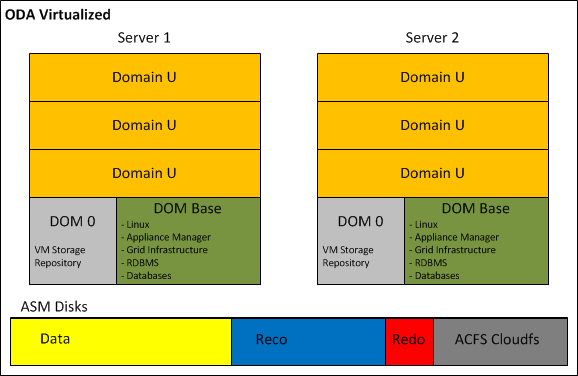
ODA_Virtualized


4.2 ACFS Becomes the default database storage of ODA

Starting from Version 12.1.0.2, a fresh installation of the Oracle Database Appliance adopts ACFS as primary cluster file system to store database files and general-purpose data. Three file systems are created in the ASM disk groups (DATA, RECO, and REDO) and the new databases are stored in these three ACFS file systems instead of in the ASM disk groups.

In case of ODA upgrade from previous release to 12.1.0.2, all pre-existing databases are not automatically migrated to ACFS; but can coexist with the new databases created on ACFS.

At any time, the databases can be migrated from ASM to ACFS as post upgrade step.

Oracle has decided to promote ACFS as default database storage on ODA environment for the following reasons:


  • ACFS provides almost equivalent performance than Oracle ASM disk groups.
  • Additional functionalities on industry standard POSIX file system.
  • Database snapshot copy of PDBs, and NON-CDB version 11.2.0.4 of greater.
  • Advanced functionality for general-purpose files such as replication, tagging, encryption, security, and auditing.

Database created on ACFS follows the same Oracle Managed Files (OMF) standard used by ASM.


4.3 ASM 12c on Exadata Machine

Oracle Exadata Database machine is now at the fifth hardware generation; the latest software update has embraced the possibility to run virtual environments, but differently from the ODA or other Engineered System like Oracle Virtual Appliance, the VMs are not intended to host application components. ASM plays a key role on the success of the Exadata, because it orchestrates all Storage Cells in a way that appear as a single entity, while in reality, they do not know and they do not talk to each other.

The Exadata, available in a wide range of hardware configurations from 1/8 to multi-racks, offers a great flexibility on the storage setup too. The sections below illustrate what is possible to achieve in term of storage configuration when the Exadata is exploited bare metal and virtualized:

  • Exadata Bare Metal: despite the default storage configuration, which foresees three disk groups striped across all Storage Cells, guaranteeing the best I/O performance; as post-installation step, it is possible to deploy a different configuration. Before changing the storage setup, it is vital to understand and evaluate all associated consequences. In fact, even though in specific cases can be a meaningful decision, any storage configuration different from the default one, has as result a shift from optimal performance to flexibility and workload isolation.

Shown below a graphical representation of the default Exadata storage setup, compared to a custom configuration, where the Storage Cells have been divided in multiple groups, segmenting the I/O workloads and avoiding disruption between environments.

Exa_BareMetal_Disks_Default

Exa_BareMetal_Disks_Segmented.png

  • Exadata Virtualized: the installation of the Exadata with the virtualization option foresees a first step of meticulous capacity planning, defining the resources to allocate to the virtual machines (CPU and memory) and the size of each ASM disk group (DBFS, Data, Reco) of the clusters. This last step is particularly important, because unlike the VM resources, the characteristics of the ASM disk groups cannot be changed.

The new version of the Exadata Deployment Assistant, which generates the configuration file to submit to the Exadata installation process, now in conjunction with the use of Oracle Virtual Machines, permits to enter the information related to multiple Grid Infrastructure clusters.

The hardware-based I/O virtualization (so called Xen SR-IOV Virtualization), implemented on the Oracle VMs running on the Exadata Database servers, guarantees almost native I/O and Networking performance over InfiniBand; with lower CPU consumption when compared to a Xen Software I/O virtualization. Unfortunately, this performance advantage comes at the detriment of other virtualization features like Load Balancing, Live Migration and VM Save/Restore operations.

If the Exadata combined with the virtualization open new horizon in term of database consolidation and licensing optimization, do not leave any option to the storage configuration. In fact, the only possible user definition is the amount of space to allocate to each disk group; with this information, the installation procedure defines the size of the Grid Disks on all available Storage Cells.

Following a graphical representation of the Exadata Storage Cells, partitioned for holding three virtualized clusters. For each cluster, ASM access is automatically restricted to the associated Grid Disks.

Exa_BareMetal_Disk_Virtual


4.4 ACFS on Linux Exadata Database Machine

Starting from version 12.1.0.2, the Exadata Database Machine running Oracle Linux, supports ACFS for database file and general-purpose, with no functional restriction.

This makes ACFS an attractive storage alternative for holding: external tables, data loads, scripts and general-purpose files.

In addition, Oracle ACFS on Exadata Database Machines supports database files for the following database versions:

  • Oracle Database 10g Rel. 2 (10.2.0.4 and 10.2.0.5)
  • Oracle Database 11g (11.2.0.4 and higher)
  • Oracle Database 12c (12.1.0.1 and higher)

Since Exadata Storage Cell does not support database version 10g, ACFS becomes an important storage option for customers wishing to host older databases on their Exadata system.

However, those new configuration options and flexibility come with one major performance restriction. When ACFS for database files is in use, the Exadata is still not supporting the Smart Scan operations and is not able to push database operations directly to the storage. Hence, for a best performance result, it is recommended to store database files on the Exadata Storage using ASM disk groups.

As per any other system, when implementing ACFS on Exadata Database Machine, snapshots and tagging are supported for database and general-purpose files, while replication, security, encryption, audit and high availability NFS functionalities are only supported with general-purpose files.


 5 Conclusion

Oracle Automatic Storage Management 12c is a single integrated solution, designed to manage database files and general-purpose data under different hardware and software configurations. The adoption of ASM and ACFS not only eliminates the need for third party volume managers and file systems, but also simplifies the storage management offering the best I/O performance, enforcing Oracle best practices. In addition, ASM 12c with the Flex ASM setup removes previous important architecture limitations:

  • Availability: the hard dependency between the local ASM and database instance, was a single point of failure. In fact, without Flex ASM, the failure of the ASM instance causes the crash of all local database instances.
  • Performance: Flex ASM reduces the network traffic generated among the ASM instances, leveraging the architecture scalability; and it is easier and faster to keep the ASM metadata synchronized across large clusters. Finally yet importantly, only few nodes of the cluster have to support the burden of an ASM instance, leaving additional resources to application processing.


Oracle ASM offers a large set of configurations and options; it is now our duty to understand case-by-case, when it is relevant to use one setup or another, with the aim to maximize performance, availability and flexibility of the infrastructure.

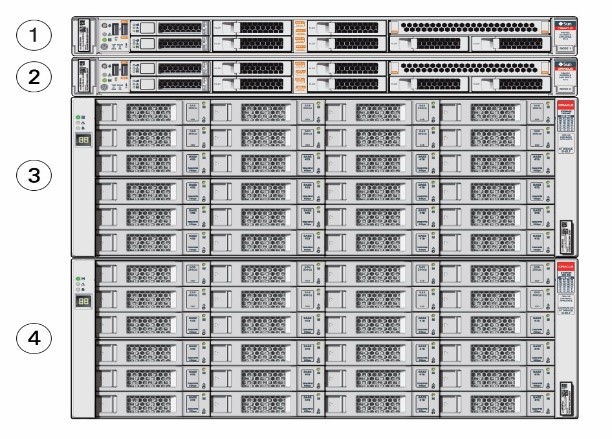


Oracle Cloud Computing

What is a database Cloud Computing?

This looks like the million dollar question; what we know for sure is that it is a quite recent technology and different people identify the Cloud Architecture by different key features (On-Demand, Broad Network Access, Resource Pooling, Rapid Elasticity, Measured Service). There are two main categories: Private and Public Cloud, which identifies respectively in house and outsourced Cloud installation. Focusing on Oracle Database technology the Private Cloud is a clustered infrastructure hosted on the company?s data center, therefore the IT department is responsible of the installation, maintenance and life cycle of all hardware and software components. In case of Public Cloud the company demands the management of the databases to a third party, which owns the infrastructure used to manage the databases of different customers.

Beyond the different marketing definitions of database cloud computing, Oracle provides a reach set of features to realize this kind of setup. The main component of this architecture is the Grid Infrastructure, which provides the cluster and storage foundation of Oracle Cloud Computing. On top of the Grid Infrastructure we have the RDBMS which enables RAC, RAC One Node and stand-alone database setups.

At this point, anyone can say that with the exception of the name, there is almost nothing new compared to the earlier version of Oracle Real Application Cluster (RAC). But Oracle Cloud Computing is much more than a simple multi-node RAC which hosts several databases; the introduction of features like Quality of Service Management (QoS), Server Pool, Instance Caging (extension of Resource Manager) and the enhancement of the existing ones, allow to consolidate all the environments guaranteeing to each application: the performance expected, the scalability for future needs, the availability to respect the Service Level Agreement (SLA), the best time to market, the governance of the entire platform and last but not least cost saving.

Obviously Oracle provides all the instruments to reach such great result, but it is up to the single organization to define and implement the most appropriate modus operandi in terms of OM, Life Cycle, Capacity planning and management, to obtain the result promised by this great technology.

ASM 11gR2 Create ACFS Cluster FS

#####################################################
##           Step by step how to create Oracle ACFS Cluster Filesystem       ##
#####################################################

[grid@lnxcld02 trace]$ asmcmd


  Type "help [command]" to get help on a specific ASMCMD command.

        commands:
        --------

        md_backup, md_restore

        lsattr, setattr

        cd, cp, du, find, help, ls, lsct, lsdg, lsof, mkalias
        mkdir, pwd, rm, rmalias

        chdg, chkdg, dropdg, iostat, lsdsk, lsod, mkdg, mount
        offline, online, rebal, remap, umount

        dsget, dsset, lsop, shutdown, spbackup, spcopy, spget
        spmove, spset, startup

        chtmpl, lstmpl, mktmpl, rmtmpl

        chgrp, chmod, chown, groups, grpmod, lsgrp, lspwusr, lsusr
        mkgrp, mkusr, orapwusr, passwd, rmgrp, rmusr

        volcreate, voldelete, voldisable, volenable, volinfo
        volresize, volset, volstat


ASMCMD>     
ASMCMD> volcreate -G FRA1 -s 5G Vol_ACFS01
ASMCMD> volinfo -a
Diskgroup Name: FRA1

         Volume Name: VOL_ACFS01
         Volume Device: /dev/asm/vol_acfs01-199
         State: ENABLED
         Size (MB): 5120
         Resize Unit (MB): 32
         Redundancy: UNPROT
         Stripe Columns: 4
         Stripe Width (K): 128
         Usage:
         Mountpath:

ASMCMD> volenable -a
ASMCMD>
ASMCMD> exit


[grid@lnxcld02 trace]$ acfsdriverstate version
ACFS-9325:     Driver OS kernel version = 2.6.18-8.el5(i386).
ACFS-9326:     Driver Oracle version = 110803.1.
[grid@lnxcld02 trace]$ acfsdriverstate loaded
ACFS-9203: true


SQL> SELECT volume_name, volume_device FROM V$ASM_VOLUME;

VOLUME_NAME                    VOLUME_DEVICE
------------------------------ ----------------------------------------
VOL_ACFS01                     /dev/asm/vol_acfs01-199

1 row selected.

---------------------------------------------------------------------------------

[root@lnxcld02 adump]# ls -la /dev/asm/vol_acfs01-199
brwxrwx--- 1 root asmadmin 252, 101889 Nov  1 20:03 /dev/asm/vol_acfs01-199

[root@lnxcld02 adump]# mkdir /cloud_FS
[root@lnxcld01 adump]# mkdir /cloud_FS


[root@lnxcld02 adump]# mkfs -t acfs /dev/asm/vol_acfs01-199
mkfs.acfs: version                   = 11.2.0.3.0
mkfs.acfs: on-disk version           = 39.0
mkfs.acfs: volume                    = /dev/asm/vol_acfs01-199
mkfs.acfs: volume size               = 5368709120
mkfs.acfs: Format complete.


[root@lnxcld02 adump]# acfsutil registry -a -f /dev/asm/vol_acfs01-199 /cloud_FS
acfsutil registry: mount point /cloud_FS successfully added to Oracle Registry


[root@lnxcld02 adump]# df -h
Filesystem            Size  Used Avail Use% Mounted on
/dev/hda1              11G  3.6G  6.0G  38% /
/dev/hdb1              12G  7.2G  3.9G  66% /home
tmpfs                 1.5G  634M  867M  43% /dev/shm
Oracle_Software       293G  180G  114G  62% /media/sf_Oracle_Software
/dev/hdc               40G   18G    22  45% /u01
/dev/asm/vol_acfs01-199
                      5.0G   75M  5.0G   2% /cloud_FS


SQL> select * from v$asm_volume;

GROUP_NUMBER VOLUME_NAME                    COMPOUND_INDEX    SIZE_MB VOLUME_NUMBER REDUND STRIPE_COLUMNS STRIPE_WIDTH_K STATE            FILE_NUMBER
------------ ------------------------------ -------------- ---------- ------------- ------ -------------- -------------- ---------------- -----------
INCARNATION DRL_FILE_NUMBER RESIZE_UNIT_MB USAGE                          VOLUME_DEVICE                            MOUNTPATH
----------- --------------- -------------- ------------------------------ ---------------------------------------- --------------------
           2 VOL_ACFS01                           33554433       5120             1 UNPROT              4            128 ENABLED                  270   
766094623               0             32    ACFS                           /dev/asm/vol_acfs01-199                  /cloud_FS


1 row selected.


Create Application VIP on GI 11gR2

###################################################################
## How to add an Application VIP to Oracle Cluster 11gR2
###################################################################

Oracle Clusterware includes the utility appvipcfg which allows to easily create application VIPs; below an example based on a cluster 11.2.0.3.1

[root@lnxcld02 ~]# appvipcfg -h
 Production Copyright 2007, 2008, Oracle.All rights reserved
 Unknown option: h
Usage: appvipcfg create -network=<network_number> -ip=<ip_address> -vipname=<vipname>
 -user=<user_name>[-group=<group_name>] [-failback=0 | 1]
 delete -vipname=<vipname>
--Example to run as root user:
 [root@lnxcld02 ~]# appvipcfg create -network=1 -ip=192.168.2.200 -vipname=myappvip -user=grid -group=oinstall
Production Copyright 2007, 2008, Oracle.All rights reserved
 2012-02-10 14:39:23: Creating Resource Type
 2012-02-10 14:39:23: Executing /home/GRID_INFRA/product/11.2.0.3/bin/crsctl add type app.appvip_net1.type -basetype ora.cluster_vip_net1.type -file /home/GRID_INFRA/product/11.2.0.3/crs/template/appvip.type
 2012-02-10 14:39:23: Executing cmd: /home/GRID_INFRA/product/11.2.0.3/bin/crsctl add type app.appvip_net1.type -basetype ora.cluster_vip_net1.type -file /home/GRID_INFRA/product/11.2.0.3/crs/template/appvip.type
 2012-02-10 14:39:26: Create the Resource
 2012-02-10 14:39:26: Executing /home/GRID_INFRA/product/11.2.0.3/bin/crsctl add resource myappvip -type app.appvip_net1.type -attr "USR_ORA_VIP=192.168.2.200,START_DEPENDENCIES=hard(ora.net1.network) pullup(ora.net1.network),STOP_DEPENDENCIES=hard(ora.net1.network),ACL='owner:root:rwx,pgrp:root:r-x,other::r--,group:oinstall:r-x,user:grid:r-x',HOSTING_MEMBERS=lnxcld02,APPSVIP_FAILBACK="
 2012-02-10 14:39:26: Executing cmd: /home/GRID_INFRA/product/11.2.0.3/bin/crsctl add resource myappvip -type app.appvip_net1.type -attr "USR_ORA_VIP=192.168.2.200,START_DEPENDENCIES=hard(ora.net1.network) pullup(ora.net1.network),STOP_DEPENDENCIES=hard(ora.net1.network),ACL='owner:root:rwx,pgrp:root:r-x,other::r--,group:oinstall:r-x,user:grid:r-x',HOSTING_MEMBERS=lnxcld02,APPSVIP_FAILBACK="
##############################################################################################
[grid@lnxcld02 trace]$ crsctl stat res -t
 --------------------------------------------------------------------------------
 NAME           TARGET  STATE        SERVER                   STATE_DETAILS
 --------------------------------------------------------------------------------
 Local Resources
 --------------------------------------------------------------------------------
 ora.DATA1.dg
 ONLINE  ONLINE       lnxcld01
 ONLINE  ONLINE       lnxcld02
 ora.FRA1.dg
 ONLINE  ONLINE       lnxcld01
 ONLINE  ONLINE       lnxcld02
 ora.LISTENER.lsnr
 ONLINE  ONLINE       lnxcld01
 ONLINE  ONLINE       lnxcld02
 ora.OCRVOTING.dg
 ONLINE  ONLINE       lnxcld01
 ONLINE  ONLINE       lnxcld02
 ora.asm
 ONLINE  ONLINE       lnxcld01                 Started
 ONLINE  ONLINE       lnxcld02                 Started
 ora.gsd
 OFFLINE OFFLINE      lnxcld01
 OFFLINE OFFLINE      lnxcld02
 ora.net1.network
 ONLINE  ONLINE       lnxcld01
 ONLINE  ONLINE       lnxcld02
 ora.ons
 ONLINE  ONLINE       lnxcld01
 ONLINE  ONLINE       lnxcld02
 ora.registry.acfs
 ONLINE  ONLINE       lnxcld01
 ONLINE  ONLINE       lnxcld02
 --------------------------------------------------------------------------------
 Cluster Resources
 --------------------------------------------------------------------------------
 myappvip
 1        ONLINE  ONLINE       lnxcld02
 ora.LISTENER_SCAN1.lsnr
 1        ONLINE  ONLINE       lnxcld02
 ora.cvu
 1        ONLINE  ONLINE       lnxcld02
 ora.lnxcld01.vip
 1        ONLINE  ONLINE       lnxcld01
 ora.lnxcld02.vip
 1        ONLINE  ONLINE       lnxcld02
 ora.oc4j
 1        ONLINE  ONLINE       lnxcld02
 ora.scan1.vip
 1        ONLINE  ONLINE       lnxcld02
 ora.tpolicy.db
 1        ONLINE  ONLINE       lnxcld01                 Open
 2        ONLINE  ONLINE       lnxcld02                 Open
 ora.tpolicy.loadbalance_rw.svc
 1        ONLINE  ONLINE       lnxcld01
 2        ONLINE  ONLINE       lnxcld02
##############################################################################################
[grid@lnxcld02 ~]$ crsctl stat res myappvip -p
 NAME=myappvip
 TYPE=app.appvip_net1.type
 ACL=owner:root:rwx,pgrp:root:r-x,other::r--,group:oinstall:r-x,user:grid:r-x
 ACTION_FAILURE_TEMPLATE=
 ACTION_SCRIPT=
 ACTIVE_PLACEMENT=1
 AGENT_FILENAME=%CRS_HOME%/bin/orarootagent%CRS_EXE_SUFFIX%
 APPSVIP_FAILBACK=0
 AUTO_START=restore
 CARDINALITY=1
 CHECK_INTERVAL=1
 CHECK_TIMEOUT=30
 DEFAULT_TEMPLATE=PROPERTY(RESOURCE_CLASS=vip)
 DEGREE=1
 DESCRIPTION=Application VIP
 ENABLED=1
 FAILOVER_DELAY=0
 FAILURE_INTERVAL=0
 FAILURE_THRESHOLD=0
 GEN_USR_ORA_STATIC_VIP=
 GEN_USR_ORA_VIP=
 HOSTING_MEMBERS=lnxcld02
 LOAD=1
 LOGGING_LEVEL=1
 NLS_LANG=
 NOT_RESTARTING_TEMPLATE=
 OFFLINE_CHECK_INTERVAL=0
 PLACEMENT=balanced
 PROFILE_CHANGE_TEMPLATE=
 RESTART_ATTEMPTS=0
 SCRIPT_TIMEOUT=60
 SERVER_POOLS=*
 START_DEPENDENCIES=hard(ora.net1.network) pullup(ora.net1.network)
 START_TIMEOUT=0
 STATE_CHANGE_TEMPLATE=
 STOP_DEPENDENCIES=hard(ora.net1.network)
 STOP_TIMEOUT=0
 TYPE_VERSION=2.1
 UPTIME_THRESHOLD=7d
 USR_ORA_ENV=
 USR_ORA_VIP=192.168.2.200
 VERSION=11.2.0.3.0

How to restore OCR and Voting disk

################################################################
# How to restore OCR and Voting disk  on Oracle 11g R2.
################################################################

--Location and status of OCR before starting the test:
 root@host1:/u01/GRID/11.2/cdata # /u01/GRID/11.2/bin/ocrcheck
 Status of Oracle Cluster Registry is as follows :
 Version                  :          3
 Total space (kbytes)     :     262120
 Used space (kbytes)      :       2744
 Available space (kbytes) :     259376
 ID                       :  401168391
 Device/File Name         : +OCRVOTING
 Device/File integrity check succeeded
Device/File not configured
Cluster registry integrity check succeeded
Logical corruption check succeeded
--Check the existency of BACKUPS:
 root@host1:/root # /u01/GRID/11.2/bin/ocrconfig -showbackup
host1     2010/01/21 14:17:54     /u01/GRID/11.2/cdata/cluster01/backup00.ocr
host1     2010/01/21 05:58:31     /u01/GRID/11.2/cdata/cluster01/backup01.ocr
host1     2010/01/21 01:58:30     /u01/GRID/11.2/cdata/cluster01/backup02.ocr
host1     2010/01/20 05:58:21     /u01/GRID/11.2/cdata/cluster01/day.ocr
host1     2010/01/14 23:12:07     /u01/GRID/11.2/cdata/cluster01/week.ocr
 PROT-25: Manual backups for the Oracle Cluster Registry are not available
--Identify all the disks belong the Disk group +OCRVOTING:
NAME                                       PATH
 ------------------------------ ------------------------------------------------------------
 OCRVOTING_0000                 /dev/oracle/asm.25.lun
 OCRVOTING_0001                 /dev/oracle/asm.26.lun
 OCRVOTING_0002                 /dev/oracle/asm.27.lun
 OCRVOTING_0003                 /dev/oracle/asm.28.lun
 OCRVOTING_0004                 /dev/oracle/asm.29.lun
5 rows selected.
--Corrupt tht disks belong the Disk group +OCRVOTING:
 dd if=/tmp/corrupt_disk of=/dev/oracle/asm.25.lun bs=1024 count=1000
 dd if=/tmp/corrupt_disk of=/dev/oracle/asm.26.lun bs=1024 count=1000
 dd if=/tmp/corrupt_disk of=/dev/oracle/asm.27.lun bs=1024 count=1000
 dd if=/tmp/corrupt_disk of=/dev/oracle/asm.28.lun bs=1024 count=1000
 dd if=/tmp/corrupt_disk of=/dev/oracle/asm.29.lun bs=1024 count=1000
--OCR Check after Corruption:
 root@host1:/tmp # /u01/GRID/11.2/bin/ocrcheck
 Status of Oracle Cluster Registry is as follows :
 Version                  :          3
 Total space (kbytes)     :     262120
 Used space (kbytes)      :       2712
 Available space (kbytes) :     259408
 ID                       :  701409037
 Device/File Name         : +OCRVOTING
 Device/File integrity check succeeded
Device/File not configured
Cluster registry integrity check succeeded
Logical corruption check succeeded
--Stop and Start of database instance after corruption
 oracle@host1:/u01/oracle/data $ srvctl stop instance -d DB -i DB1
 oracle@host1:/u01/oracle/data $ srvctl start instance -d DB -i DB1
--Stop and Start entire Cluster:
-host1:
 root@host1:/tmp # /u01/GRID/11.2/bin/crsctl stop crs
 CRS-2791: Starting shutdown of Oracle High Availability Services-managed resources on 'host1'
 CRS-2673: Attempting to stop 'ora.crsd' on 'host1'
 CRS-2790: Starting shutdown of Cluster Ready Services-managed resources on 'host1'
 CRS-2673: Attempting to stop 'ora.OCRVOTING.dg' on 'host1'
 CRS-2673: Attempting to stop 'ora.db.db' on 'host1'
 CRS-2673: Attempting to stop 'ora.LISTENER.lsnr' on 'host1'
 CRS-2677: Stop of 'ora.LISTENER.lsnr' on 'host1' succeeded
 CRS-2673: Attempting to stop 'ora.host1.vip' on 'host1'
 CRS-2677: Stop of 'ora.host1.vip' on 'host1' succeeded
 CRS-2677: Stop of 'ora.OCRVOTING.dg' on 'host1' succeeded
 CRS-2673: Attempting to stop 'ora.scan2.vip' on 'host1'
 CRS-2673: Attempting to stop 'ora.scan3.vip' on 'host1'
 CRS-2673: Attempting to stop 'ora.host2.vip' on 'host1'
 CRS-2677: Stop of 'ora.scan2.vip' on 'host1' succeeded
 CRS-2677: Stop of 'ora.scan3.vip' on 'host1' succeeded
 CRS-2677: Stop of 'ora.host2.vip' on 'host1' succeeded
 CRS-2677: Stop of 'ora.db.db' on 'host1' succeeded
 CRS-2673: Attempting to stop 'ora.DATA1.dg' on 'host1'
 CRS-2673: Attempting to stop 'ora.FRA1.dg' on 'host1'
 CRS-2677: Stop of 'ora.DATA1.dg' on 'host1' succeeded
 CRS-2677: Stop of 'ora.FRA1.dg' on 'host1' succeeded
 CRS-2673: Attempting to stop 'ora.asm' on 'host1'
 CRS-2677: Stop of 'ora.asm' on 'host1' succeeded
 CRS-2673: Attempting to stop 'ora.ons' on 'host1'
 CRS-2673: Attempting to stop 'ora.eons' on 'host1'
 CRS-2677: Stop of 'ora.ons' on 'host1' succeeded
 CRS-2673: Attempting to stop 'ora.net1.network' on 'host1'
 CRS-2677: Stop of 'ora.net1.network' on 'host1' succeeded
 CRS-2677: Stop of 'ora.eons' on 'host1' succeeded
 CRS-2792: Shutdown of Cluster Ready Services-managed resources on 'host1' has completed
 CRS-2677: Stop of 'ora.crsd' on 'host1' succeeded
 CRS-2673: Attempting to stop 'ora.mdnsd' on 'host1'
 CRS-2673: Attempting to stop 'ora.gpnpd' on 'host1'
 CRS-2673: Attempting to stop 'ora.cssdmonitor' on 'host1'
 CRS-2673: Attempting to stop 'ora.ctssd' on 'host1'
 CRS-2673: Attempting to stop 'ora.evmd' on 'host1'
 CRS-2673: Attempting to stop 'ora.asm' on 'host1'
 CRS-2677: Stop of 'ora.cssdmonitor' on 'host1' succeeded
 CRS-2677: Stop of 'ora.mdnsd' on 'host1' succeeded
 CRS-2677: Stop of 'ora.gpnpd' on 'host1' succeeded
 CRS-2677: Stop of 'ora.evmd' on 'host1' succeeded
 CRS-2677: Stop of 'ora.ctssd' on 'host1' succeeded
 CRS-2677: Stop of 'ora.asm' on 'host1' succeeded
 CRS-2673: Attempting to stop 'ora.cssd' on 'host1'
 CRS-2677: Stop of 'ora.cssd' on 'host1' succeeded
 CRS-2673: Attempting to stop 'ora.diskmon' on 'host1'
 CRS-2673: Attempting to stop 'ora.gipcd' on 'host1'
 CRS-2677: Stop of 'ora.gipcd' on 'host1' succeeded
 CRS-2677: Stop of 'ora.diskmon' on 'host1' succeeded
 CRS-2793: Shutdown of Oracle High Availability Services-managed resources on 'host1' has completed
 CRS-4133: Oracle High Availability Services has been stopped.
--host2:
 root@host2:/root # /u01/GRID/11.2/bin/crsctl stop crs
 CRS-2791: Starting shutdown of Oracle High Availability Services-managed resources on 'host2'
 CRS-2673: Attempting to stop 'ora.crsd' on 'host2'
 CRS-2790: Starting shutdown of Cluster Ready Services-managed resources on 'host2'
 CRS-2673: Attempting to stop 'ora.LISTENER_SCAN2.lsnr' on 'host2'
 CRS-2673: Attempting to stop 'ora.LISTENER_SCAN3.lsnr' on 'host2'
 CRS-2673: Attempting to stop 'ora.LISTENER.lsnr' on 'host2'
 CRS-2673: Attempting to stop 'ora.OCRVOTING.dg' on 'host2'
 CRS-2673: Attempting to stop 'ora.db.db' on 'host2'
 CRS-2673: Attempting to stop 'ora.LISTENER_SCAN1.lsnr' on 'host2'
 CRS-2677: Stop of 'ora.LISTENER_SCAN2.lsnr' on 'host2' succeeded
 CRS-2673: Attempting to stop 'ora.scan2.vip' on 'host2'
 CRS-2677: Stop of 'ora.scan2.vip' on 'host2' succeeded
 CRS-2672: Attempting to start 'ora.scan2.vip' on 'host1'
 CRS-2677: Stop of 'ora.LISTENER_SCAN3.lsnr' on 'host2' succeeded
 CRS-2673: Attempting to stop 'ora.scan3.vip' on 'host2'
 CRS-2677: Stop of 'ora.LISTENER.lsnr' on 'host2' succeeded
 CRS-2673: Attempting to stop 'ora.host2.vip' on 'host2'
 CRS-2677: Stop of 'ora.scan3.vip' on 'host2' succeeded
 CRS-2672: Attempting to start 'ora.scan3.vip' on 'host1'
 CRS-2677: Stop of 'ora.host2.vip' on 'host2' succeeded
 CRS-2672: Attempting to start 'ora.host2.vip' on 'host1'
 CRS-2677: Stop of 'ora.LISTENER_SCAN1.lsnr' on 'host2' succeeded
 CRS-2673: Attempting to stop 'ora.scan1.vip' on 'host2'
 CRS-2677: Stop of 'ora.scan1.vip' on 'host2' succeeded
 CRS-2676: Start of 'ora.scan2.vip' on 'host1' succeeded
 CRS-2676: Start of 'ora.scan3.vip' on 'host1' succeeded
 CRS-2676: Start of 'ora.host2.vip' on 'host1' succeeded
 CRS-2677: Stop of 'ora.OCRVOTING.dg' on 'host2' succeeded
 CRS-2677: Stop of 'ora.db.db' on 'host2' succeeded
 CRS-2673: Attempting to stop 'ora.DATA1.dg' on 'host2'
 CRS-2673: Attempting to stop 'ora.FRA1.dg' on 'host2'
 CRS-2677: Stop of 'ora.DATA1.dg' on 'host2' succeeded
 CRS-2677: Stop of 'ora.FRA1.dg' on 'host2' succeeded
 CRS-2673: Attempting to stop 'ora.asm' on 'host2'
 CRS-2677: Stop of 'ora.asm' on 'host2' succeeded
 CRS-2673: Attempting to stop 'ora.ons' on 'host2'
 CRS-2673: Attempting to stop 'ora.eons' on 'host2'
 CRS-2677: Stop of 'ora.ons' on 'host2' succeeded
 CRS-2673: Attempting to stop 'ora.net1.network' on 'host2'
 CRS-2677: Stop of 'ora.net1.network' on 'host2' succeeded
 CRS-2677: Stop of 'ora.eons' on 'host2' succeeded
 CRS-2792: Shutdown of Cluster Ready Services-managed resources on 'host2' has completed
 CRS-2677: Stop of 'ora.crsd' on 'host2' succeeded
 CRS-2673: Attempting to stop 'ora.gpnpd' on 'host2'
 CRS-2673: Attempting to stop 'ora.cssdmonitor' on 'host2'
 CRS-2673: Attempting to stop 'ora.ctssd' on 'host2'
 CRS-2673: Attempting to stop 'ora.evmd' on 'host2'
 CRS-2673: Attempting to stop 'ora.asm' on 'host2'
 CRS-2673: Attempting to stop 'ora.mdnsd' on 'host2'
 CRS-2677: Stop of 'ora.cssdmonitor' on 'host2' succeeded
 CRS-2677: Stop of 'ora.gpnpd' on 'host2' succeeded
 CRS-2677: Stop of 'ora.evmd' on 'host2' succeeded
 CRS-2677: Stop of 'ora.mdnsd' on 'host2' succeeded
 CRS-2677: Stop of 'ora.asm' on 'host2' succeeded
 CRS-2677: Stop of 'ora.ctssd' on 'host2' succeeded
 CRS-2673: Attempting to stop 'ora.cssd' on 'host2'
 CRS-2677: Stop of 'ora.cssd' on 'host2' succeeded
 CRS-2673: Attempting to stop 'ora.diskmon' on 'host2'
 CRS-2673: Attempting to stop 'ora.gipcd' on 'host2'
 CRS-2677: Stop of 'ora.gipcd' on 'host2' succeeded
 CRS-2677: Stop of 'ora.diskmon' on 'host2' succeeded
 CRS-2793: Shutdown of Oracle High Availability Services-managed resources on 'host2' has completed
 CRS-4133: Oracle High Availability Services has been stopped.
--host1
 root@host1:/root # /u01/GRID/11.2/bin/crsctl start crs
 CRS-4123: Oracle High Availability Services has been started.
--host2
 root@host2:/u01/GRID/11.2/cdata/cluster01 # /u01/GRID/11.2/bin/crsctl start crs
 CRS-4123: Oracle High Availability Services has been started.
--CRS Alert log: (Start failed because the Diskgroup is not available)
 2010-01-21 16:29:07.785
 [cssd(10123)]CRS-1705:Found 0 configured voting files but 1 voting files are required, terminating to ensure data integrity; details at (:CSSNM00065:) in /u01/GRID/11.2/log/host1/cssd/ocssd.log
 2010-01-21 16:29:07.785
 [cssd(10123)]CRS-1603:CSSD on node host1 shutdown by user.
 2010-01-21 16:29:07.918
 [ohasd(9931)]CRS-2765:Resource 'ora.cssdmonitor' has failed on server 'host1'.
 2010-01-21 16:30:05.489
 [/u01/GRID/11.2/bin/orarootagent.bin(10113)]CRS-5818:Aborted command 'start for resource: ora.diskmon 1 1' for resource 'ora.diskmon'. Details at (:CRSAGF00113:) in /u01/GRID/11.2/log/host1/agent/ohasd/orarootagent_root/orarootagent_root.log.
 2010-01-21 16:30:09.504
 [ohasd(9931)]CRS-2757:Command 'Start' timed out waiting for response from the resource 'ora.diskmon'. Details at (:CRSPE00111:) in /u01/GRID/11.2/log/host1/ohasd/ohasd.log.
 2010-01-21 16:30:20.687
 [cssd(10622)]CRS-1713:CSSD daemon is started in clustered mode
 2010-01-21 16:30:21.801
 [cssd(10622)]CRS-1705:Found 0 configured voting files but 1 voting files are required, terminating to ensure data integrity; details at (:CSSNM00065:) in /u01/GRID/11.2/log/host1/cssd/ocssd.log
 2010-01-21 16:30:21.801
 [cssd(10622)]CRS-1603:CSSD on node host1 shutdown by user.
--host1 STOP CRS because due to Voting Disk unavailability is not running properly:
 root@host1:/tmp # /u01/GRID/11.2/bin/crsctl stop crs
 CRS-2791: Starting shutdown of Oracle High Availability Services-managed resources on 'host1'
 CRS-2673: Attempting to stop 'ora.crsd' on 'host1'
 CRS-4548: Unable to connect to CRSD
 CRS-2675: Stop of 'ora.crsd' on 'host1' failed
 CRS-2679: Attempting to clean 'ora.crsd' on 'host1'
 CRS-4548: Unable to connect to CRSD
 CRS-2678: 'ora.crsd' on 'host1' has experienced an unrecoverable failure
 CRS-0267: Human intervention required to resume its availability.
 CRS-2795: Shutdown of Oracle High Availability Services-managed resources on 'host1' has failed
 CRS-4687: Shutdown command has completed with error(s).
 CRS-4000: Command Stop failed, or completed with errors.
--Because all the processes are not STOPPING, disable the cluster AUTO Start and reboot
 --the server for cleaning all the pending processes.
root@host1:/tmp # /u01/GRID/11.2/bin/crsctl disable crs
 CRS-4621: Oracle High Availability Services autostart is disabled.
root@host1:/tmp # reboot
--Start the Cluster in EXLUSIVE Mode in order to recreate ASM Diskgroup:
 root@host1:/root # /u01/GRID/11.2/bin/crsctl start crs -excl
 CRS-4123: Oracle High Availability Services has been started.
 CRS-2672: Attempting to start 'ora.gipcd' on 'host1'
 CRS-2672: Attempting to start 'ora.mdnsd' on 'host1'
 CRS-2676: Start of 'ora.gipcd' on 'host1' succeeded
 CRS-2676: Start of 'ora.mdnsd' on 'host1' succeeded
 CRS-2672: Attempting to start 'ora.gpnpd' on 'host1'
 CRS-2676: Start of 'ora.gpnpd' on 'host1' succeeded
 CRS-2672: Attempting to start 'ora.cssdmonitor' on 'host1'
 CRS-2676: Start of 'ora.cssdmonitor' on 'host1' succeeded
 CRS-2672: Attempting to start 'ora.cssd' on 'host1'
 CRS-2679: Attempting to clean 'ora.diskmon' on 'host1'
 CRS-2681: Clean of 'ora.diskmon' on 'host1' succeeded
 CRS-2672: Attempting to start 'ora.diskmon' on 'host1'
 CRS-2676: Start of 'ora.diskmon' on 'host1' succeeded
 CRS-2676: Start of 'ora.cssd' on 'host1' succeeded
 CRS-2672: Attempting to start 'ora.ctssd' on 'host1'
 CRS-2676: Start of 'ora.ctssd' on 'host1' succeeded
 CRS-2672: Attempting to start 'ora.asm' on 'host1'
 CRS-2676: Start of 'ora.asm' on 'host1' succeeded
 CRS-2672: Attempting to start 'ora.crsd' on 'host1'
 CRS-2676: Start of 'ora.crsd' on 'host1' succeeded
--Stop ASM and restart it using a pfile example:
 *.asm_diskgroups='DATA1','FRA1'
 *.asm_diskstring='/dev/oracle/asm*'
 *.diagnostic_dest='/u01/oracle'
 +ASM1.instance_number=1
 +ASM2.instance_number=2
 *.instance_type='asm'
 *.large_pool_size=12M
 *.processes=500
 *.sga_max_size=1G
 *.sga_target=1G
 *.shared_pool_size=300M
--Recreate ASM Diskgroup
 --This command FAILS because asmca is not able to update the OCR:
 asmca -silent -createDiskGroup -diskGroupName OCRVOTING  -disk '/dev/oracle/asm.25.lun' -disk '/dev/oracle/asm.26.lun'  -disk '/dev/oracle/asm.27.lun'  -disk '/dev/oracle/asm.28.lun'  -disk '/dev/oracle/asm.29.lun'  -redundancy HIGH -compatible.asm '11.2.0.0.0'  -compatible.rdbms '11.2.0.0.0' -compatible.advm '11.2.0.0.0'
--Create the Diskgroup Using SQLPLUS Create Diskgroup and save the ASM spfile inside:
 create Diskgroup OCRVOTING high redundancy disk '/dev/oracle/asm.25.lun',
 '/dev/oracle/asm.26.lun', '/dev/oracle/asm.27.lun',
 '/dev/oracle/asm.28.lun', '/dev/oracle/asm.29.lun'
 ATTRIBUTE  'compatible.asm'='11.2.0.0.0', 'compatible.rdbms'='11.2.0.0.0';
create spfile='+OCRVOTING' from pfile='/tmp/asm_pfile.ora';
File created.
SQL> shut immediate
 ASM diskgroups dismounted
 ASM instance shutdown
 SQL> startup
 ASM instance started
Total System Global Area 1069252608 bytes
 Fixed Size                  2154936 bytes
 Variable Size            1041931848 bytes
 ASM Cache                  25165824 bytes
 ASM diskgroups mounted
-- Restore OCR from backup:
 root@host1:/root # /u01/GRID/11.2/bin/ocrconfig -restore /u01/GRID/11.2/cdata/cluster01/backup00.ocr
--Check the OCR status after restore:
 root@host1:/root # /u01/GRID/11.2/bin/ocrcheck
 Status of Oracle Cluster Registry is as follows :
 Version                  :          3
 Total space (kbytes)     :     262120
 Used space (kbytes)      :       2712
 Available space (kbytes) :     259408
 ID                       :  701409037
 Device/File Name         : +OCRVOTING
 Device/File integrity check succeeded
Device/File not configured
Cluster registry integrity check succeeded
Logical corruption check succeeded
--Restore the Voting Disk:
 root@host1:/root # /u01/GRID/11.2/bin/crsctl replace votedisk +OCRVOTING
 Successful addition of voting disk 7s16f9fbf4b64f74bfy0ee8826f15eb4.
 Successful addition of voting disk 9k6af49d3cd54fc5bf28a2fc3899c8c6.
 Successful addition of voting disk 876eb99563924ff6bfc1defe6865deeb.
 Successful addition of voting disk 12230b5ef41f4fc2bf2cae957f765fb0.
 Successful addition of voting disk 47812b7f6p034f33bf13490e6e136b8b.
 Successfully replaced voting disk group with +OCRVOTING.
 CRS-4266: Voting file(s) successfully replaced
--Re-enable CRS auto starup
 root@host1:/root # /u01/GRID/11.2/bin/crsctl enable crs
 CRS-4622: Oracle High Availability Services autostart is enabled.
--Stop CRS on host1
 root@host1:/root # /u01/GRID/11.2/bin/crsctl stop crs
 CRS-2791: Starting shutdown of Oracle High Availability Services-managed resources on 'host1'
 CRS-2673: Attempting to stop 'ora.crsd' on 'host1'
 CRS-2677: Stop of 'ora.crsd' on 'host1' succeeded
 CRS-2673: Attempting to stop 'ora.gpnpd' on 'host1'
 CRS-2673: Attempting to stop 'ora.cssdmonitor' on 'host1'
 CRS-2673: Attempting to stop 'ora.ctssd' on 'host1'
 CRS-2673: Attempting to stop 'ora.asm' on 'host1'
 CRS-2673: Attempting to stop 'ora.mdnsd' on 'host1'
 CRS-2677: Stop of 'ora.cssdmonitor' on 'host1' succeeded
 CRS-2677: Stop of 'ora.gpnpd' on 'host1' succeeded
 CRS-2677: Stop of 'ora.mdnsd' on 'host1' succeeded
 CRS-2677: Stop of 'ora.ctssd' on 'host1' succeeded
 CRS-2677: Stop of 'ora.asm' on 'host1' succeeded
 CRS-2673: Attempting to stop 'ora.cssd' on 'host1'
 CRS-2677: Stop of 'ora.cssd' on 'host1' succeeded
 CRS-2673: Attempting to stop 'ora.diskmon' on 'host1'
 CRS-2673: Attempting to stop 'ora.gipcd' on 'host1'
 CRS-2677: Stop of 'ora.gipcd' on 'host1' succeeded
 CRS-2677: Stop of 'ora.diskmon' on 'host1' succeeded
 CRS-2793: Shutdown of Oracle High Availability Services-managed resources on 'host1' has completed
 CRS-4133: Oracle High Availability Services has been stopped.
--Start CRS on host1
 root@host1:/root # /u01/GRID/11.2/bin/crsctl start crs
 CRS-4123: Oracle High Availability Services has been started.
--Start CRS on host2
 root@host2:/root # /u01/GRID/11.2/bin/crsctl start crs
 CRS-4123: Oracle High Availability Services has been started.
--Check if all the Resources are running:
 root@host1:/root # /u01/GRID/11.2/bin/crsctl stat res -t
 --------------------------------------------------------------------------------
 NAME           TARGET  STATE        SERVER                   STATE_DETAILS
 --------------------------------------------------------------------------------
 Local Resources
 --------------------------------------------------------------------------------
 ora.DATA1.dg
 ONLINE  ONLINE       host1
 ONLINE  ONLINE       host2
 ora.FRA1.dg
 ONLINE  ONLINE       host1
 ONLINE  ONLINE       host2
 ora.LISTENER.lsnr
 ONLINE  ONLINE       host1
 ONLINE  ONLINE       host2
 ora.OCRVOTING.dg
 ONLINE  ONLINE       host1
 ONLINE  ONLINE       host2
 ora.asm
 ONLINE  ONLINE       host1                 Started
 ONLINE  ONLINE       host2                 Started
 ora.eons
 ONLINE  ONLINE       host1
 ONLINE  ONLINE       host2
 ora.gsd
 OFFLINE OFFLINE      host1
 OFFLINE OFFLINE      host2
 ora.net1.network
 ONLINE  ONLINE       host1
 ONLINE  ONLINE       host2
 ora.ons
 ONLINE  ONLINE       host1
 ONLINE  ONLINE       host2
 --------------------------------------------------------------------------------
 Cluster Resources
 --------------------------------------------------------------------------------
 ora.LISTENER_SCAN1.lsnr
 1        ONLINE  ONLINE       host1
 ora.LISTENER_SCAN2.lsnr
 1        ONLINE  ONLINE       host2
 ora.LISTENER_SCAN3.lsnr
 1        ONLINE  ONLINE       host2
 ora.db.db
 1        ONLINE  ONLINE       host1                 Open
 2        ONLINE  ONLINE       host2                 Open
 ora.oc4j
 1        OFFLINE OFFLINE
 ora.scan1.vip
 1        ONLINE  ONLINE       host1
 ora.scan2.vip
 1        ONLINE  ONLINE       host2
 ora.scan3.vip
 1        ONLINE  ONLINE       host2
 ora.host1.vip
 1        ONLINE  ONLINE       host1
 ora.host2.vip
 1        ONLINE  ONLINE       host2